Apple - Thunderbolt Cable (0.5 m)
Cable Length
1.6'FREE shipping to

About This Item
- Key Specs
- Cable Length: 1.6 feet
- Connector Type (End 1): Thunderbolt
- Connector Type (End 2): Thunderbolt
- General
- Brand: Apple
- Model Number: MF640LL/A
- Product Name: Thunderbolt Cable (0.5 m)
- Connectivity
- Cable Type: Power
- Cable Length: 1.6 feet
- Product Type: Cable
- Connector Type (End 1): Thunderbolt
- Connector Type (End 2): Thunderbolt
- Other
- UPC: 888462287654
Apple Thunderbolt Cable (0.5 m) - Black
- Product Details: Thunderbolt technology supports blazing-fast data transfer with two independent channels of 10 Gbps each.
- Product Details: Thunderbolt technology supports blazing-fast data transfer with two independent channels of 10 Gbps each.
A: Yes, mini display port is backward compatible with thunderbolt 2 cables....but not the other way around (i.e, if you have a thunderbolt 2 port you cannot use a minidisplay cable because the data will not transfer; I tried it and my 27" thunderbolt apple display monitor has major pieces of functionality missing.... ONLY a Thunderbolt 2 cable is compatible with Thunderbolt apple monitors... but if you have an older minidisplay cabled apple monitor you can just plug it into the thunderbolt 2 port on your laptop; I tried that also and it works fine; I have both tpes of monitors I use with my MacBookPro 2009 and 2011 and MaBookAir 2017 all work fine with both of my monitors and the brightness buttons work just fine as well on both monitors in all 3 computers because I'm using genuine apple cables of the correct type). I don't know if what is sold on BestBuy 3rd party sellers are actual real Apple or knock-offs and I'm afraid to buy one even though I need the longer cable Just can't deal with knock-offs that do not work properly. There are no guarantees about authenticity mentioned and return policy is vague.
Reviews
This product doesn't have any reviews yet.
Compare similar products


Thunderbolt technology supports fast data transfers with two independent channels of 10Gb/s each. And Thunderbolt 2 technology can bond the two channels for a superfast 20Gb/s. Use this cable to connect Thunderbolt-enabled devices to the Thunderbolt or Thunderbolt 2 port on your Mac.The Apple Thunderbolt Cable lets you connect a Thunderbolt-equipped system to a Thunderbolt device. Connect a Thunderbolt-equipped Mac in target disk mode to another Mac for fast data access or system migration, or network two Thunderbolt-equipped computers.

The Thunderbolt 3 (USB-C) to Thunderbolt 2 Adapter lets you connect Thunderbolt and Thunderbolt 2 devices - external hard drives and Thunderbolt displays, for example - to any of the Thunderbolt 3 (USB-C) ports on your MacBook Pro. As a bidirectional adapter, it can also connect new Thunderbolt 3 devices to a Mac with a Thunderbolt or Thunderbolt 2 port.*
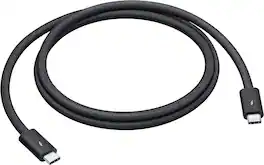
Featuring a black braided design that coils without tangling, this 1-meter cable supports Thunderbolt 5 data transfer up to 120Gb/s;¹ Thunderbolt 3, Thunderbolt 4, and USB 4 data transfer up to 40Gb/s; USB 3 data transfer up to 10Gb/s; DisplayPort 2.1 video output; and charging up to 240W. Use this cable to connect a Mac with Thunderbolt 3, 4, or 5 (USB-C) ports to Thunderbolt (USB-C) and USB displays and devices such as Studio Display, Pro Display XDR, docks, and external drives. You can also use this cable to connect iPhone and iPad models with USB-C to your Mac.
| Pros for Apple - Thunderbolt Cable (0.5 m) | |||
|---|---|---|---|
| There were no pros for this product— | There were no pros for this product— | Compatibility, Overall Performance, Thunderbolt 2, USB-C, Ease of use | Build Quality, Charging Speed |
| Cons for Apple - Thunderbolt Cable (0.5 m) | |||
| There were no cons for this product— | There were no cons for this product— | Price, Size, Cable Length | There were no cons for this product— |