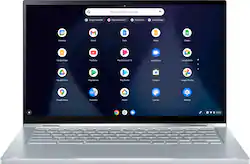
ASUS - 2-in-1 14" Touchscreen Chromebook - Intel Core M3-8100Y - 8GB Memory - 64GB eMMC - Silver
- Key Specs
- Screen Size: 14 inches (Size of the screen, measured diagonally from corner to corner.)
- Screen Resolution: 1920 x 1080 (Full HD) (Screens come in a range of resolutions (measured in pixels, horizontal x vertical). The higher the resolution, the greater the picture quality.)
- Touch Screen: true (Touch-screen devices make navigating more intuitive. Using a touch-screen display, you can do things such as tap to select, hold and drag to move items, swipe to scroll, and pinch to zoom.)
- Processor Model: Intel Core m3 (Your computer's processor is like its brain. Working in combination with system memory, the power of the processor determines the complexity of software you can run, how many programs you can have open at the same time, and how fast those programs will run. Most computers feature an AMD, Intel or Snapdragon processor.)
- Storage Type: eMMC
- Total Storage Capacity: 64 gigabytes
- System Memory (RAM): 8 gigabytes (Random-access memory (RAM) is a computing device's short-term data storage, which allows active information to be accessed quickly. The size and type of RAM determines how efficiently the device can handle large amounts of information at one time. For example, gaming or video editing requires more RAM for optimal performance.)
- Graphics: Intel HD Graphics 5000 (Often referred to as a "graphics processing unit" (GPU), this device is responsible for displaying image content and decoding/encoding video content in programs and games.)
- Display Connector(s): 2 x DisplayPort (The number and type of connectors used to connect to an external display.)
- Backlit Keyboard: true (Integrated lights allow for visibility of the keys in low-light conditions.)
- General
- Product Name: 2-in-1 14" Touchscreen Chromebook - Intel Core M3-8100Y - 8GB Memory - 64GB eMMC
- Brand: ASUS
- Model Number: C433TA-M364
- Year of Release: 2022
- Color: Silver
- Display
- Screen Size: 14 inches (Size of the screen, measured diagonally from corner to corner.)
- Screen Resolution: 1920 x 1080 (Full HD) (Screens come in a range of resolutions (measured in pixels, horizontal x vertical). The higher the resolution, the greater the picture quality.)
- Touch Screen: true (Touch-screen devices make navigating more intuitive. Using a touch-screen display, you can do things such as tap to select, hold and drag to move items, swipe to scroll, and pinch to zoom.)
- Processor
- Processor Brand: Intel
- Processor Model: Intel Core m3 (Your computer's processor is like its brain. Working in combination with system memory, the power of the processor determines the complexity of software you can run, how many programs you can have open at the same time, and how fast those programs will run. Most computers feature an AMD, Intel or Snapdragon processor.)
- Processor Model Number: 8100Y
- Storage
- Storage Type: eMMC
- Total Storage Capacity: 64 gigabytes
- eMMC Capacity: 64 gigabytes (The amount of data that can be stored on the device's embedded Multimedia Card (eMMC). eMMC is a flash-based storage used in smartphones and personal computers; it typically has a smaller capacity than HDD or SSD storage.)
- Memory
- System Memory (RAM): 8 gigabytes (Random-access memory (RAM) is a computing device's short-term data storage, which allows active information to be accessed quickly. The size and type of RAM determines how efficiently the device can handle large amounts of information at one time. For example, gaming or video editing requires more RAM for optimal performance.)
- Type of Memory (RAM): LPDDR3 (Each type of RAM delivers a different level of speed, bandwidth, energy efficiency and performance.)
- Graphics
- Graphics Type: Integrated (Dedicated graphics uses a separate graphics card for processing video images. Because it does not use memory from the system's RAM, there is no extra burden on the CPU and graphics are processed more efficiently. Integrated graphics shares system RAM to process video images.)
- GPU Brand: Intel
- Graphics: Intel HD Graphics 5000 (Often referred to as a "graphics processing unit" (GPU), this device is responsible for displaying image content and decoding/encoding video content in programs and games.)
- Compatibility
- Operating System: Chrome OS (The operating system manages all software and hardware, including files, memory and connected devices. Most importantly, it lets you interact with your device and your programs in a visual way; otherwise, you'd be typing computer code to get anything done.)
- Connectivity
- Display Connector(s): 2 x DisplayPort (The number and type of connectors used to connect to an external display.)
- Number of HDMI Outputs (Total): 0
- Number of DisplayPort Outputs (Total): 2
- Number of Thunderbolt Ports (Total): 0
- USB Ports: 3 x USB-A (The number and type of USB ports the product has.)
- Number of USB Ports (Total): 3
- Camera
- Front-Facing Camera: true
- Features
- Backlit Keyboard: true (Integrated lights allow for visibility of the keys in low-light conditions.)
- Dimensions
- Product Weight: 3.09 pounds (The out of box weight of the item.)
- Certifications Listings & Approvals
- ENERGY STAR Certified: true (Devices carrying the ENERGY STAR service mark, such as computer products and peripherals, kitchen appliances, and other products, generally use 20% to 30% less energy than required by federal standards.)
- EPEAT Qualified: false (The Electronic Product Environmental Assessment Tool (EPEAT) was designed to provide an environmental assessment tool for purchasers. In order to qualify for EPEAT, a product must meet all 23 required criteria.)
- Other
- UPC: 195553834322
The stunning ASUS Chromebook Flip C433 takes convertible Chromebook design to the next level. Its stylish contemporary looks, compact portability and powerful specifications are all designed to let you get things done with no fuss, all day and every day. ASUS Chromebook Flip C433 features a four-sided NanoEdge 14-inch Touchscreen display — with ultraslim bezels and an incredible 85% screen-to-body ratio.
- Google Chrome OS: Chromebook is a computer for the way the modern world works, with thousands of apps, built-in virus protection and cloud backups. It is secure, fast, up-to-date, versatile and simple.
- 14" Full HD Touchscreen: The 1920 x 1080 resolution boasts impressive color and clarity. Energy-efficient LED backlight.
- 8GB system memory for basic multitasking: Adequate high-bandwidth RAM to smoothly run multiple applications and browser tabs all at once.
- 64GB eMMC: This ultracompact system is ideal for mobile devices and applications, providing enhanced storage capabilities, streamlined data management, quick boot-up times and support for high-definition video playback.
- Clamshell Design: Offers versatile design with laptop, audience, tabletop and presentation modes
- Built-in cloud support: Easily save your files to your Google Drive account for secure access wherever you go. You can also sync with your other devices running Chrome and even work offline when needed. Fees may apply.
- Intel® UHD Graphics: On-processor graphics with shared video memory provide everyday image quality for Internet use, basic photo editing and casual gaming.
- Weighs 3.09 lbs. and measures 0.65" thin: Ultrathin and ultralight for maximum portability, featuring a smaller screen size and omitting the DVD/CD drive to achieve the compact form factor. Lithium-polymer battery.
- Built-in media reader for simple photo transfer: Supports SD, SDHC and SDXC memory card formats.
- Wireless/Wired connectivity (Wi-Fi 6 - 802.11ax): Connect to a Wireless-AX router for nearly 3x the speed, more capacity and wider coverage than Wireless-N. Backward-compatible with all other Wi-Fi networks and hotspots.
- Built-in HD webcam with microphone: Makes it easy to video chat with family and friends or teleconference with colleagues over Google Hangouts or other popular applications.
- Additional port: Headphone/microphone combo jack. Note: This laptop does not include a built-in DVD/CD drive.
- Built-in virus protection and Google products: Work, play and do right out of the box with Search, Gmail, Talk, YouTube and Hangouts, then personalize with the Chrome Web Store. Multiple layers of protection defend against viruses and malware.
- Additional port: Headphone/microphone combo jack.
Whats Included
- Power Cord
- Manual
- C433 Chromebook
Q: When will this stop receiving auto updates?
A: June 2026
A: This model has a touch screen option so you can use in tablet mode
A: No it does not, it comes with a USB Type-C that supports display.
A: microsoft 365 app i even look it up on the website .
A: Unfortunately No. I had to Buy one. It doesn't support those fancy expensive electronic ones though. Only supports the basic (finger touch) style Shown here
Q: Does this come loaded with a bunch of junk programs?
A: No junk
Q: Is this chrome book have slot for memory card
A: Yes, this chromebook has a micro SD card reader.
A: Yes