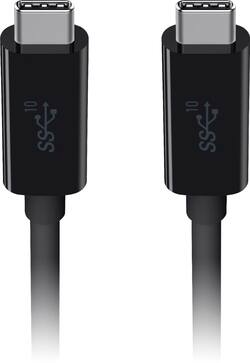
Belkin - 3.3' USB Type C-to-USB Type C Cable - Works with Chromebook - Black
- Key Specs
- Cable Length: 3.3 feet
- Connector Type (End 1): USB Type C
- Gender (End 1): Male
- Connector Type (End 2): USB Type C
- Gender (End 2): Male
- Maximum Data Transfer Rate: 1250 megabytes per second (The fastest data can be moved between devices.)
- Jacket Material: Plastic
- General
- Product Name: 3.3' USB Type C-to-USB Type C Cable - Works with Chromebook
- Brand: Belkin
- Model Number: F2CU052BT1MBKP1
- Connectivity
- Cable Type: USB
- Cable Length: 3.3 feet
- Product Type: Cable
- Connector Type (End 1): USB Type C
- Gender (End 1): Male
- Connector Type (End 2): USB Type C
- Gender (End 2): Male
- Maximum Data Transfer Rate: 1250 megabytes per second (The fastest data can be moved between devices.)
- Material
- Jacket Material: Plastic
- Certifications Listings & Approvals
- Certifications and Standards: USB-IF Certified
- Other
- UPC: 745883772995
Increase file transfer speeds to 10Gbps with this Belkin USB-C to USB-C cable. Its 3.3-foot length also lets you connect equipment for charging or powering.
- Works With Chromebook: This product has been certified to meet Google's compatibility standards. Certified accessories work seamlessly to help you get the most from your Chromebook.
- Compatible with most USB Type C devices: For simple connection between devices.
- Thermoplastic elastomer jacket: Keeps the components inside safe so that they last longer.
- 3.3' length: Lets you place your devices exactly where they're needed.
- 5-amp output: For efficient operation.
Whats Included
- Belkin 3.3' USB Type C-to-USB Type C Cable
Q: Can I use this to connect my Wii console to my TV to play games?
A: Yes, MVF13, if the Wii console and the TV uses USB-C port.
A: Yes, Yong. This cable is designed to connect MacBook and Ultrabook computers to Type C peripherals such as hard drives, hubs and displays. It also supports up to 100 W charging power and up to 10 Gbps data transfer speeds.
A: It supports data and charging, but the problem is that it can't support Apple's full charging spec and will not charge your Apple device at maximum speed possible when hooked to an Apple charger.
A: Hi, ACC. As long as both devices are USB-C enabled, then the cable should work.
A: I am using it to transfer data/files between Samsung USB-C devices and external USB-C Samsung SSD drives. This cable is USB-C to USB-C so your OTG adapter or phone port would have to be USB-C to use this cable.
A: Hi, Susan. The Belkin 3.1 USB-C to USB-C cable only comes in a 3.3-feet / 1-meter length but, it allows you to quickly and safely charge your USB-C device as well as sync your photos, music and data to your existing USB-C enabled device.
Q: can i use this cable to not only power the display but cast video as well on an external monitor
A: Yes. It's a 3.1 usb, 10gigabits/s data transfer as well as 100w power.
Q: With this cable, can I copy files from one laptop to another including music and pictures, etc.?
A: Yes as long as your device has the same hook up. Very quick speed.




















