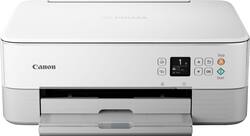
Canon - Pixma TS6420 Wireless All-In-One Inkjet Printer - White
- Key Specs
- Networking: Wireless, Wired
- Printer Type: All In One, Printer, Scanner
- ISO Color Print Speed: 6.8 pages per minute (The number of color pages able to be printed per minute in the device's default single-side mode, as tested by the International Standards Organization (ISO).)
- ISO Mono Print Speed: 13 pages per minute (The number of black ink (grayscale) pages able to be printed per minute in the device's default single-side mode, as tested by the International Standards Organization (ISO).)
- Touch Screen: false (Touch-screen devices make navigating more intuitive. Using a touch-screen display, you can do things such as tap to select, hold and drag to move items, swipe to scroll, and pinch to zoom.)
- General
- Product Name: Pixma TS6420 Wireless All-In-One Inkjet Printer
- Brand: Canon
- Display Screen: true
- Display Screen Size: 1.44 inches
- Model Number: 4462C022
- Dimensions
- Product Height: 5.9 inches (The out of box height of the item. Height is measured as the vertical distance from the bottom of the item to the top as it would be primarily used or placed.)
- Product Width: 15.9 inches (The out of box width of the item. Width is measured as the horizontal distance from one side of the item to the other as it would be primarily used or placed.)
- Product Depth: 14.2 inches (The out of box depth of the item. Depth is measured as the distance from the front of the item to the back as it would be primarily used or placed.)
- Product Weight: 13.8 pounds (The out of box weight of the item.)
- Features
- Automatic Document Feeder: false
- Photo Printing: true
- Automatic Two-Sided Printing: true
- Tray Capacity: 100
- Certifications Listings & Approvals
- EPEAT Qualified: false (The Electronic Product Environmental Assessment Tool (EPEAT) was designed to provide an environmental assessment tool for purchasers. In order to qualify for EPEAT, a product must meet all 23 required criteria.)
- Ink
- Compatible Cartridges: Canon PG-260 XL, Canon PG-260, Canon CL-261 XL, Canon CL-261
- Paper Info
- Supported Paper Sizes: 3.5” x 3.5” (Square), 4” x 6”, 5” x 5” (Square), 5” x 7”, 7” x 10”, 8” x 10”, Letter (8.5” x 11”), Legal (8.5” x 14”), U.S. #10 Envelopes, Card Size (91 mm x 55 mm)
- Other
- UPC: 013803329582
Introducing the PIXMA TS6420, a compact and sleek All-in-One printer built for your busy lifestyle. It’s easy to setup and simple to use — featuring a 1.44” OLED window which delivers clear, easy to read status messages as well as Front & Rear Paper feeding so you can print on a variety of paper types. The TS6420 can handle your everyday tasks with ease from scanning an old hand-written recipe to printing crafts from the Canon Creative Park App22. Whether printing from your computer or wirelessly1 from your smartphone, the TS6420 is an effortless All-In-One Printer that fits your everyday printing needs.
- Compact to fit your space: The TS6420 features a compact and stylish design that matches your space. With Front & Rear Paper Feeding you can simultaneously hold plain paper in the front cassette and extend the rear tray when you want to print on photo paper or other paper types.
- Easy setup and operation: Get started with Easy Setup for smartphone and computer. Printing/copying/scanning is a breeze with a clear 1.44” OLED Display and built-in Auto Duplex so you can use less paper when printing large documents.
- Print from your mobile devices: Print from your smartphone or tablet quickly and easily using Apple AirPrint®4, Mopria® Print Service5, or the Canon PRINT App3.
- Get creative: Download the Easy-PhotoPrint Editor app6 or Canon Creative Park App22 for more printing options and fun projects like posters, calendars, and other crafts. Push your creativity even further with Canon square, Magnetic, and Restickable photo papers!
Q: Why can i not find ink for this printer? Canon ts6420
A: I went to Canon Website: INK TYPE PG-260 Pigment Black Ink CL-261 Color Ink INK TANK & FILL VOLUME PG-260 Black: 7.5 ml (Std.) | 14.3 ml (XL) CL-261 Color: 8.3 ml (Std.) | 12.2 ml (XL)
Q: Does this printer have a usb port so you can plug and print?
A: "USB port to connect printer with computer." from printer manual
Q: can the printer be connecter to a computer?
A: yes you will need a connector cord as it does not come with one. I used the one that I had from my previous cannon printer.
Q: Does this computer come with a setup CD or do you have to download software like HP's Smart App?
A: No setup CD. Scan a QR code for step by step instructions online.
Q: Does this printer copy,fax and scans all in one and also does it do it in color
A: It does print in color, it does not have a fax feature only print, copy and scan.
A: Canon PG-260 XL Black Ink Cartridge, CL-261 XL Color Ink Cartridge The XL designates long lasting. The number without the XL are cheaper but don't last long. Hope that helps
Q: does this printer come with ink?
A: Yes, it came with one black cartridge and one color.

















