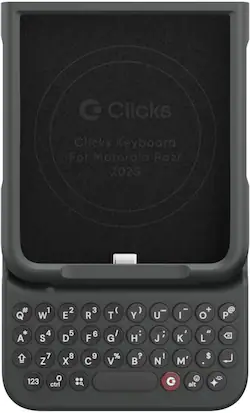
Clicks - Keyboard for Motorola Razr Base, Plus (2024 & 2025) and Ultra (2025) - Onyx
- Key Specs
- Brand Compatibility: Motorola
- Model Compatibility: Motorola Razr (2025), Motorola Razr+ (2025), Motorola Razr Ultra (2025), Motorola Razr (2024), Motorola Razr+ (2024)
- Case Style: Keyboard
- Screen Protector: false
- Integrated Stand: false
- General
- Brand: Clicks
- Model Number: CA-2200-1
- Product Name: Clicks Keyboard for Motorola Razr Base, Plus (2024 & 2025) and Ultra (2025)
- Color: Onyx
- Compatibility
- Brand Compatibility: Motorola
- Model Compatibility: Motorola Razr (2025), Motorola Razr+ (2025), Motorola Razr Ultra (2025), Motorola Razr (2024), Motorola Razr+ (2024)
- Features
- Case Style: Keyboard
- Screen Protector: false
- Integrated Stand: false
- Wireless Charging Compatible: Yes (Allows for wireless charging to pass through it. Some products do so by allowing power to flow through the material, while others may have a physical, proprietary method of doing so (ex. MagSafe).)
- Material: Polycarbonate, Polyurethane, Faux leather
- Non-Slip Grip: false
- Belt Clip: false
- Dimensions
- Product Height: 0.74 inches (The out of box height of the item. Height is measured as the vertical distance from the bottom of the item to the top as it would be primarily used or placed.)
- Product Width: 3.06 inches (The out of box width of the item. Width is measured as the horizontal distance from one side of the item to the other as it would be primarily used or placed.)
- Product Depth: 5.15 inches (The out of box depth of the item. Depth is measured as the distance from the front of the item to the back as it would be primarily used or placed.)
- Product Weight: 0.132 ounces (The out of box weight of the item.)
- Warranty
- Warranty - Parts: 1 YEAR
- Warranty - Labor: 1 year
- Other
- UPC: 850063244244
Clicks extends the power of your Razr with a physical keyboard. Use Clicks to free up your screen for content, tackle tasks on the go and take full control of your Razr with keyboard shortcuts. By moving the keyboard off the screen, Clicks helps you gain up to 50% more display to immerse yourself in chats, browsing, live streaming and more. Real keys make typing feel natural so you can write long notes, edit documents, or take action on ideas, without having to wait to get back to your laptop or tablet. Use Clicks to access powerful keyboard shortcuts such as scroll through web pages with space bar. Clicks connects directly to the Razr so there's no battery to charge or Bluetooth connection.
- Precision tuned buttons: The perfect balance of click, resistance, and feedback for fast, accurate typing.
- Content first: Maximize your screen space for apps and content while you create with Clicks.
- Make your statement: Type with speed and precision on a keyboard built for feel and performance.
- Ultimate control: Take action with access to Shortcuts and voice input at the push of a button.
- Easy on and off: Add a compact, lightweight keyboard when needed, or leave it on all the time - you decide!
- Unibody design: Fits snug and feels like a natural extension of your Phone.
- Backlight: Toggle on the keyboard backlight for typing at night or in the dark.
- Pass through charging: Enables you to charge your phone without having to take the Clicks Keyboard off
- Wireless charging: Supports wireless charging.
Whats Included
- 1x Clicks for Motorola Razr Base, Plus (2024 & 2025) and Ultra (2025)
- 1x Quick Start Guide
Product Manuals
Disclaimers
- Phone Not Included
Q: Is the Clicks keyboard compatible with wireless charging?
A: Yes, the Clicks keyboard supports wireless charging.
Q: How does the Clicks Keyboard connect to the Motorola Razr?
A: The Clicks keyboard connects directly to the Razr, eliminating the need for Bluetooth or charging.
Q: What is the material of the Clicks keyboard?
A: The Clicks keyboard is made of polycarbonate.
Q: Does this keyboard have a backlight?
A: Yes, the Clicks keyboard has a backlight for typing in low-light conditions.
Q: Can I charge my phone while using the Clicks keyboard?
A: Yes, the Clicks keyboard supports pass-through charging, allowing you to charge your phone without removing the keyboard.
Q: What is the purpose of the Clicks keyboard?
A: The Clicks keyboard extends the functionality of your Razr by providing a physical keyboard, freeing up screen space and offering keyboard shortcuts.
Q: Can the clicks keyboard be used with a galaxy flip 7?
A: undefined
Q: Will this work with the new 2025 Motorola Razr?
A: Yes, the Clicks for Razr 2025 will support the full 2025 Motorola Razr lineup including the Ultra, Razr Plus and Razr (base). The Clicks for Razr 2025 is also backwards compatible with the 2024 Razr series.