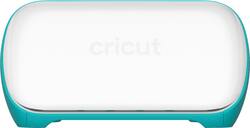
Cricut - Joy™
- Key Specs
- App Compatible: true (The product can be connected to a program or software application on a mobile device, which then receives collected data from the product.)
- Built-In Scanner: false
- Number of USB Port(s): 0
- General
- Product Name: Joy™
- Brand: Cricut
- Model Number: 2007813
- Features
- Software Included: Design Space
- Built-In Scanner: false
- Connectivity
- Connectivity Technology: Bluetooth (The manner in which a device sends data to another device over a short distance.)
- App Compatible: true (The product can be connected to a program or software application on a mobile device, which then receives collected data from the product.)
- Number of USB Port(s): 0
- Dimensions
- Product Height: 4.25 inches (The out of box height of the item. Height is measured as the vertical distance from the bottom of the item to the top as it would be primarily used or placed.)
- Product Length: 8.43 inches (The out of box length of the item. Length is measured as the longest dimension of the item.)
- Product Weight: 3.66 pounds (The out of box weight of the item.)
- Product Width: 5.43 inches (The out of box width of the item. Width is measured as the horizontal distance from one side of the item to the other as it would be primarily used or placed.)
- Display
- Display Screen: false
- Other
- UPC: 093573997594
Turn your inspiration board intentions into action with a little help from your DIY best friend, Cricut Joy™. Ridiculously easy to set up and use, this smart little cutting and writing machine helps you make more in less time, so you'll find yourself personalizing, organizing, and customizing every single day. Cut vinyl decals for custom water bottles or wall decor. Quickly make kitchen or office labels. Bust out a birthday banner or a just-because card. It also works with Cricut Smart Materials™ for super-easy, super-long cuts without a cutting mat. Just load & go! With a plethora of projects that take just 15 minutes, Cricut Joy makes it fast and easy to make something unique for you – or anyone – at a moment's notice. It's the perfect companion to full-size Cricut Maker® and Cricut Explore® machines.
- Basic Features: Weighing in at only 3.9 lbs (1.75 kg), this smart little cutting and writing machine makes it easy to personalize almost anything. Cuts 50+ materials, including iron-on, cardstock, vinyl, paper, and Smart Materials™ – super-easy, super-long cuts without a cutting mat.*
- Additional Features: Fits in a cubby, packs away easily, sets up instantly. Perfect companion to full-size Cricut smart cutting machines. Bluetooth® wireless technology. Design Space® software for iOS, Android™, Windows®, and Mac®"
- Includes: Cricut Joy machine. Blade + Housing** Fine Point Pen, Black (0.4 mm)** StandardGrip Mat, 4.5"" x 6.5"" (11.4 cm x 16.5 cm)** Welcome card. Power adapter. Free trial membership to Cricut Access™ (for new subscribers) 50 ready-to make projects online. Materials for a practice cut
- * descriptions: *Requires Cricut Smart Materials. **Only for Cricut Joy
Whats Included
- Cricut Joy Cutting Machine
- Blade and housing
- 0.4 mm fine point pen
- StandardGrip mat, 4.5" x 6.5"
- Power adapter
- Materials for a practice cut
- Free trial membership to Cricut Access
- 50 ready-to make projects
- Owner's manual
Product Manuals
Q: Can I use my cricut cartridges on the Joy?
A: You will have to call Customer Service so they can link your cartridges to your Design Space account or find someone that has an Cricut Explore or Explore Air with a cartridge linking port. Sign into your own account and link your cartridges. Once linked to your Design Space account you do not use the physical cartridge in the machine.
Q: Does this machine cut fabric?
A: No, it’s a smaller size but can do everything that the explorer can on a smaller scale. If your looking for cutting thicker items then you would need to purchase the maker.
Q: Those it come with tiny or no
A: This question makes no sense.
A: Great question! That depends on the type of material you use. With Smart Materials, Cricut Joy can cut an individual, continuous shape up to 4.5 inches wide and 4 feet long, and repeated cuts (like stars, hearts, and confetti) up to 20 feet long! With a cutting mat, Cricut Joy can cut up to 4.25 in x 6.25 in (10.795 cm x 15.875 cm), or 4.25 in x 11.75 in (10.795 cm x 29.845 cm).
Q: Can I purchase the Circuit Joy in store?
A: No only online the don’t have them in the store
Q: Can this machine make vinyl decals for a bike?
A: Yes this machine can make kid decals home decor decal wall art and more
Q: Does this machine make stickers or only cut them?
A: You use Cricut Design Space to create images from their image library. There are some free images but otherwise you pay per image or do a subscription called “accesss”. As long as you have an active subscriptions you can use images and fonts for free. (Over 100,000) You can also import svg files into Design Space to cut or import png or jpeg images into Design Space and convert them to cut in Design Space. Regardless of whether you use your own images or Cricut images, Design Space is required to cut all images. You can then cut on a number of materials, sticker paper being one of them.
A: Hi Basha, You can cut or draw on the thermal paper labels with your Cricut Joy machine, however, you need a Cricut Joy mat to put your thermal paper labels on top of it in order to draw on them or cut them with your machine. You can download your projects as a PDF file from the desktop Design Space application. however, you can't upload a PDF file in the Design Space app. The Cricut Joy machine is not a printer machine so it doesn't use ink but it cuts the desired material and it can also draw on them using infusible ink pens or normal pens or markers. You can find more information about this machine at help.cricut.com and you can also find the infusible ink materials and markers at cricut.com/shop




















