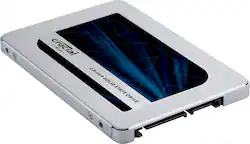
Crucial - MX500 4TB Internal SSD SATA
- Key Specs
- Storage Capacity: 4000 gigabytes (Measured in megabytes (MB), gigabytes (GB) and terabytes (TB), this is the amount available for storing files, music, movies, photos and more. The total includes the capacity of the hard disk drive and solid state drive if both are included on the computer.)
- Storage Drive Type: SSD (Traditional, mechanical hard disk drives are the most common type of storage because they're relatively inexpensive and offer huge capacities. However, they also generate both noise and heat. Solid state drives, also known as SSDs, are many times faster than hard disk drives and have no moving parts to wear out, but typically offer less capacity for the same price.)
- Maximum Read Speed: 560 megabytes per second (The greatest speed at which the device can read information; for example, opening files.)
- Maximum Write Speed: 510 megabytes per second (The greatest speed at which the device can write information; for example, saving files.)
- Form Factor: 2.5 in.
- Interface(s): SATA (Refers to the types of connections that devices use to interact and communicate with each other.)
- General
- Product Name: MX500 4TB Internal SSD SATA
- Brand: Crucial
- Model Number: CT4000MX500SSD1
- Capacity
- Storage Capacity: 4000 gigabytes (Measured in megabytes (MB), gigabytes (GB) and terabytes (TB), this is the amount available for storing files, music, movies, photos and more. The total includes the capacity of the hard disk drive and solid state drive if both are included on the computer.)
- Performance
- Storage Drive Type: SSD (Traditional, mechanical hard disk drives are the most common type of storage because they're relatively inexpensive and offer huge capacities. However, they also generate both noise and heat. Solid state drives, also known as SSDs, are many times faster than hard disk drives and have no moving parts to wear out, but typically offer less capacity for the same price.)
- Maximum Read Speed: 560 megabytes per second (The greatest speed at which the device can read information; for example, opening files.)
- Maximum Write Speed: 510 megabytes per second (The greatest speed at which the device can write information; for example, saving files.)
- Compatibility
- Internal Or External: Internal
- Product Compatibility: Desktop computers, Laptop computers
- Form Factor: 2.5 in.
- Interface(s): SATA (Refers to the types of connections that devices use to interact and communicate with each other.)
- Operating System Compatibility: Mac, Windows, Apple iPadOS
- Features
- Security Features: Software
- Data Encryption: true
- Usage: Everyday computing
- Memory
- NAND Flash Memory Type: 3D NAND (Single Level Cell (SLC) stores 1 bit of data per memory cell; Multi Level Cell (MLC) stores 2 bits per cell, Triple Level Cell (TLC) 3 bits, and Quad Level Cell (QLC) 4 bits. Vertical NAND (V-NAND) or 3D NAND stores more data by layering cells vertically. Similarly, there are 3D MLC, 3D TLC and 3D QLC stacked cells.)
- Dimensions
- Product Height: 2.75 inches (The out of box height of the item. Height is measured as the vertical distance from the bottom of the item to the top as it would be primarily used or placed.)
- Product Width: 0.28 inches (The out of box width of the item. Width is measured as the horizontal distance from one side of the item to the other as it would be primarily used or placed.)
- Product Weight: 2.47 ounces (The out of box weight of the item.)
- Included
- Included Software: Storage Executive and Acronis Micron version
- Other
- UPC: 649528906472
Start your system in seconds, store up to 4TB of data, and upgrade with an SSD you can count on. Join more and more people who are keeping their family videos, travel photos, music, and important documents on an SSD, and get the near-instant performance and lasting reliability that comes with solid state storage. Upgrade with the Crucial MX500 SSD, a drive built on quality, speed, and security that’s all backed by helpful service and support. Even if you’ve never installed an SSD, don’t fear – our step-by-step guide walks you through the process to make installation easy. It’s worth it.
- Sequential Reads: 560 MB/s sequntial reads
- Micron® 3D TLC NAND: Built with 3D TLC NAND and Silicon Motion® SM2258 with Micron® Custom Firmware
- Integrated power loss immunity: Integrated power loss Immunity preserves all your saved work if the power unexpectedly gets cut
- Encryption Capability: AES 256 bit hardware based encryption keeps data safe and secure from hackers and thieves
Whats Included
- MX500 4TB 3D NAND SATA 2.5" Internal Solid State Drive
Q: Why is the 2tb ssd endurance 700TB written and the 4tb ssd endurance is 360TB?
A: Hello, thanks for getting in touch, Endurance details which you have shared for Crucial drives are incorrect. Correct endurance for crucial Drives are below. 1 - CT2000MX500SSD1 endurance is 700TB, equal to 383GB per day for 5 years 2 - CT4000MX500SSD1 endurance is 1000TB, equal to 547GB per day for 5 years Please check the product flyer for your reference. https://content.crucial.com/content/dam/crucial/ssd-products/mx500/flyer/crucial-mx500-ssd-productflyer-en.pdf If you need any more information or support, please contact us back through the link below. https://www.crucial.com/support/contact - The Crucial Team
Q: Will this fit in my legion Lenovo 5 laptop in the extra space provided for an memorie slot
A: Hello, Thank you for your post, There are many system of this series legion Lenovo 5. Please share the complete make and model of the system. You can find make and model of the system on sticker which is the underneath of laptop, Also you can scan your system on website. Our scanner tool provide 100% compatibility guaranty. You can also visit our contact page: https://www.crucial.com/support/contact to know about other ways to reach out to us. Crucial Regards,
A: Hello, thanks for getting in touch, You can install crucial CT4000MX500SSD1 in your system Dell XPS 8960. You can use crucial SSD Dell XPS 8960 as boot drive. You would not required extra hardware, you can install the SSD internally on motherboard in SATA 2.5 inch Slot. - The crucial Team.
A: undefined
Q: Will this fit in a laptop? What is the height of this drive? Is it 7mm or higher?
A: 7mm thickness. Fits my laptop fine. Make sure you have a sata slot in your system. Mine has both an m.2 & room for a sata drive. I replaced a 1tb hard drive in about 10 minutes.
A: Hello Sincity, Every time you turn on your computer, you’re using your storage drive. It holds all your irreplaceable files and it loads and saves almost everything your system does. Join more and more people who are keeping their family videos, travel photos, music and important documents on an SSD, and get the near-instant performance and lasting reliability that comes with solid state storage. Upgrade with the Crucial MX500 SSD, a drive built on quality, speed, and security that’s all backed by helpful service and support. Even if you’ve never installed an SSD, don’t sweat it — our step-by-step guide walks you through the process to make installation easy. Regards, Crucial
![The text on the image reads: "SAMSUNG 990 EVO Plus 1TB HF 87 29 [4] D2 UIT 2/-c 947-0 CrUNED AZUECHB 25 a17 SAMSUNG 003 200 s0o 8 SAVSUNG KZS 82TOHBLS."](https://pisces.bbystatic.com/image2/BestBuy_US/images/products/3c623518-8022-4e56-b6e5-f6c8cb9144bf.jpg;maxHeight=144;maxWidth=200?format=webp)






![The text on the image reads:
"SAMSUNG 990 EVO Plus 2TB HF 87 29 34] D2 UIT 21-c 341-0 CrUNE AZMECHB 25 SAMSUNG OCS 200 SSo 8 SAVSUNG KIVL OHEL"
Corrected text:
"SAMSUNG 990 EVO Plus 2TB HF 87 29 34] D2 UIT 21-c 341-0 CrUNE AZMECHB 25 SAMSUNG OCS 200 SSo 8 SAVSUNG KIVL OHEL"
The text is a description of a Samsung product, which is a 2TB hard drive.](https://pisces.bbystatic.com/image2/BestBuy_US/images/products/ee3c5861-78da-4d93-97ad-825a9eff529a.jpg;maxHeight=144;maxWidth=200?format=webp)



