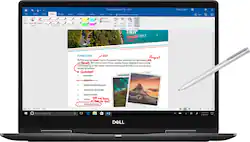
Dell - 2-in-1 15.6" 4K Ultra HD Touch-Screen Laptop - Intel Core i7 - 16GB Memory - NVIDIA GeForce MX130 - 256GB SSD - Abyss Black
- Key Specs
- Screen Size: 15.6 inches (Size of the screen, measured diagonally from corner to corner.)
- Screen Resolution: 3840 x 2160 (4K) (Screens come in a range of resolutions (measured in pixels, horizontal x vertical). The higher the resolution, the greater the picture quality.)
- Touch Screen: true (Touch-screen devices make navigating more intuitive. Using a touch-screen display, you can do things such as tap to select, hold and drag to move items, swipe to scroll, and pinch to zoom.)
- Processor Model: Intel 8th Generation Core i7 (Your computer's processor is like its brain. Working in combination with system memory, the power of the processor determines the complexity of software you can run, how many programs you can have open at the same time, and how fast those programs will run. Most computers feature an AMD, Intel or Snapdragon processor.)
- Storage Type: SSD
- Total Storage Capacity: 256 gigabytes
- System Memory (RAM): 16 gigabytes (Random-access memory (RAM) is a computing device's short-term data storage, which allows active information to be accessed quickly. The size and type of RAM determines how efficiently the device can handle large amounts of information at one time. For example, gaming or video editing requires more RAM for optimal performance.)
- Graphics: Other (Often referred to as a "graphics processing unit" (GPU), this device is responsible for displaying image content and decoding/encoding video content in programs and games.)
- 2-in-1 Design: true (A laptop and a tablet combined in one lightweight, portable device. Sometimes referred to as "convertible" or "hybrid" laptops, these devices deliver the processing power and keyboard of a laptop. When you're ready to play, either detach the screen or fold your 2-in-1 into tablet mode to comfortably watch movies, play games, read an e-book and more.)
- Backlit Keyboard: true (Integrated lights allow for visibility of the keys in low-light conditions.)
- General
- Brand: Dell
- Model Number: I7573-7019BLK-PUS
- Product Name: 2-in-1 15.6" 4K Ultra HD Touch-Screen Laptop - Intel Core i7 - 16GB Memory - NVIDIA GeForce MX130 - 256GB SSD
- Color: Abyss Black
- Display
- Display Type: LED
- Screen Size: 15.6 inches (Size of the screen, measured diagonally from corner to corner.)
- Screen Resolution: 3840 x 2160 (4K) (Screens come in a range of resolutions (measured in pixels, horizontal x vertical). The higher the resolution, the greater the picture quality.)
- Stylus Input: Built for Windows Ink (Active) (An active stylus/pen is able to communicate directly with a compatible device; active electromagnetic resonance (EMR) pens are powered via a device's screen and active electrostatic (AES) pens require an additional power source. A passive stylus does not have electronic features and is compatible with most capacitative touch screens.)
- Touch Screen: true (Touch-screen devices make navigating more intuitive. Using a touch-screen display, you can do things such as tap to select, hold and drag to move items, swipe to scroll, and pinch to zoom.)
- Processor
- Processor Brand: Intel
- Processor Model: Intel 8th Generation Core i7 (Your computer's processor is like its brain. Working in combination with system memory, the power of the processor determines the complexity of software you can run, how many programs you can have open at the same time, and how fast those programs will run. Most computers feature an AMD, Intel or Snapdragon processor.)
- Processor Model Number: 8550U
- Storage
- Storage Type: SSD
- Total Storage Capacity: 256 gigabytes
- Solid State Drive Capacity: 256 gigabytes (The amount of data that can be stored on the device's solid state drive (SSD). SSD is a flash-based storage with faster speeds than a hard disk drive (HDD).)
- Hard Drive Accelerator: None (A module integrated (or added) into a PC to improve performance speed. By acting as a high-speed cache, an accelerator speeds up access times to the hard drive, which results in faster web browsing, improved gaming experience, and overall more responsiveness.)
- Memory
- System Memory (RAM): 16 gigabytes (Random-access memory (RAM) is a computing device's short-term data storage, which allows active information to be accessed quickly. The size and type of RAM determines how efficiently the device can handle large amounts of information at one time. For example, gaming or video editing requires more RAM for optimal performance.)
- Type of Memory (RAM): DDR4 SDRAM (Each type of RAM delivers a different level of speed, bandwidth, energy efficiency and performance.)
- System Memory RAM Speed: 2400 megahertz (How fast the information-storing hardware operates. The faster the RAM, the faster memory can be transferred to other system components. Ultimately, faster RAM improves operational efficiency.)
- Number Of Memory Slots: 2
- Number of Memory Sticks Included: 1
- System Memory RAM Expandable To: 32 gigabytes (Adding more random-access memory (RAM) to a computer speeds up performance and improves efficiency. Upgrades to memory are limited by the number of expansion slots for additional RAM and existing RAM installed on the device.)
- Graphics
- Graphics Type: Dedicated (Dedicated graphics uses a separate graphics card for processing video images. Because it does not use memory from the system's RAM, there is no extra burden on the CPU and graphics are processed more efficiently. Integrated graphics shares system RAM to process video images.)
- GPU Brand: NVIDIA
- Graphics: Other (Often referred to as a "graphics processing unit" (GPU), this device is responsible for displaying image content and decoding/encoding video content in programs and games.)
- Compatibility
- Operating System: Windows 10 Home (The operating system manages all software and hardware, including files, memory and connected devices. Most importantly, it lets you interact with your device and your programs in a visual way; otherwise, you'd be typing computer code to get anything done.)
- Operating System Architecture: 64-bit (An operating system (OS) manages computer hardware, software resources, and programs in conjunction with the system's processor. 64-bit operating systems can handle more data at once than 32-bit systems, resulting in faster speeds, more effiency, and overall improved performance.)
- Connectivity
- Number of HDMI Outputs (Total): 1
- Number of USB Ports (Total): 3
- Headphone Jack: true (The device features an interface that allows for the connection of headphones.)
- Ethernet Card: 10/100/1000 (Also known as an Ethernet adapter, this card plugs into a computer's motherboard and enables it to access an Ethernet network. Ethernet data transmission speeds are measured in Mbps (megabits per second) and Gbps (gigabits per second). For example, a 10/100 Ethernet port transmits 10 and 100 Mbps, while a 10/100/1000 Ethernet port transmits 10 and 100 Mbps and has a maximum speed of 1000 Mbps (1 Gbps).)
- Power
- Battery Cells: 4-cell
- Camera
- Front-Facing Camera: true
- Features
- 2-in-1 Design: true (A laptop and a tablet combined in one lightweight, portable device. Sometimes referred to as "convertible" or "hybrid" laptops, these devices deliver the processing power and keyboard of a laptop. When you're ready to play, either detach the screen or fold your 2-in-1 into tablet mode to comfortably watch movies, play games, read an e-book and more.)
- Backlit Keyboard: true (Integrated lights allow for visibility of the keys in low-light conditions.)
- Media Card Reader: true (A hardware device that allows for access to data on a memory card and enables the transfer of its files to a computer. These devices may have one or multiple slots for various types of memory cards, and may be integrated into the computer or available as an external device.)
- Audio Technology: MaxxAudio Pro
- Speaker Type: Stereo speakers
- Dimensions
- Product Height: 0.7 inches (The out of box height of the item. Height is measured as the vertical distance from the bottom of the item to the top as it would be primarily used or placed.)
- Product Width: 14.2 inches (The out of box width of the item. Width is measured as the horizontal distance from one side of the item to the other as it would be primarily used or placed.)
- Product Depth: 9.6 inches (The out of box depth of the item. Depth is measured as the distance from the front of the item to the back as it would be primarily used or placed.)
- Product Weight: 4.98 pounds (The out of box weight of the item.)
- Certifications Listings & Approvals
- ENERGY STAR Certified: true (Devices carrying the ENERGY STAR service mark, such as computer products and peripherals, kitchen appliances, and other products, generally use 20% to 30% less energy than required by federal standards.)
- EPEAT Qualified: false (The Electronic Product Environmental Assessment Tool (EPEAT) was designed to provide an environmental assessment tool for purchasers. In order to qualify for EPEAT, a product must meet all 23 required criteria.)
- Included
- Included Software: Microsoft Office (30 days trial) and McAfee LiveSafe (12 months subscription)
- Optical Drive Type: None (An optical disk drive (ODD) uses a laser light to read data from or write data to an optical disc. These discs include CDs, DVDs, and Blu-ray Discs. This allows you to play music or watch movies using prerecorded discs.)
- Stylus Included: true
- Other
- UPC: 884116293019
 Dell Inspiron Convertible 2-in-1 Laptop: Experience games in a new way with this 15.6-inch Dell Inspiron notebook computer. Its Intel Core i7 processor and 16GB of RAM run programs efficiently, and its 4K display delivers high-quality images for realistic gaming. This Dell Inspiron notebook computer has an HDMI port to connect an HD monitor or television.
- Windows 10 operating system: Windows 10 brings back the Start Menu from Windows 7 and introduces new features, like the Edge Web browser that lets you markup Web pages on your screen. Learn more ›
- 15.6" touch screen: 3840 x 2160 native resolution. Natural finger-touch navigation makes the most of Windows 10. IPS technology for wide viewing angles. Energy-efficient LED backlight.
- 8th Gen Intel® Core™ i7-8550U mobile processor: Ultra-low-voltage platform. Quad-core, eight-way processing provides maximum high-efficiency power to go. Intel Turbo Boost Technology delivers dynamic extra power when you need it.
- 16GB system memory for intense multitasking and gaming: Reams of high-bandwidth DDR4 RAM to smoothly run your graphics-heavy PC games and video-editing applications, as well as numerous programs and browser tabs all at once.
- 256GB solid state drive (SSD): While offering less storage space than a hard drive, a flash-based SSD has no moving parts, resulting in faster start-up times and data access, no noise, and reduced heat production and power draw on the battery.
- 360° flip-and-fold design: Offers versatile functionality with laptop, audience, tabletop, presentation and tablet modes.
- NVIDIA GeForce MX130 graphics: Driven by 2GB GDDR5 dedicated video memory to quickly render high-quality images for videos and games.
- MaxxAudio: To give you great sound across music, movies, voice and games.
- Weighs 4.98 lbs. and measures 0.7" thin: Thin and light design with DVD/CD drive omitted for improved portability. 4-cell lithium-ion battery.
- HDMI output expands your viewing options: Connect to an HDTV or high-def monitor to set up two screens side by side or just see more of the big picture.
- Built-in media reader for simple photo transfer: Supports SD memory card formats.
- Dual-band wireless network connectivity: Built-in high-speed wireless LAN built into the screen, so it connects to your network or hotspots on all current Wi-Fi standards in both laptop and tablet modes.
- Built-in HD webcam with dual array microphone: Makes it easy to video chat with family and friends or teleconference with colleagues over Skype or other popular applications.
- Additional port: Headphone/microphone combo jack.
- Windows 10 operating system: Windows 10 brings back the Start Menu from Windows 7 and introduces new features, like the Edge Web browser that lets you markup Web pages on your screen. Learn more ›
- 15.6" touch screen: 3840 x 2160 native resolution. Natural finger-touch navigation makes the most of Windows 10. IPS technology for wide viewing angles. Energy-efficient LED backlight.
- 8th Gen Intel® Core™ i7-8550U mobile processor: Ultra-low-voltage platform. Quad-core, eight-way processing provides maximum high-efficiency power to go. Intel Turbo Boost Technology delivers dynamic extra power when you need it.
- 16GB system memory for intense multitasking and gaming: Reams of high-bandwidth DDR4 RAM to smoothly run your graphics-heavy PC games and video-editing applications, as well as numerous programs and browser tabs all at once.
- 256GB solid state drive (SSD): While offering less storage space than a hard drive, a flash-based SSD has no moving parts, resulting in faster start-up times and data access, no noise, and reduced heat production and power draw on the battery.
- 360° flip-and-fold design: Offers versatile functionality with laptop, audience, tabletop, presentation and tablet modes.
- NVIDIA GeForce MX130 graphics: Driven by 2GB GDDR5 dedicated video memory to quickly render high-quality images for videos and games.
- MaxxAudio: To give you great sound across music, movies, voice and games.
- Weighs 4.98 lbs. and measures 0.7" thin: Thin and light design with DVD/CD drive omitted for improved portability. 4-cell lithium-ion battery.
- HDMI output expands your viewing options: Connect to an HDTV or high-def monitor to set up two screens side by side or just see more of the big picture.
- Built-in media reader for simple photo transfer: Supports SD memory card formats.
- Dual-band wireless network connectivity: Built-in high-speed wireless LAN built into the screen, so it connects to your network or hotspots on all current Wi-Fi standards in both laptop and tablet modes.
- Built-in HD webcam with dual array microphone: Makes it easy to video chat with family and friends or teleconference with colleagues over Skype or other popular applications.
- Additional port: Headphone/microphone combo jack.
Whats Included
- 4-cell battery
- Dell Inspiron 7573 2-in-1
- Power adapter
- Stylus
- 4-cell battery
- Dell Inspiron 7573 2-in-1
- Power adapter
- Stylus
Product Manuals
A: Yes I would recommend this laptop for a college student, however, you will pay for the specs. This laptop isn't cheap. For less money you can absolutely get a really nice computer that is more than capable of doing what you require. That being said, if you do purchase this machine you will not regret it. I would try to see if you can get it open box for sure. The 4k display is simply beautiful and the laptop comes with a pen from dell included in the box.If you're willing to spend the money it is a great machine.
Q: Is the aluminium chassis is durable and sturdy to use the laptop outside?
A: I do sports photography and this is a vital piece of my work. The hinges are rock solid and the over chassis quality is professional grade. Depending on how rough you are with it, you should only get scratches in the brushed aluminum. The screen is bright enough at 100% to be seen well in direct sunlight, but the reflectiveness of the screen might cause some issues.
Q: Is it possible to upgrade the SSD?
A: Yes, but SATA SSD's only. Will not accept a PCIe SSD.
A: The battery life is not as long as they say. Maybe with some tweaks to the settings you might get a longer life out of the battery. There is no holder or pocket for the stylus pen.
A: Hi Serg, My battery life currently tops at 5-6hrs with my usage, I don't think this PC could reach its said 10 hrs with this battery and such high specifications.
A: I had the same issue. I resolved it by installing all windows updates and dell updates (including the BIOS update). This resolved the issue.
A: Outside on your deck, yes. On the hood of your truck at a worksite, no. I hope that helps.















![The text on the image reads:
17 F8 Home P End F10 PgUp it PgDn F12 Ies Del * 8 ( 9 ) 0 I I + = Backspace I o P : [ ] ] I / K L : : .. . Enter M V > . ? / Shift Alt <
The corrected text should be:
17 F8 Home PgUp it PgDn F10 F12 Ies Del * 8 ( 9 ) 0 I I + = Backspace I o P : [ ] ] I / K L : : .. . Enter M V > . ? / Shift Alt <
The corrected text groups the keys in a more organized manner, making it easier to read and understand.](https://pisces.bbystatic.com/image2/BestBuy_US/images/products/699c06f5-6aba-4ab2-bbf6-114986b58b2a.jpg;maxHeight=144;maxWidth=200?format=webp)