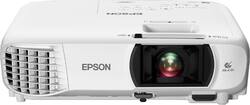
- Key Specs
- Product Weight: 6 pounds (The out of box weight of the item.)
- Resolution: 1080 (Refers to the number of pixels, both horizontally and vertically, used to capture video/images. The higher the resolution the finer the detail that can be seen.)
- Contrast Ratio: 15000:1 (Measured difference between a displayed image's brightest whites and darkest blacks. The larger the first number, the more detail and color that can be displayed.)
- Projector Use: Home Theater
- General
- Brand: Epson
- Model Number: EPSON HC1060 PROJECTOR V11H849
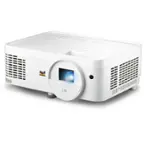
- Product Name: Home Cinema 1060 1080p 3LCD Projector
- Color: White
- Dimensions
- Product Height: 3.4 inches (The out of box height of the item. Height is measured as the vertical distance from the bottom of the item to the top as it would be primarily used or placed.)
- Product Width: 11.9 inches (The out of box width of the item. Width is measured as the horizontal distance from one side of the item to the other as it would be primarily used or placed.)
- Product Depth: 9.8 inches (The out of box depth of the item. Depth is measured as the distance from the front of the item to the back as it would be primarily used or placed.)
- Product Weight: 6 pounds (The out of box weight of the item.)
- Display
- Resolution: 1080 (Refers to the number of pixels, both horizontally and vertically, used to capture video/images. The higher the resolution the finer the detail that can be seen.)
- Resolution (Native): 1920 x 1080 (Native resolution of a screen refers to its single, fixed resolution. Sometimes screens must scale an image up or down in order to fit the native resolution. This can cause a loss of resolution or detail.)
- 3-Chip Technology: true (Projectors with this technology are able to display images with optimal brightness, color, and detail. Because of their high-performance design, these projectors are primarily used in large venues and digital cinemas.)
- Contrast Ratio: 15000:1 (Measured difference between a displayed image's brightest whites and darkest blacks. The larger the first number, the more detail and color that can be displayed.)
- Aspect Ratio: 16:9 (The measurement of the width of a screen compared to the height of a screen, expressed as a ratio.)
- Throw Ratio Range: 1.02 - 1.23 (This measurement indicates what size of projected image can be produced from a certain distance. The smaller the ratio, the closer the projector can be to the screen while still producing a large image.)
- Digital Keystone Correction: true ("Keystone effect" refers to the distortion of an image when it is projected on an angled surface or when the projector is positioned too high or too low from the center of the display. Projectors with a digital keystone correction feature are able to scale the image as needed before it is projected, resulting in the correct image orientation no matter where it is displayed.)
- 3D Technology: false
- Viewing
- Minimum Projector Distance: 3 feet (Minimum distance that the projector can be placed from the screen to produce a display with acceptable visual performance.)
- Maximum Projector Distance: 26.6 feet (Maximum distance that the projector can be placed from the screen to produce a display with acceptable visual performance.)
- Minimum Viewable Screen Size: 29.9 inches
- Maximum Viewable Screen Size: 300 inches
- Features
- Projector Use: Home Theater
- Remote Control Included: true
- Exposure Control
- Focus Adjustment: Manual (The method used to focus the device in order to view or display a sharper image.)
- Minimum Aperture: 1.58 (The smallest opening of a lens, typically expressed in f-numbers. The larger the number, the smaller the aperture and the less light that can enter the lens. A smaller aperture creates a larger depth of field, which keeps both foreground and background in focus.)
- Maximum Aperture: 1.7 (The limit to how wide a lens can be open, typically expressed in f-numbers. The smaller the number, the larger the aperture and the more light that can enter the lens. A larger aperture creates a shallower depth of field, helpful for keeping subjects in focus and blurring background details.)
- Audio
- Sound Mode: Mono
- Integrated Speaker(s): true
- Speaker(s) Included: true
- Other
- UPC: 010343936737
Amplify your Full HD viewing experience with this Epson home cinema projector. It lets you project 1080p content up to a size of 300 inches, and it provides brilliant picture quality thanks to its 3,100 lumens of color & white brightness and 3LCD technology. Connect high-definition media sources to this portable Epson home cinema projector via its two HDMI ports.
- Portable design: Weighs 5.95 lbs. for easy transport to a friend’s house for your next movie night.
- ±30° keystone correction: For distortion-free images.
- 3100 lumens of color brightness and 3100 lumens of white brightness: Boost display visibility and produce clear, vibrant on-screen images.
- Dynamic contrast ratio: Up to 15,000:1 for rich detail in dark scenes.
- 1080p (1920 x 1080) native resolution: Creates a sharp, detailed high-definition picture.
- Stream HD TV, movies, videos and games: Supports MHL-enabled smartphones and streaming sticks for mirroring and charging.
- Dual HDMI inputs: Make it easy to connect to high-definition sources.
- 29.9" - 300" viewable screen size: Allows everyone in the room to enjoy a clear view.
- USB Plug 'n Play instant setup: Instantly projects audio and video from a PC or Mac via a USB connection.
- UHE 210W lamp: Delivers up to 7,500 hours of lamp life in ECO mode and up to 4,500 hours of lamp life in normal mode for extended use.
- 28-37dBA fan noise: Ensures quiet operation.
- Built-in speaker: Provides crisp sound.
- Included remote: Provides simple control from across the room.
- Portable design: Weighs 5.95 lbs. for easy transport to a friend’s house for your next movie night.
- ±30° keystone correction: For distortion-free images.
- 3100 lumens of color brightness and 3100 lumens of white brightness: Boost display visibility and produce clear, vibrant on-screen images.
- Dynamic contrast ratio: Up to 15,000:1 for rich detail in dark scenes.
- 1080p (1920 x 1080) native resolution: Creates a sharp, detailed high-definition picture.
- Stream HD TV, movies, videos and games: Supports MHL-enabled smartphones and streaming sticks for mirroring and charging.
- Dual HDMI inputs: Make it easy to connect to high-definition sources.
- 29.9" - 300" viewable screen size: Allows everyone in the room to enjoy a clear view.
- USB Plug 'n Play instant setup: Instantly projects audio and video from a PC or Mac via a USB connection.
- UHE 210W lamp: Delivers up to 7,500 hours of lamp life in ECO mode and up to 4,500 hours of lamp life in normal mode for extended use.
- 28-37dBA fan noise: Ensures quiet operation.
- Built-in speaker: Provides crisp sound.
- Included remote: Provides simple control from across the room.
Whats Included
- Epson Home Cinema 1060 Projector
- Power Cord
- Quick Setup Guide
- Remote Control with AA batteries
- Epson Home Cinema 1060 Projector
- Power Cord
- Quick Setup Guide
- Remote Control with AA batteries
Product Manuals
A: It’s likely a failed power supply. Mine did it about a month ago. Call Epson and they can get you a replacement.
A: I've had the same issue with my 1060 and I bought mine in August of last year. No where near the max hours for a typical bulb and mine starts flickering after a while now in ECO mode. From what I have read through research is that it's a problem with the ECO mode in these projectors. It doesn't provide the right amount of power needed for the bulb to operate consistently. I'm thinking there is some truth to that because if you take it out of ECO mode and put it into Normal mode, the problem goes away. Kind of annoying because ECO mode is plenty of light in my opinion and I don't like the higher fan noise in normal mode.
A: To answer your question, I need to know if you're measuring screen width from side to side or diagonally (from one corner to the opposite corner.) Assuming width is from left side to right side, the projector set-back is found by multiplying the screen width by the throw ratio of the projector. This projector has a throw ratio of 1.35 to 1.64, So to produce a picture 120" wide (10 feet) the projector has to be 13.5 to 16.4 feet from the screen. On the other had, if you're screen measure is diagonal, you need to look at the width to height ratio to figure true screen width. As most video screens today are a 16:9 ratio, your magic number is 0.872. Multiply your diagonal screen width by that number, then multiply by the throw ratio: 10' x 0.872 x 1.35 = 11.7' minimum, 10' x 0.872 x 1.64 = 14.3' maximum. If you're using the older, original TV format ratio of 4:3. the magic number is 0.8 for a minimum and maximum distance of 10.8' to 13.1'.
Q: I’m trying to hook up a firestick to the projector and also to my surround sound help
A: 1. Buy a HDMI audio splitter. Firestick plugs into splitter. Splitter to projector using HDMI cable. Splitter to receiver or sound bar using optical or coax digital audio cable. 2. Firestick has built in Bluetooth. You can connect to a Bluetooth receiver which connects to your home theater. 3. Use Bluetooth capability of Firestick to connect to a Bluetooth speaker. Connect "headphone out" of Bluetooth speaker to input of your receiver or sound bar using an earphone to RCA cable.
Q: Can a iPad or a portable storage device be connected to the projector
A: Yes, it can be connected to an iPad or a portable storage device.
A: Go to the Menu -> Extended -> Projection -> front/Ceiling
A: Yes it can! There are a wide variety of universal mounts you can use with this projector.
A: Well you might need a multi hdmi splitter where that is hooked up to the projector and then your components are hooked up the the splitter. In my case I have my surround sound set up with a pioneer receiver which has 4 hdmi outputs and 1 hdmi input. So the 1 input plugs into the projector then your components plug in to the receiver. Hope I didn’t confuse you.