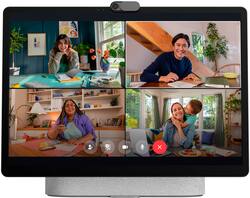
Meta - Portal Plus - Smart Video Calling 14” Touch Screen with Stereo Speakers - Light Gray
- Key Specs
- Built-In Speakers: true
- Featured Streaming Services: Spotify, Pandora, iHeartRadio, Facebook (Streaming services and other programs are available on this device. Keep in mind, there may be more services supported than just those shown here.)
- Number of Microphones: 4
- General
- Brand: Meta
- Model Number: 899-00119-01
- Product Name: Portal Plus - Smart Video Calling 14” Touch Screen with Stereo Speakers
- Color: Light Gray
- Audio
- Built-In Speakers: true
- Featured Streaming Services: Spotify, Pandora, iHeartRadio, Facebook (Streaming services and other programs are available on this device. Keep in mind, there may be more services supported than just those shown here.)
- Number of Speakers: 2
- Woofer Size: 20 inches
- Voice
- Voice Assistant Built-in: Amazon Alexa (A digital assistant built into the device that uses voice commands to answer questions and control smart devices.)
- Number of Microphones: 4
- Microphone Features: 4-mic array with 360° pickup
- Calling Features: Messenger, WhatsApp and Zoom
- Connectivity
- Connectivity Technology: Wi-Fi, Bluetooth (The manner in which a device sends data to another device over a short distance.)
- Bluetooth Version: 5.1 (The Bluetooth specification formalized by the Bluetooth Special Interest Group. All versions of the Bluetooth standard are backwards compatible with previous versions.)
- Works With: Amazon Alexa, Hue, Nest, Wink (Compatible with or able to be connected to other smart devices or applications.)
- Wireless Connectivity: Wi-Fi, Bluetooth (The manner in which a device sends data to another device over a short distance without the use of wires or cables.)
- Operating System Compatibility: Android
- Wireless Standard: AC, N (The wireless networking protocol used by the device. Each iteration of the protocol is based on the 802.11 standard developed by the Institute of Electrical and Electronics Engineers (IEEE) Standards Association. Denoted by letters following 802.11 (802.11a, 802.11ac, etc.), each version, published in alphabetical order, encompasses all previous versions.)
- Wireless Networking Standard: Wi-Fi 5 (The wireless networking standard used by the device. Each iteration of the standard developed by the Wi-Fi Alliance corresponds to an existing IEEE 802.11 protocol; for example, standard 802.11ac (or AC) is termed Wi-Fi 5. Refers specifically to the standard the device is designed to use, but ultimately determines product interoperability and backward compatibility including previous versions.)
- Features
- Control Button(s): Power on/off, Camera, Volume, Touch
- Wake Word: Alexa, Hey Portal (The term or phrase used to activate a device.)
- Alarm Function: false
- Front-Facing Camera: 12.2 megapixels
- Processor Model: Qualcomm 605 (Your computer's processor is like its brain. Working in combination with system memory, the power of the processor determines the complexity of software you can run, how many programs you can have open at the same time, and how fast those programs will run. Most computers feature an AMD, Intel or Snapdragon processor.)
- Display
- Display Type: LCD
- Display Screen: true
- Screen Size: 14 inches (Size of the screen, measured diagonally from corner to corner.)
- Touch Screen: true (Touch-screen devices make navigating more intuitive. Using a touch-screen display, you can do things such as tap to select, hold and drag to move items, swipe to scroll, and pinch to zoom.)
- Screen Resolution: 1280 x 800 (Screens come in a range of resolutions (measured in pixels, horizontal x vertical). The higher the resolution, the greater the picture quality.)
- Power
- Power Source: Plug-in
- Dimensions
- Product Height: 9.88 inches (The out of box height of the item. Height is measured as the vertical distance from the bottom of the item to the top as it would be primarily used or placed.)
- Product Width: 3.6 inches (The out of box width of the item. Width is measured as the horizontal distance from one side of the item to the other as it would be primarily used or placed.)
- Product Depth: 9.88 inches (The out of box depth of the item. Depth is measured as the distance from the front of the item to the back as it would be primarily used or placed.)
- Product Weight: 4.15 pounds (The out of box weight of the item.)
- Warranty
- Warranty - Parts: 1 year
- Warranty - Labor: 1 year
- Other
- UPC: 810387031043
The entire Meta Portal family is video calling designed to bring people closer. Simple to set up and fun to use, Meta Portal is a smart video calling device for a closer connection to friends and family—wherever they are. Once you’ve connected, Smart Camera pans and zooms to keep you in frame so you can move and talk naturally, while Smart Sound minimizes background noise and enhances your voice. Meta Portal’s simple privacy settings mean you can easily disable the camera and microphone, or block the lens with the camera cover. All Meta Portal WhatsApp calls are end-to-end encrypted and you can choose to call individual Messenger contacts using end-to-end encryption. Meta Portal needs a wireless internet connection and AC power. Meta Portal voice command availability varies. Screen images simulated. User experience may vary. Requires wireless internet connection and Facebook or WhatsApp account. WhatsApp is not available on tablets. Features, functionality, and content vary and may not be available on all Meta Portal models or in all areas and languages. Some features may require a Facebook account and downloading the Meta Portal mobile app. Additional account registration, terms and fees may apply. Your employer may restrict your ability to login to third-party video-calling apps on Meta Portal.
- A more natural connection.: Smart Camera adjusts automatically so you can move freely and stay in frame, while Smart Sound ensures you can easily be heard.
- Call anyone, anywhere.: Use apps like Messenger and WhatsApp to connect with friends and family—even if they don’t have a Meta Portal.
- Designed for the home.: With a sleek picture frame design, quick setup and intuitive voice and touchscreen controls, Meta Portal fits easily and seamlessly into your home.
- Privacy by design.: Easily disable the camera and microphone, or block the lens with the camera cover.
- Take time to recharge.: With entertainment and music at your fingertips via Facebook Watch, Spotify, Pandora and more, it’s never all work and no play.
- See and do more with Alexa built-in.: Control your smart home, listen to your favorite music, watch the news, get the weather, set a timer and more.
- Enhance your calls.: An ever-growing AR library lets you clean up your background or liven up calls with effects and masks.
- Privacy by design.: Easily disable the camera and microphone, or block the lens with the integrated camera cover. All Messenger and WhatsApp calls are encrypted.
Whats Included
- Portal+
- Power Adapter
- Quick Start Guide
- Safety and Warranty Guide
Q: Does the Meta Portal Plus have a lithium battery?
A: undefined
A: undefined
Q: Can this portal be used while not being plugged in?
A: The Portal+ must be plugged in to operate. If you need portability, I’d recommend the Portal Go. The Portal Go has a rechargeable battery, so it can be used on the go.
Q: Can this portal plus be used as an external monitor for a computer?
A: Hello and thank you for your interest and in our products. In answer to your question, whether a Portal Plus can be used as a monitor screen when connected to a computer, that is something yet to be developed. Allow us to show you all the features readily available and in full swing over here -> https://store.facebook.com/portal/features Thank you for your preference, and feel free to contact us for more assistance should you wish to -> https://store.facebook.com/help/support/portal
Q: Hi. Is this portal cab. Samsung 30 or higher flat screen? Thanks, Craig Culwell
A: Compatibility for connecting your Portal+ to a TV will be based on whether you are using the correct adaptors and cables. Fortunately, we keep a list of the supported adaptors and cables in our Portal Support articles! You can visit the Official Portal Support pages to view the article "How Do I Connect My Portal To a TV, Computer Monitor, or Ethernet?" for more information regarding the officially supported adaptors and cables. If you notice anything strange, or come across any issues while attempting to connect your Portal+ to your TV, you can quickly contact our Portal Support team at the bottom of the article page. One of our masterful agents would be delighted to assist you further!
Q: Does this device also have photos?
A: Yes i downloaded my photos there
Q: Is it compatible with iphone
A: Only if your using the apps on your phone like Spotify.