GIGABYTE - X870 EAGLE WIFI7 (Socket AM5) AMD X870 ATX DDR5 Wi-Fi 7 Motherboard - Black
FREE shipping to
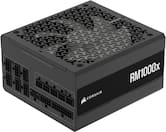 CORSAIR - RMX Series RM1000x Cybenetics Gold Fully Modular ATX Power Supply - BlackWinter Sale Deal$179.99$209.99
More Buying Options
Specifications
- ChipsetAMD X870Form FactorATXProcessor SocketSocket AM5 (LGA 1718)Number of PCI-E Slots3Wireless Networking StandardWi-Fi 7Number Of Memory Slots4
- Key Specs
- Chipset: AMD X870
- Form Factor: ATX (The size, arrangement, and physical configuration of the product.)
- Processor Socket: Socket AM5 (LGA 1718) (Type of pin configuration that connects a CPU to a computer’s motherboard.)
- Number of PCI-E Slots: 3 (How many peripheral component interconnect express slots are available.)
- Wireless Networking Standard: Wi-Fi 7 (The wireless networking standard used by the device. Each iteration of the standard developed by the Wi-Fi Alliance corresponds to an existing IEEE 802.11 protocol; for example, standard 802.11ac (or AC) is termed Wi-Fi 5. Refers specifically to the standard the device is designed to use, but ultimately determines product interoperability and backward compatibility including previous versions.)
- Number Of Memory Slots: 4
- Maximum Memory Supported: 256 gigabytes
- Memory Type Supported: DDR5
- General
- Brand: GIGABYTE
- Model Number: X870 EAGLE WIFI7
- Product Name: X870 EAGLE WIFI7 (Socket AM5) AMD X870 ATX DDR5 Wi-Fi 7 Motherboard
- Color: Black
- Year of Release: 2024
- Compatibility
- Chipset: AMD X870
- Chipset Compatibility: AMD
- Form Factor: ATX (The size, arrangement, and physical configuration of the product.)
- Processor Socket: Socket AM5 (LGA 1718) (Type of pin configuration that connects a CPU to a computer’s motherboard.)
- Processor Compatibility: AMD Ryzen 9 9000 Series, AMD Ryzen 9 8000 Series, AMD Ryzen 9 7000 Series
- Operating System Compatibility: Windows 11 Home
- Slot
- Number of M.2 Slots: 4 (This interface is most commonly used for high-speed solid state drives (SSDs), and is often used in laptops due to its small size.)
- Number of PCI-E Slots: 3 (How many peripheral component interconnect express slots are available.)
- Number Of PCI-E x16 Slots: 3
- Number Of PCI-E x8 Slots: 0
- Number Of PCI-E x4 Slots: 0
- Number Of PCI-E x2 Slots: 0
- Number Of PCI-E x1 Slots: 0
- Number Of Memory Slots: 4
- Connectivity
- Power Connector: 24-pin ATX main power connector, 1 x 8-pin ATX 12V, 1x 4-pin ATX 12Vpower connectors (The configuration of the connector as it connects the motherboard to a power supply unit.)
- SATA Connector: 4x SATA 6G (The configuration of the connector as it connects a computer power supply unit to a SATA-based drive.)
- Fan/Cooling System Connector: 1 x CPU fan header,1 x water cooling CPU fan header,4 x system fan headers (The configuration of the connector as it connects a computer component to a fan or cooling system.)
- Wireless Connectivity: Bluetooth, Wi-Fi (The manner in which a device sends data to another device over a short distance without the use of wires or cables.)
- Wireless Networking Standard: Wi-Fi 7 (The wireless networking standard used by the device. Each iteration of the standard developed by the Wi-Fi Alliance corresponds to an existing IEEE 802.11 protocol; for example, standard 802.11ac (or AC) is termed Wi-Fi 5. Refers specifically to the standard the device is designed to use, but ultimately determines product interoperability and backward compatibility including previous versions.)
- Wireless Standard: AX (The wireless networking protocol used by the device. Each iteration of the protocol is based on the 802.11 standard developed by the Institute of Electrical and Electronics Engineers (IEEE) Standards Association. Denoted by letters following 802.11 (802.11a, 802.11ac, etc.), each version, published in alphabetical order, encompasses all previous versions.)
- Ports
- USB Ports: 2 x USB-C 4, 4 x USB-A 3.2, 4 x USB-A 2.0 (The number and type of USB ports the product has.)
- Audio Ports: 3 x audio jacks
- Number of Audio Channels: 1 (The number of discrete channels of sound output. This can be a single number or multiple numbers separated by decimal(s). The first number is the primary, horizontally directed audio channels. The number after the first decimal, if applicable, is the number of subwoofer outputs or channels. The number after the second decimal, if applicable, is the number of height or atmospheric channels designed to immerse the listener by producing overhead sound effects.)
- Dimensions
- Product Length: 300.5 millimeters (The out of box length of the item. Length is measured as the longest dimension of the item.)
- Product Width: 244 millimeters (The out of box width of the item. Width is measured as the horizontal distance from one side of the item to the other as it would be primarily used or placed.)
- Product Weight: 72.8 ounces (The out of box weight of the item.)
- Memory
- Maximum Memory Supported: 256 gigabytes
- Memory Type Supported: DDR5
- Memory Format Supported: UDIMM (Memory module size that will fit with the device.)
- Memory Speeds Supported: 4 x DDR5 DIMM sockets supporting up to 256 GB (64 GB single DIMM capacity) (The RAM's bandwidth rating supported by the device. The number refers to transfer speed. For example, 12800 would indicate that the memory has a theoretical bandwidth of 12,800 megabytes per second (MBs). The higher the number, the faster the speed.)
- Memory Slot Type: 288-pin DIMM
- Features
- RAID Support: RAID 5, RAID 01 (RAID 0+1), RAID 10 (RAID 1+0) (A Redundant Array of Independent Disks (RAID) includes a collection of separate disks that your computer recognizes as one disk unit. Each configuration offers a different level of mirroring, striping and read/write speeds.)
- Warranty
- Warranty - Parts: 5 years
- Warranty - Labor: 5 Years
- Other
- UPC: 889523045312
The X870 EAGLE WIFI7 supports AM5 Processors and features unparalleled performance. GIGABYTE X870 motherboards come with upgraded power design, high grade storage standards, and outstanding connectivity that enables you to optimize your performance.
- Warranty: 5-year Warranty
- Processor Compatibility: supports amd ryzen 9000 / ryzen 8000 / ryzen 7000 series processors
- Ddr5 Compatible: 4*dimms with AMD EXPO Support
- Next Gen Connectivity: Pcie 5.0, 4x M.2 Slots, Dual USB4, Front And Rear USB-C, Sensor Panel Link
- Sturdy Power Design: 14+2+2
- Comprehensive Thermal Design: VRM and M.2 Thermal Guard
- Fast Networking: Wi-Fi 7, 2.5gbe LAN
- Diy Friendly: M.2 EZ-Latch, pcie EZ-Latch, Wi-Fi EZ-Plug, EZ-Debug Zone
Q: What is the maximum memory supported by the motherboard?
A: The maximum memory supported by the motherboard is 256 gigabytes.
Q: What type of memory does the motherboard support?
A: The motherboard supports DDR5 memory type.
Q: How many SATA connectors does the motherboard have?
A: The SATA Connector for the X870 EAGLE WIFI7 (Socket AM5) AMD X870 ATX DDR5 Wi-Fi 7 Motherboard is 4x SATA 6G.
Q: Does the motherboard support RAID?
A: This motherboard does support RAID 5.
Q: What is the form factor of the motherboard?
A: The form factor of the motherboard is ATX.
Q: Can the motherboard support AMD Ryzen 9 9000 Series processors?
A: This motherboard is compatible with the AMD Ryzen 9 9000 Series processors.
Q: Do the open boxes include io shield
A: undefined
Compare similar products

The X870 EAGLE WIFI7 supports AM5 Processors and features unparalleled performance. GIGABYTE X870 motherboards come with upgraded power design, high grade storage standards, and outstanding connectivity that enables you to optimize your performance.

The ASUS ROG Strix B850-A Gaming WiFi pairs powerful performance with sleek design. Featuring 14+2+2 power stages and thick metal heatsinks, it’s ready for AMD Ryzen 9000 Series processors. Enjoy DDR5 with AEMP, PCIe 5.0 M.2, WiFi 7 with Q-Antenna, four M.2 slots, advanced USB connectivity, and Aura Sync RGB.

The B850M GAMING X WIFI6E supports AM5 Processors and features unparalleled performance. GIGABYTE B850 motherboards come with upgraded power design, high grade storage standards, and outstanding connectivity that enables you to optimize your performance.
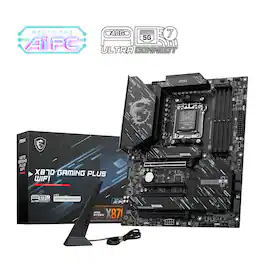
X870 GAMING PLUS WIFI is designed with durable components to provide great gaming experience.
| Pros for GIGABYTE - X870 EAGLE WIFI7 (Socket AM5) AMD X870 ATX DDR5 Wi-Fi 7 Motherboard - Black | |||
|---|---|---|---|
| There were no pros for this product— | Overall Performance, BIOS, Connectivity, Installation Ease, Features | There were no pros for this product— | Overall Performance, BIOS, Connectivity |
| Cons for GIGABYTE - X870 EAGLE WIFI7 (Socket AM5) AMD X870 ATX DDR5 Wi-Fi 7 Motherboard - Black | |||
| There were no cons for this product— | Driver Support | There were no cons for this product— | There were no cons for this product— |
Specs



Reviews
Customer Images
The vast majority of our reviews come from verified purchases. Reviews from customers may include My Best Buy members, employees, and Tech Insider Network members (as tagged). Select reviewers may receive discounted products, promotional considerations or entries into drawings for honest, helpful reviews.
- Rated 5 out of 5 stars
Excellent AM5 Motherboard for Next-Gen Builds
Picked up the GIGABYTE X870 EAGLE WIFI7 for my Ryzen 9950X build, and I’ve been extremely impressed. Setup was smooth, BIOS was easy to navigate (with Expo and PBO support out of the box), and the overall design is clean and well laid out. Tons of rear I/O, fast Wi-Fi 7 and Bluetooth 5.4, plus futureproof PCIe 5.0 support made this board a no-brainer at this price. Running DDR5 6000 RAM with zero issues, and VRMs stay cool even under load. It also looks great in a windowed case with its matte black finish and subtle accents. Not overdone... and not boring either. GIGABYTE’s BIOS updates have been stable so far, and driver support was seamless on Windows 11. If you're going AM5 and want a solid board with all the modern features without going overboard on price, this one nails the sweet spot.
This review is from GIGABYTE - X870 EAGLE WIFI7 (Socket AM5) AMD X870 ATX DDR5 Wi-Fi 7 Motherboard - Black
Posted by ZackB
- Rated 5 out of 5 stars
Good to go for 9800X3D
I’ve only had this board for a couple months but so far so good, haven’t had any issues. Quality seems good and it was easy to build on. 9800x3D Peerless Assassin cooler 32gb Teamgroup Tcreate RAM GTX 1080 (anyone have a 9070XT for MSRP??) 2TB WD Black NVME Corsair RM850x Fractal North
This review is from GIGABYTE - X870 EAGLE WIFI7 (Socket AM5) AMD X870 ATX DDR5 Wi-Fi 7 Motherboard - Black
Posted by Justaguy
- Rated 5 out of 5 stars
Solid X870 Board - Won't Break the Bank
I have been building computers off and on for the last 15 years, and this marks my 5th AMD build. This is my 3rd Ryzen based system – previously used 1800X on an X370 board and a 3600X on an X570 board. I have always preferred the X line of boards over the A/B lines for the generally higher quality components and greater capacity to tinker and overclock. The Gigabyte X870 Eagle WiFi 7 board provides an entry point into the X series of boards without breaking the bank. I paired the Eagle with a 9600X on a build I did for one of my kids. MOBO Spec’s: Socket – AM5 support 7000, 8000, and 9000 CPU’s Memory – 4 DIMMs Dual Channel DDR5 with EXPO support – Max 256GB up to DDR5 8200 PCIe – (1) PCIe x16 slot @ 5.0 x16 for GPU, (2) PCIe x16 slots @ 3.0 x1 Storage - (1) M.2 @ PCIe 5.0 x4, (2) M.2 @PCIe 4.0 - slot B runs at x4 or @ x2 if slot C is also populated, (4) SATA III connectors USB Headers – (1) USB 3.2 Gen 2x2 Type-C, (1) USB 3.2 Gen 1 Type A, (2) USB 2.0 Type A Fan/LED Headers – (1) CPU Fan, (1) CPU_Opt Fan, (4) System fans, (3) aRGB, (1) rgb I/O Panel – (4) USB 2.0, (3) USB 3.2 Gen 1 Type A, (1) USB 3.2 Gen 2 Type A, (2) USB 4 Type C w/ DP, (1) HDMI 2.1, 3.5mm audio, 2.5Gb LAN, and Q-Flash BIOS button Connectivity – 2.5Gb LAN, WiFi 7 2.4/5/6 GHz, and Bluetooth 5.4 BIOS – Single BIOS chip - F2 BIOS currently installed – F5a available to flash System Components Used: CPU – AMD R5 9600X AM5 6C/12T @ 3.9GHz (boost to 5.4GHz) GPU – ASUS ROG STRIX 6900XT LC TOP 16GB GDDR6 w/ 200mm Okinos Riser Cable RAM – TEAMGROUP T-Force Delta RGB 32GB (2x16GB) DDR5 6000 CL30 Storage – 1TB Crucial T700 PCIe Gen5x4 NVME; 1TB Samsung 990 EVO Plus Gen 4x4 NVME PSU – SeaSonic Focus GX ATX3 850W modular Case – Corsair 3500X aRGB with 3 Corsair RS120 aRGB fans Cooler – Razer Hanbo Chroma 240mm AIO The X870 Eagle is an ATX form factor motherboard that sits as Gigabyte’s entry level X870 offering. The board has a decent amount of connectivity options including a 2.5G LAN port, USB 4.0, a PCIe 5.0 M.2 slot, and plenty of fan headers. If you have built a PC you will appreciate some of the creature comforts on this board like the toolless M.2 slot, PCIe EZ-Latch, and right-angle board connectors for SATA and USB 3.2 Gen 1 Type A. No matter how many times I have built a computer I always find myself pulling parts to reroute cables, or maybe I installed something in the wrong order. Things like the PCIe EZ-Latch were useful aids, and while I really only need it during the initial build I was thankful to have it. My initial assessment of the board went pretty well with a decent/familiar layout of headers, but a couple of things jumped out. The rear I/O panel is attached to the board, which means I can’t build up my entire system only to realize I left it off (like the good old days). The main M.2 slot sits below the main PCIe lane, which I found odd and would actually cause some problems later for me. Overall, though it’s a nice, clean looking board without a ton of over stylized bits and RGB, which will appeal to those that like a cleaner look. For the build things went pretty smooth. I jumped right in with the CPU install – I did not realize that AM5 had gone to an LGA pin-on-board socket, but its appreciated. My cooler does not use the retention frame, so those got removed in order to mate up directly with the backplate. Once the CPU was installed I worked on populating the other components before loading it into my case. RAM installed easily into slots 2 and 4 – I checked Gigabyte’s QVL list for RAM kits and selected a pair that gave good performance/$ while keeping the CL to the tightest timing I could. I went with a TEAMGROUP DDR5 6000 32GB (2x16GB) CL 30 kit (FF3D532G6000HC30DC01). After the RAM I installed the my M.2 drives into the top and middle slots – I used a PCIe Gen 5 drive for the main slot to utilize that higher bandwidth. The toolless design of the slot was really nice – the heatsink felt well made. Make sure you pull the blue plastic off the heatsink though. To install the second M.2 drive I had to fish the tiny screw out of the MOBO box, which furthered my appreciation of the toolless top slot. If you look at the specs you will see that the second M.2 slot runs at PCIe 4.0 x4. However, if you add another drive to the bottom slot, the connector speed is halved and switches to run at PCIe 4.0 x2. The bottom M.2 slot will only run at x2 speeds. Once those components were in, I loaded the board into my case to start making the next connections. The board installed into my case without issue. I had already screwed on the standoffs for the cooler, so after I mounted the radiator I attached the cooler head to the socket – no issues. However, right after this is when I noticed my first problem. I wanted to mount the GPU vertically so I knew to plan ahead and get a riser cable. Research told me to use a 150mm riser cable for my Corsair 3500X case, which is what I bought. I did a test fit and found the cable to be too short as it was really putting a strain on the connectors. This is where the odd configuration of the PCIe lane and M.2 slot bites me – if the PCIe x16 lane was below the M.2, like on all my previous builds then the 150mm cable would have been perfect. Instead I’m out the cost of another riser cable. So, as a PSA, buy a 200mm riser cable if you plan to use this board. While I waited for the new riser cable to come in I chose to temporarily mount my GPU straight to the board, which I where I saw my next issue. The backplate of my GPU (277 mm length) was in slight contact with my RAM. The RAM heatspreader/RGB shroud is partly to blame, but my GPU isn’t overly long and I would have expected easy clearance. So another PSA, if you plan to mount your GPU straight to the board make sure your RAM heatspreader shrouds aren’t too big. The rest of the assembly process was straightforward with connecting the front panel headers, fans, and power supply cables. When the new riser cable arrived I gladly used the PCIe EZ-Latch to remove my card and slot in my new riser cable, which thankfully worked just fine. A thing to note if you are using a riser cable, it will block your bottom board connections (aRGB, RGB, TPM, USB) so you need to get everything connected first. Everything booted up first try, which always feels good. I loaded a bootable USB up and made sure to set the boot order in the BIOS to point to it first. From there I got windows installed, but I ran into an issue with needing internet. I had pulled the drivers for the WiFi chipset off the support page and had them ready, but I couldn’t get the install process to read it. I tethered a laptop’s internet connection for awhile, but it was painfully slow. I ended up making a cable that would reach the closest network port. In order to get the WiFi working I had to go through the Gigabyte Control Center utility to download all of the drivers before it worked. I feel like that is just a crappy way to implement things, and I should have been able to load a basic WiFi driver during the install process. Through the Control Center you can also set the lighting scheme for anything connected to the RGB/aRGB headers, and RAM. Once things were settled I could install the other utilities (AMD, ASUS, and Razer) and work on tweaking things. I rebooted and entered the BIOS to explore the settings, which is where I enabled EXPO1 to get my RAM running at advertised speeds. I dove into the Overclock settings, but I haven’t enabled anything yet. I like to run the system for a little bit of time to see if anything pops up under normal operation. However, the BIOS setup was really easy to follow and adjusting settings appears to be straightforward. The only thing I found difficult was getting into the BIOS – you basically have to hold the DEL key from the moment you reboot your system until it pops into the BIOS. Usually just a tap or 2 of the correct key on the BIOS splash screen gets you in. Overall, I am really happy with how this build has turned out, and I think the X870 Eagle makes for a solid choice. I have found in the past that getting all the bells and whistles on a MOBO just runs the price up, and then I don’t use the majority of those things anyways. The X870 Eagle strikes the balance of providing everything I needed now and a few things I may use in the future, but without the markup of the top-tier X boards. Also, I wasn’t doing anything super crazy since this needs to last for years, but I wanted to make sure it would have room to grow. That’s why I have always opted for the X series of boards – they just seem to age a little better and are worth at least 1 processor upgrade before getting a whole new board. My past experience with overclocking on the X boards has been pretty positive and allowed me to squeeze more performance and relevancy out of the components. I expect a similar experience here. I have had good luck with Gigabyte products in the past, so I am hopeful this system will last for quite a while. The only thing left now is to redo the cable management in the case 5 or 6 times before I am happy.
This review is from GIGABYTE - X870 EAGLE WIFI7 (Socket AM5) AMD X870 ATX DDR5 Wi-Fi 7 Motherboard - Black
Posted by DaveW