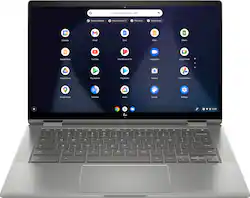
HP - 2-in-1 14" Touch-Screen Chromebook - Intel Core i3 - 8GB Memory - 64GB eMMC Flash Memory
- Key Specs
- Screen Size: 14 inches (Size of the screen, measured diagonally from corner to corner.)
- Screen Resolution: 1920 x 1080 (Full HD) (Screens come in a range of resolutions (measured in pixels, horizontal x vertical). The higher the resolution, the greater the picture quality.)
- Touch Screen: true (Touch-screen devices make navigating more intuitive. Using a touch-screen display, you can do things such as tap to select, hold and drag to move items, swipe to scroll, and pinch to zoom.)
- Processor Model: Intel 10th Generation Core i3 (Your computer's processor is like its brain. Working in combination with system memory, the power of the processor determines the complexity of software you can run, how many programs you can have open at the same time, and how fast those programs will run. Most computers feature an AMD, Intel or Snapdragon processor.)
- Storage Type: eMMC
- Total Storage Capacity: 64 gigabytes
- System Memory (RAM): 8 gigabytes (Random-access memory (RAM) is a computing device's short-term data storage, which allows active information to be accessed quickly. The size and type of RAM determines how efficiently the device can handle large amounts of information at one time. For example, gaming or video editing requires more RAM for optimal performance.)
- Graphics: Intel UHD Graphics (Often referred to as a "graphics processing unit" (GPU), this device is responsible for displaying image content and decoding/encoding video content in programs and games.)
- 2-in-1 Design: true (A laptop and a tablet combined in one lightweight, portable device. Sometimes referred to as "convertible" or "hybrid" laptops, these devices deliver the processing power and keyboard of a laptop. When you're ready to play, either detach the screen or fold your 2-in-1 into tablet mode to comfortably watch movies, play games, read an e-book and more.)
- Backlit Keyboard: true (Integrated lights allow for visibility of the keys in low-light conditions.)
- General
- Product Name: 2-in-1 14" Touch-Screen Chromebook - Intel Core i3 - 8GB Memory - 64GB eMMC Flash Memory
- Brand: HP
- Model Number: 14C-CA0053DX
- Year of Release: 2020
- Display
- Display Type: LED
- Screen Size: 14 inches (Size of the screen, measured diagonally from corner to corner.)
- Screen Resolution: 1920 x 1080 (Full HD) (Screens come in a range of resolutions (measured in pixels, horizontal x vertical). The higher the resolution, the greater the picture quality.)
- Touch Screen: true (Touch-screen devices make navigating more intuitive. Using a touch-screen display, you can do things such as tap to select, hold and drag to move items, swipe to scroll, and pinch to zoom.)
- Processor
- Processor Brand: Intel
- Processor Model: Intel 10th Generation Core i3 (Your computer's processor is like its brain. Working in combination with system memory, the power of the processor determines the complexity of software you can run, how many programs you can have open at the same time, and how fast those programs will run. Most computers feature an AMD, Intel or Snapdragon processor.)
- Processor Model Number: 10110U
- Storage
- Storage Type: eMMC
- Total Storage Capacity: 64 gigabytes
- eMMC Capacity: 64 gigabytes (The amount of data that can be stored on the device's embedded Multimedia Card (eMMC). eMMC is a flash-based storage used in smartphones and personal computers; it typically has a smaller capacity than HDD or SSD storage.)
- Memory
- System Memory (RAM): 8 gigabytes (Random-access memory (RAM) is a computing device's short-term data storage, which allows active information to be accessed quickly. The size and type of RAM determines how efficiently the device can handle large amounts of information at one time. For example, gaming or video editing requires more RAM for optimal performance.)
- Type of Memory (RAM): DDR4 SDRAM (Each type of RAM delivers a different level of speed, bandwidth, energy efficiency and performance.)
- System Memory RAM Speed: 2666 megahertz (How fast the information-storing hardware operates. The faster the RAM, the faster memory can be transferred to other system components. Ultimately, faster RAM improves operational efficiency.)
- Graphics
- Graphics Type: Integrated (Dedicated graphics uses a separate graphics card for processing video images. Because it does not use memory from the system's RAM, there is no extra burden on the CPU and graphics are processed more efficiently. Integrated graphics shares system RAM to process video images.)
- GPU Brand: Intel
- Graphics: Intel UHD Graphics (Often referred to as a "graphics processing unit" (GPU), this device is responsible for displaying image content and decoding/encoding video content in programs and games.)
- Compatibility
- Operating System: Chrome OS (The operating system manages all software and hardware, including files, memory and connected devices. Most importantly, it lets you interact with your device and your programs in a visual way; otherwise, you'd be typing computer code to get anything done.)
- Connectivity
- Number of HDMI Outputs (Total): 0
- Number of DisplayPort Outputs (Total): 0
- Number of Thunderbolt Ports (Total): 0
- Number of VGA Ports: 0 (VGA (Video Graphics Adapter or Video Graphics Array) is a display standard that transmits via analog signals. This type of interface is typically used to connect a computer to a display device such as a monitor, projector, or TV.)
- Number of USB Ports (Total): 3
- Headphone Jack: true (The device features an interface that allows for the connection of headphones.)
- Number Of Ethernet Ports: 0
- Power
- Battery Cells: 3-cell
- Camera
- Front-Facing Camera: true
- Built-In Microphone: true
- Features
- 2-in-1 Design: true (A laptop and a tablet combined in one lightweight, portable device. Sometimes referred to as "convertible" or "hybrid" laptops, these devices deliver the processing power and keyboard of a laptop. When you're ready to play, either detach the screen or fold your 2-in-1 into tablet mode to comfortably watch movies, play games, read an e-book and more.)
- Backlit Keyboard: true (Integrated lights allow for visibility of the keys in low-light conditions.)
- Media Card Reader: true (A hardware device that allows for access to data on a memory card and enables the transfer of its files to a computer. These devices may have one or multiple slots for various types of memory cards, and may be integrated into the computer or available as an external device.)
- Audio Technology: Bang & Olufsen Audio
- Speaker Type: Stereo speakers
- Security Features: Fingerprint reader
- Dimensions
- Product Height: 0.7 inches (The out of box height of the item. Height is measured as the vertical distance from the bottom of the item to the top as it would be primarily used or placed.)
- Product Width: 12.8 inches (The out of box width of the item. Width is measured as the horizontal distance from one side of the item to the other as it would be primarily used or placed.)
- Product Depth: 8.6 inches (The out of box depth of the item. Depth is measured as the distance from the front of the item to the back as it would be primarily used or placed.)
- Product Weight: 3.64 pounds (The out of box weight of the item.)
- Certifications Listings & Approvals
- ENERGY STAR Certified: false (Devices carrying the ENERGY STAR service mark, such as computer products and peripherals, kitchen appliances, and other products, generally use 20% to 30% less energy than required by federal standards.)
- EPEAT Qualified: false (The Electronic Product Environmental Assessment Tool (EPEAT) was designed to provide an environmental assessment tool for purchasers. In order to qualify for EPEAT, a product must meet all 23 required criteria.)
- Included
- Included Software: Google Play and Google Assistant
- Optical Drive Type: None (An optical disk drive (ODD) uses a laser light to read data from or write data to an optical disc. These discs include CDs, DVDs, and Blu-ray Discs. This allows you to play music or watch movies using prerecorded discs.)
- Numeric Keypad: false
- Other
- UPC: 194850029141
HP x360 Convertible 2-in-1 Chromebook, speed up work and games with this HP Chromebook x360 laptop computer. An Intel Core i3 processor delivers impressive computing power to take on heavy digital tasks, while the Chrome OS simplifies operations with an easy-to-use interface. This HP Chromebook x360 laptop computer boasts 8GB of memory, which is ideal for multitasking across open tabs, and internal storage of 64GB for robust data access. Easy video chatting with HD webcam equipped with privacy off/on switch.
- Google Chrome OS: Chromebook is a computer for the way the modern world works, with thousands of apps, built-in virus protection and cloud backups. It is secure, fast, up-to-date, versatile and simple.
- 14" Full HD multitouch screen: The 1920 x 1080 resolution boasts impressive color and clarity. IPS technology for wide viewing angles. Energy-efficient WLED backlight.
- 10th Gen Intel® Core™ i3-10110U mobile processor: Smart dual-core, four-way processing performance for HD-quality computing.
- 8GB system memory for advanced multitasking: Substantial high-bandwidth RAM to smoothly run your games and photo- and video-editing applications, as well as multiple programs and browser tabs all at once.
- 64GB eMMC flash memory: This ultracompact memory system is ideal for mobile devices and applications, providing enhanced storage capabilities, streamlined data management, quick boot-up times and support for high-definition video playback.
- 360° flip-and-fold design: Offers versatile functionality with laptop, audience, tabletop, presentation and tablet modes.
- Built-in HD webcam with Privacy Switch: Makes it easy to video chat with family and friends or teleconference with colleagues over Google Hangouts or other popular applications. Webcam is equipped with dual array microphone and can be easily turned off with a toggle switch.
- Built-in cloud support: Easily save your files to your Google Drive account for secure access wherever you go. You can also sync with your other devices running Chrome and even work offline when needed. Fees may apply.
- Intel® UHD Graphics: On-processor graphics with shared video memory provide everyday image quality for Internet use, basic photo editing and casual gaming.
- Weighs 3.64 lbs. and measures 0.7" thin: Ultrathin and ultralight for maximum portability, featuring a smaller screen size and omitting the DVD/CD drive to achieve the compact form factor. 3-cell lithium-polymer battery.
- Built-in media reader for simple photo transfer: Supports microSD memory card formats.
- Wireless/Wired connectivity (WiFi 6 - 802.11 ax): Flexible, dual-band connectivity w/ greater reliability thanks to two data streams and antennas. Connect to a Wi-Fi router to experience GB Wi-Fi speeds nearly 3X faster vs. standard Wi-Fi 5 w/ improved responsiveness for even more devices.
- Backlit keyboard: Allows you to enjoy comfortable and accurate typing, even in dim lighting.
- Built-in fingerprint reader: Streamlines security settings for quick, typo-free access.
- Built-in virus protection and Google products: Work, play and do right out of the box with Search, Gmail, Talk, YouTube and Hangouts, then personalize with the Chrome Web Store. Multiple layers of protection defend against viruses and malware.
- Additional port: Headphone/microphone combo jack.
Whats Included
- HP Chromebook x360 14c-ca0053dx
- 3-cell battery
- USB-C power adapter
A: It depends by what you mean by full substitute. You should clearly think through your use case before switching operating systems. It will run Microsoft apps from the google play store or office 360 online. You can also use online banking and check book apps from google play store. You can run most media apps with no problem (notable exception - iTunes, although you can run Apple Music if you are willing to ‘sideload’, but this is a hack). Chrome will open PDF’s with a Chrome extension. You can store files locally, but the Chromebook user should think in terms of using google drive as default storage, with internal storage used for files needed for offline access. And don’t let the 64GB of internal storage deter you. This Chromebook also features a micro SDcard slot so you can easily add storage by inserting a micro SDcard. BE AWARE THAT PRINTERS are a special subject in the Chrome OS world. Make sure you are aware of your options if you intend to print from a Chromebook.
A: You actually can use Office 365 with a Chromebook, as well as the Office apps from the Google Play store.
A: It has a core i3 processor that does have a cooling fan, unlike a lot of other Chromebook models which use fanless core M or celeron processors. So far the fan is the one thing I haven't been thrilled with on this computer. It's not terribly loud, and it doesn't run all the time, but it also doesn't take very long of using the computer for the fan to come on. Like I said, it's not all that loud, so really this has been a minor inconvenience rather than a dealbreaker, although that's definitely more of a personal preference thing. Overall I've been really pleased with this model- the core i3-8130u is crazy fast (faster than the fanless models used on most Chromebooks- that's the trade-off!), and this model might have the nicest trackpad and keyboard I've ever used on a laptop, period.
Q: What is the Google Auto-Update Expiration Date?
A: June 2025
A: yes , 512 GB
A: The keyboard backlight can be turned on or off using the Alt-Bright key combination. It has several levels of brightness that it cycles through with each press of the Bright key (the same key used to increase screen brightness, but combined with Alt to control the backlighting).
Q: Which stylus should I purchase for this chromebook?
A: This is a capacitive touch screen so most stylus will work but you can just as easily use your finger most of the time. Wacom makes very nice ones or Insignia makes nice ones that are a bit less expensive with a bigger tip.
Q: Is this chromebook fanless?
A: If you didn't tell me it had a fan, I wouldn't know. The machine's latest-generation Intel Core i3 processor, plus improved thermal management and metallic construction mean that the fan rarely runs at more than a whisper. I would definitely not worry about it.