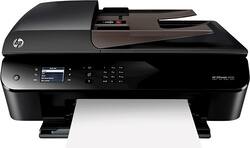
HP - Officejet Wireless e-All-In-One Instant Ink Ready Printer - Black
- Key Specs
- Networking: Wireless
- Printer Type: All In One
- ISO Color Print Speed: 5.2 pages per minute (The number of color pages able to be printed per minute in the device's default single-side mode, as tested by the International Standards Organization (ISO).)
- ISO Mono Print Speed: 8.8 pages per minute (The number of black ink (grayscale) pages able to be printed per minute in the device's default single-side mode, as tested by the International Standards Organization (ISO).)
- General
- Product Name: Officejet Wireless e-All-In-One Instant Ink Ready Printer
- Brand: HP
- Model Number: OFFICEJET 4630
- Dimensions
- Product Height: 7.4 inches (The out of box height of the item. Height is measured as the vertical distance from the bottom of the item to the top as it would be primarily used or placed.)
- Product Width: 17.6 inches (The out of box width of the item. Width is measured as the horizontal distance from one side of the item to the other as it would be primarily used or placed.)
- Product Weight: 16.7 pounds (The out of box weight of the item.)
- Certifications Listings & Approvals
- EPEAT Qualified: false (The Electronic Product Environmental Assessment Tool (EPEAT) was designed to provide an environmental assessment tool for purchasers. In order to qualify for EPEAT, a product must meet all 23 required criteria.)
- Features
- Tray Capacity: 100
- Duty Cycle: Up to 1,000 (The maximum number of pages per month that the device can produce without failing, as specified by the manufacturer.)
- Scanner Info
- Scanner Type: Flatbed
- Ink
- Compatible Cartridges: HP 61, HP 61XL
- Ink Subscription Service Available: true (The printer monitors ink usage and alerts the subscription provider when levels are low. A purchased subscription provides refills of ink based on usage.)
- Memory
- Memory Card Slot: false
- Paper Info
- Automatic Document Feeder Capacity: 35 sheets
- Maximum Document Length: 14 inches
- Maximum Document Width: 8.5 inches
- Supported Paper Sizes: 3" x 5" to 8.5" x 14"
- Paper Handling: Up to 100 sheets
- Copier Info
- Maximum Number Of Copies: 50
- Copier Resolution (Black): Up to 300 x 300 (Refers to the number of pixels/dots, both horizontally and vertically, of the image produced by the copier in black ink. Generally, the higher the resolution, the sharper and cleaner the produced image.)
- Copier Resolution (Color): Up to 600 x 600 (Refers to the number of pixels/dots, both horizontally and vertically, of the image produced by the copier in colored ink. Generally, the higher the resolution, the sharper and cleaner the produced image.)
- Performance
- Printer Resolution (Black): Up to 1200 x 600 (Refers to the number of pixels/dots, both horizontally and vertically, of the image produced by the printer in black ink. Generally, the higher the resolution, the sharper and cleaner the produced image.)
- Printer Resolution (Color): Up to 4800 x 1200 (Refers to the number of pixels/dots, both horizontally and vertically, of the image produced by the printer in colored ink. Generally, the higher the resolution, the sharper and cleaner the produced image.)
- Connectivity
- Minimum System Requirements: PC: Windows XP SP3 or higher (32-bit): Intel Pentium II, Celeron or other 233MHz compatible processor; 750MB hard disk space; Internet Explorer 6; Windows Vista: 800MHz 32-bit (x86) or 64-bit (x64) processor
- Other
- UPC: 887758362679
HP Officejet e-All-In-One Printer: Print, copy, scan and fax photos and documents in the comfort of your home or complete tasks for your small business with this e-all-in-one printer, which uses built-in Wi-Fi to connect to your network. You can even print directly from your mobile device.
- Inkjet printers are best for home or small business use: They offer excellent print quality for photos and documents and accept a variety of paper types and sizes.
- Wireless and mobile printing capability: Connect this printer to your computer easily with built-in Wi-Fi. Plus, print from your smartphone, tablet and other mobile devices with the free HP ePrint app, HP wireless direct or Apple® AirPrint.
- Up to 4800 x 1200 optimized dpi (dots per inch) color resolution: High resolution when printing from a computer on select HP photo paper (sold separately) for documents and photos. Up to 1200 x 600 rendered dpi when printing black only.
- 1 black and 1 tri-color print cartridge: Three inks produce vivid color in photos, and black ink produces crisp text.
- Standard paper handling: 100-sheet input and 30-sheet output capacity. Scan multiple pages easily with the 35-sheet automatic document feeder.
- 2" high-resolution monochrome LCD: Easily input commands.
- 1 USB port for simple connectivity: 1 high-speed USB 2.0 port offers a standard connection to your computer.
- More print, copy, scan and solutions: Create 2-sided copies, fax multiple pages and use HP Printer Control to scan documents to your mobile device.
- HP Instant Ink: Original HP Ink ordered by your printer, delivered to your door. Plans start at $2.99/month.
- PC system requirements: Windows XP SP3 or higher (32-bit): Intel® Pentium® II, Celeron® or other 233MHz compatible processor; 750MB hard disk space; Internet Explorer 6 or higher.
- Mac system requirements: Intel® Core™ processor; OS X v10.6, Lion or Mountain Lion; 1GB hard drive; DVD/CD-ROM drive or Internet connection; USB port.
Whats Included
- HP 61 black ink cartridge
- HP 61 tricolor ink cartridge
- Officejet Wireless e-All-In-One Printer
- Owner's manual
- Power cord, phone cord
- Software CD
Q: Do I need a land line to be able to fax, I do have internet
A: This HP Printer will require a dedicated fax line in order to be able to send and receive faxes.
Q: Can I still print with just black if color cartridges are empty?
A: yes, select in your when you print your documents. You have chioice of color or just black
Q: Can this work as a "stand alone" fax and copier or does it need to be connected to a computer?
A: Yes, this can work as stand alone. It has inputs on the front to enter fax numbers or copy/print inputs. I often use it without my computer.
A: Yes you just press print and look for the printers and is going to ask you for the option of double-sided pages and that's up to you if you want to conserve on paper but you can print from any Apple product and Samsumg products. On your iPad that way you would print it is the same way you would share an image through a message there is a little box with an arrow looking thing you would press that and you would get a menu where that option is
A: We purchased the HP Wireless Officejet 4630 in store. The salesperson offered the Ink Delivery Plan after we made the decision. Since it was presented as an Option, I assume that you would be able to buy the printer without the plan. You may want to check your local BestBuy to be sure, but as far as I know, we were NOT required to purchase an ink plan. We did choose the plan, but it was because we didn't know how much ink we needed. We were also told we could opt out of the plan at a later date.
Q: Will it work with an older computer?
A: This HP Printer is compatible to the Microsoft Windows XP SP3 or higher (32-bit only).
A: yes!
Q: Can you continue printing with low ink levels?
A: My experience is that it will continue printing with low ink, it will not, however continue printing if the cartridge is empty. Also... HP printers only recognize their own cartridge... the 'refilled' replacements wont be recognized...