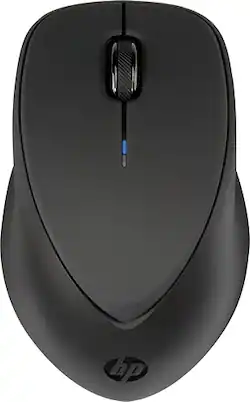
HP - X4000b Bluetooth Optical Mouse - Black
- Key Specs
- Lighting Type: None
- Maximum Sensitivity: 1600 dots per inch (Mouse sensitivity is measured in dots per inch (DPI). The higher the DPI, the more sensitive the mouse is and may be more useful for high-density pixel screens. Lower DPI typically means more precision and accuracy in mouse movement.)
- Number of Buttons (Total): 3
- General
- Product Name: X4000b Bluetooth Optical Mouse
- Brand: HP
- System Requirements: Microsoft Windows Vista / XP / 7 / 8 (The software that a product must have for it to be able to integrate with another product.)
- Model Number: H3T51AA#ABC
- Features
- Mouse Type: Standard
- Lighting Type: None
- Performance
- Mouse Operation: Button(s), Scroll wheel
- Handedness: Ambidextrous
- Tracking Method: Laser (There are several types of computer mice, optical and laser being among the most common. Optical mice detect less detail and provide more precise and accurate movement. Laser mice detect more detail and can be used on a wider variety of surfaces, but are more sensitive to small movements.)
- Maximum Sensitivity: 1600 dots per inch (Mouse sensitivity is measured in dots per inch (DPI). The higher the DPI, the more sensitive the mouse is and may be more useful for high-density pixel screens. Lower DPI typically means more precision and accuracy in mouse movement.)
- Number of Buttons (Total): 3
- Connectivity
- Wireless Connectivity: Bluetooth (The manner in which a device sends data to another device over a short distance without the use of wires or cables.)
- Operating System Compatibility: Windows
- Power
- Mouse Power Source: Battery-powered
- Rechargeable Battery (Mouse): false
- Battery Size: AA (The battery size required for operation.)
- Number of Batteries Required: 2
- Batteries Included: true (Indicates whether the product comes with the required batteries for its operation.)
- Dimensions
- Product Height: 1.5 inches (The out of box height of the item. Height is measured as the vertical distance from the bottom of the item to the top as it would be primarily used or placed.)
- Product Width: 2.6 inches (The out of box width of the item. Width is measured as the horizontal distance from one side of the item to the other as it would be primarily used or placed.)
- Product Weight: 123 grams (The out of box weight of the item.)
- Warranty
- Manufacturer's Warranty - Parts: 1 year
- Manufacturer's Warranty - Labor: 1 year
- Other
- UPC: 887111093196
Point, click and scroll with this HP Bluetooth mouse. Wireless connectivity provides full range of motion without using a USB port, and the contoured sides keep your palm comfortable during long work sessions. This HP Bluetooth mouse has a center wheel for smooth scrolling, and the indicator light lets you know when it's time to replace the batteries.
- Laser technology: This mouse uses a laser to detect movement with accuracy across a variety of surface types, including glass.
- Wirelessly connects to your computer with Bluetooth: This mouse connects to your computer without using wires or taking up a USB port.
- 3 buttons: Provide access to frequently used commands and functions for powerful control.
- Scroll wheel: Enables smooth, fast movement.
- Maximum of 1600 dpi: Lets you find the perfect sensitivity.
- Compatible with most versions of Windows: Works with most PCs.
Whats Included
- Documentation
- HP X4000b Bluetooth Mouse
- Two AA Batteries
Product Manuals
Q: How do you change the batteries?
A: 1. Pop off the cover. 2. Press down on the two plastic tabs just above the batteries and this releases a small plastic holder which you then just slide completely out and set aside. (This is probaby the step you were understandably missing because the tabs are small-ish and their purpose isn't documented or readily apparent) 3. With thiis holder out of the way, the batteries have plenty of clearance and can be removed by hand. 4. Replace the batteries, put the plastic clip back into place, reattach the cover, done. Not hard but the holding clip is not obvious or inuitive and should at the very least have been documented in the guide. It's a nice little mouse though, I'm happy with it, and hope this helps someone.
Q: WIRELESS MOUSE FOR HP LAPTOP
A: The wifi is for your internet connection and is irrelevant for the mouse. I don't think they make wifi mice, or at least I've never seen one. You can get a wireless mouse with a usb dongle but that will use one of your usb ports. If the laptop has bluetooth capabilities then this will work. Without knowing your model I can't say yes or no for sure.
Q: Does it work with MacBooks?
A: yes. works with spousal units MacBook Pro.
Q: can you use the mouse the same time as you are using a bluetooth keyboard with your tablet?
A: Yes you can. Most devices can handle several bluetooth connections at the same time.
A: Yes, it does. I have connected it with both a Galaxy Tab 2, an MS Surface Pro 3, and a Surface 2.
A: No. The iPad doesn't have mouse control.
A: When you are in your settings to use your laptop/computer and add a bluetooth device, push and hold the blue button. This sends a signal to the computer of what you want to add. Your computer won't just add anything unless you authorize it.
Q: Does this work with the hp chromebook?
A: This HP Mouse is not compatibile with the Google Chrome Operating System.




















