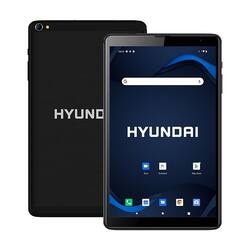
Hyundai - HyTab Plus 8LB1 8" - 32GB - LTE - Black
- Key Specs
- Screen Size: 8 inches (Size of the screen, measured diagonally from corner to corner.)
- Screen Resolution: 1280 x 800 (Screens come in a range of resolutions (measured in pixels, horizontal x vertical). The higher the resolution, the greater the picture quality.)
- Processor Model: Quad-Core Processor (Your computer's processor is like its brain. Working in combination with system memory, the power of the processor determines the complexity of software you can run, how many programs you can have open at the same time, and how fast those programs will run. Most computers feature an AMD, Intel or Snapdragon processor.)
- Total Storage Capacity: 128 gigabytes
- Operating System: Android 10 (The operating system manages all software and hardware, including files, memory and connected devices. Most importantly, it lets you interact with your device and your programs in a visual way; otherwise, you'd be typing computer code to get anything done.)
- General
- Product Name: HyTab Plus 8LB1 8" - 32GB - LTE
- Brand: Hyundai
- Model Number: HT8LB1PBKLTM
- Year of Release: 2020
- Color: Black
- Display
- Screen Size: 8 inches (Size of the screen, measured diagonally from corner to corner.)
- Screen Resolution: 1280 x 800 (Screens come in a range of resolutions (measured in pixels, horizontal x vertical). The higher the resolution, the greater the picture quality.)
- Processor
- Processor Model: Quad-Core Processor (Your computer's processor is like its brain. Working in combination with system memory, the power of the processor determines the complexity of software you can run, how many programs you can have open at the same time, and how fast those programs will run. Most computers feature an AMD, Intel or Snapdragon processor.)
- Storage
- Total Storage Capacity: 128 gigabytes
- Memory
- System Memory (RAM): 2 gigabytes (Random-access memory (RAM) is a computing device's short-term data storage, which allows active information to be accessed quickly. The size and type of RAM determines how efficiently the device can handle large amounts of information at one time. For example, gaming or video editing requires more RAM for optimal performance.)
- Compatibility
- Operating System: Android 10 (The operating system manages all software and hardware, including files, memory and connected devices. Most importantly, it lets you interact with your device and your programs in a visual way; otherwise, you'd be typing computer code to get anything done.)
- Operating System Compatibility: Android
- Connectivity
- Internal Carrier: Not Applicable
- Power
- Charging Interface(s): USB-C (The connection for transmitting power to charge the device.)
- Camera
- Front-Facing Camera: true
- Rear-Facing Camera: true
- Other
- UPC: 810033035531
Take this sleek, lightweight tablet anywhere. Its slim design slips right into your bag and comes with a vivid, crystal clear display with dual speakers. The Quad-Core processor in the 8LB1 comes fully equipped with 2GB of RAM and 32GB of storage, efficiently improving the running speed of all your daily needs - working, studying and entertainment. With the latest Android 10 operating system, it harnesses the power of artificial intelligence to give you a more customized experience and everything necessary for entertainment. Built for web-first experiences, the included SIM card slot allows you to always stay connected, combining blazing fast LTE and WiFi connections. With its portability and microSD card slot that supports up to 128GB of expandable storage, the 8LB1 is designed to keep up with you.
- Latest Android OS:: With the latest Android 10 operating system, it harnesses the power of artificial intelligence to give you a more customized experience and everything necessary for entertainment.
- Expandable Storage:: The HyTab Plus 8LB1 tablet is equipped with 2GB of RAM with 32GB of built-in storage. Store more of your favorite music, photos, books and movies with the expandable microSD slot that supports up to 128GB of additional storage.
- Portable and Powerful:: The Hyundai 8LB1 is a lightweight and powerful android tablet. Small enough to go with you anywhere, large enough to enjoy entertainment and web surfing at the comfort of your hands.
- Bluetooth and WiFi:: Connect to a network through WiFi connection. Easily browse the internet and go online or pair Bluetooth enabled devices at ease. Enjoy at home or on the go! Dual Band WiFi 802.11 AC/B/G/N, 4G LTE Bands: 2/3/4/5/7/28A/28B
A: undefined
Q: Does this tablet work well if or can be linked with Hyundai vehicles
A: Hyundai Technology is a mobile electronics manufacturer located in Anaheim, California. They manufacture computers, laptops, gaming platforms, tablets, smartphones, digital displays and storage medium devices, among other electronics. Hyundai was indeed founded over 70 years ago by Chung Ju-yang in 1947 in South Korea. Fun fact: Hyundai is actually pronounced jion-dei and means "to be modern," or "modernity" in English. The Hyundai brand is widely recognized around the world as a global leader in many industries, and best known for automotive, construction, shipbuilding, steel & technology. To answer your question regarding the Hyundai tablet, I consider this device to be a high-quality product that performs very well. The hardware and software specs are quote impressive given the reasonable cost of the device. The Android OS is fully up-to-date in terms of security and version. In short, it has excellent bang for the buck. Regarding using the tablet with your Hyundai automobile, there is no integrated protocol or feature which enables the two to be used in conjunction as a matter of brand; however, you can certainly pair the tablet with your vehicle's Bluetooth for playing music, watching movies or shows, and using the tablet as a source for the vehicle's sound system. You can also use the tablet hands free via the Android Auto app.
Q: Good Morning! Tablet was purchased in May. Won't come on. Screen totally black..Can't come on
A: It sounds as though your tablet battery may be depleted to the point that you are experiencing difficulties trying to get it powered up again. This is common on devices that are not used often, or are only used briefly after an extended periods of inactivity. First, ensure that you are using the factory-supplied, or a power-rated equivalent charging cable and adapter. The ideal charging power for this tablet is 5 VDC at 2000 mAh (2 Amps). Or simply put, a 10 Watt charging adapter. The quality of the charging cable is also key to maintaining a healthy battery and consistent charging output. The cable should be rated for 2.1 Amps (2.1A is a standard rating, as is 1A). Using a cable rated any lower than 2.1A can result in extremely slow charging, or even an inability to charge the battery at all. Once you are confident of the right charging adapter and cable, as well as ensuring that they are working properly, connect your tablet to your charger. Hold the Power and Volume Down keys simultaneously for at least thirty seconds. If no logo or backlight appears on your display, allow the device to charge for a full 20 minutes. Repeat the key combination again. This time, your device should display the Hyundai or Android logo. Once it does, release both keys and press only the Power button continuously until the tablet power cycles down. Once the logo appears again, release the Power key and allow the tablet to boot normally. Now charge the battery until it reaches 100% capacity. That's it... and good luck.














