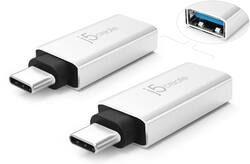
j5create - USB Type C-to-USB Type A Charge-and-Sync Adapter (2-Pack) - Black/Silver
- Key Specs
- Connector Type (End 1): USB Type C
- Gender (End 1): Male
- Connector Type (End 2): USB Type A
- Gender (End 2): Female
- Maximum Data Transfer Rate: 625 megabytes per second (The fastest data can be moved between devices.)
- General
- Product Name: USB Type C-to-USB Type A Charge-and-Sync Adapter (2-Pack)
- Brand: j5create
- Quantity: 2
- Model Number: JUCX15X2
- Color: Black/Silver
- Connectivity
- Cable Type: USB
- Product Type: Adapter
- Connector Type (End 1): USB Type C
- Gender (End 1): Male
- Connector Type (End 2): USB Type A
- Gender (End 2): Female
- Maximum Data Transfer Rate: 625 megabytes per second (The fastest data can be moved between devices.)
- Other
- UPC: 847626003653
Connect and charge USB-C laptops and smartphones to USB-A hosts with these j5create USB-C to USB-A adapters. The compact profile is easy to carry, while the USB 3.1 connector enables fast data transfer speeds. This two-pack of j5create USB-C to USB-A adapters are also compatible with USB 3.0 and USB 2.0 devices for flexibility.
- Built for use with most USB Type C and USB Type A ports: For simple connection between devices.
- Charge and sync capabilities: Allow you to power your device or transfer photos and music.
- 1.5-amp output: For efficient operation.
Whats Included
- J5Create USB Type C-to-USB Type A Charge-and-Sync Adapter (2-Pack)
A: Yes, simply connect mice, keyboards, webcams, flash drives and that's all, no driver installation required.
Q: Will these work to hook up a USB External Microphone to a laptop that only has USB-C ports? Thanks.
A: It should work as the JUCX15X2 is a simple converter; but due to the device being connected to the converter carrying voice signals, it may be better to make a direct connection as in the past we have seen devices such as headsets not transferring voice signals properly with our devices.
A: Yup. I've used it for just that purpose before
Q: Can I use this to plug a usb-c cable into a laptop with only 3.2 usb A ports?
A: If you are considering utilizing the JUCX15 for connecting USB-C accessories to a USB-A computer, this will not work. The JUCX15 is intended to connect to a computer via USB-C and a USB-A peripheral to the USB-A female end. This will not work backwards as it is unidirectional only.
Q: Hello, will this adapter work for an external hard drive data transfer to a Mac Thunderport?
A: Most external HDD require more power then what an adapter can provide. We cannot guarantee full functions on a HDD while connected to the adapter. It's best when it's connected directly to a computer.
A: The S10 may not have the power to run a HDD but may work with a compatible flash drive to load your pictures to.
A: Since cases come in different thickness, it's tough to say if the adapter will fit your phone with the case on. The adapter has that additional black support then the USB-C connection, therefore it may not connect perfectly.






















