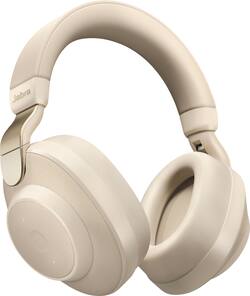
Jabra - Elite 85h Wireless Noise Cancelling Over-the-Ear Headphones - Gold Beige
- Key Specs
- Noise Cancelling (Active): true
- Sound Mode: Stereo
- Connection Type: Wireless
- Wireless Connectivity: Bluetooth (The manner in which a device sends data to another device over a short distance without the use of wires or cables.)
- True Wireless: false (These headphones not only lack wires between the device and headphones, they also lack wires between the headphones themselves. (true wireless is really only possible with in-ear headphones))
- Water Resistant: true (Resists some degree of water penetration.)
- Built-In Microphone: true
- Headphone Fit: Over-the-Ear
- Adjustable Headband: false
- Battery Life: 36 hours (Battery life will vary depending on the product configuration, product model, applications loaded on the product, power management setting of the product and the product features used by the customer. As with all batteries, the maximum capacity of this battery will decrease with time and usage.)
- Works With: Siri, Google Assistant, Amazon Alexa (Compatible with or able to be connected to other smart devices or applications.)
- General
- Product Name: Elite 85h Wireless Noise Cancelling Over-the-Ear Headphones
- Brand: Jabra
- Model Number: 100-99030002-02
- Color: Gold Beige
- Audio
- Noise Cancelling (Active): true
- Sound Isolating: true
- Sound Mode: Stereo
- Connectivity
- Connection Type: Wireless
- Wireless Connectivity: Bluetooth (The manner in which a device sends data to another device over a short distance without the use of wires or cables.)
- True Wireless: false (These headphones not only lack wires between the device and headphones, they also lack wires between the headphones themselves. (true wireless is really only possible with in-ear headphones))
- Features
- Water Resistant: true (Resists some degree of water penetration.)
- Built-In Microphone: true
- Maximum Talk Time: 32 hours
- Design
- Headphone Fit: Over-the-Ear
- Adjustable Headband: false
- Power
- Rechargeable: true
- Battery Life: 36 hours (Battery life will vary depending on the product configuration, product model, applications loaded on the product, power management setting of the product and the product features used by the customer. As with all batteries, the maximum capacity of this battery will decrease with time and usage.)
- Compatibility
- Works With: Siri, Google Assistant, Amazon Alexa (Compatible with or able to be connected to other smart devices or applications.)
- Warranty
- Manufacturer's Warranty - Parts: 2 years
- Manufacturer's Warranty - Labor: 2 years
- Other
- UPC: 615822011747
Get peace and quiet in noisy environments with these Jabra Elite wireless headphones. Smart Active Noise Cancellation technology automatically activates in loud areas and eliminates distractions by blocking out background noise. These Jabra Elite wireless headphones use SmartSound technology to automatically detect surrounding conditions and adjust settings for optimal audio wherever you go.
- Rechargeable battery: Offers up to 36 hours of use on a charge.
- Active noise cancellation: Effectively blocks out distracting background noises, so you can enjoy a focused, immersive sound environment.
- Built-in microphone: Enables simple hands-free chatting via a compatible device.
- Bluetooth interface: Enables simple wireless pairing with your Bluetooth-enabled device.
- Over-the-ear design: For comfort during extended listening sessions.
- Stereo design: Delivers crisp tones.
Whats Included
- Jabra Elite 85h Wireless Noise Cancelling Over-the-Ear Headphones
Q: how do these compare to Boise?
A: These will have a newer tech than the Bose. Bluetooth 5.0, An App to adjust sound profiles and equalizer. Longer battery life: 36 hrs vs. 20 for the Bose. The Elite 85H's have Smart Adaptive Noise Cancellation that will adjust to your environment. These should be at the very least on par, if not a complete improvement over the the Bose and Top-End Sony's.
Q: What Bluetooth version do these utilize?
A: Hello - The Jabra Elite 85h will feature Bluetooth 5.0.
Q: How many Bluetooth devices can this connect to at one time?
A: Hello - The Jabra Elite 85h can connect to two devices at a time, and remember the connections of up to eight devices.
Q: Do these have a "wired" option for listening, or can you only listen via bluetooth?
A: there is an audio connection if needed
Q: What audio formats do these support? (AptX, LDAC...etc)
A: From Jabra's own Techsheet, these headphones support the following Bluetooth profiles: HSP v1.2 , HFP v1.7, A2DP v1.3, AVRCP v1.6, PBAP v1.1, SPP v1.2 Sadly, no aptX, AAC or any high fidelity audio codecs are supported. What a shame since I was looking forward to these headphones as a worthy competitor to Sony's flagship ANC ones.
Q: Can I use these with my PlayStation 4?
A: The truth is ...NO. Jabra t85 do not work with the PS4. I have both and wanted to use the Jabra earbuds because they are so awesome but they are not supported
A: I believe they choose automatically based on active input signal. You may need to press the play/pause button once something is playing. I've paired with my laptop and smartphone, needed to do some tinkering like that to switch between devices. Don't know how you can choose to output from TV. Also, not extremely compatible with all laptops. Win10 should be able to work well though.
A: Hello JayDee - The voice assistant is prompted by pressing the Voice button when not in a call. It cannot be activated by voice only.