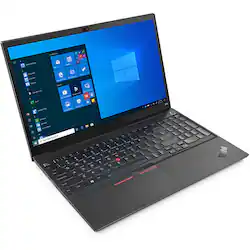
Lenovo - 15.6" ThinkPad E15 Gen 2 Laptop - Intel Core i3 - 8GB Memory - 256 SSD - Black
- Key Specs
- Screen Size: 15.6 inches (Size of the screen, measured diagonally from corner to corner.)
- Screen Resolution: 1920 x 1080 (Full HD) (Screens come in a range of resolutions (measured in pixels, horizontal x vertical). The higher the resolution, the greater the picture quality.)
- Touch Screen: false (Touch-screen devices make navigating more intuitive. Using a touch-screen display, you can do things such as tap to select, hold and drag to move items, swipe to scroll, and pinch to zoom.)
- Processor Model: Intel 10th Generation Core i3 (Your computer's processor is like its brain. Working in combination with system memory, the power of the processor determines the complexity of software you can run, how many programs you can have open at the same time, and how fast those programs will run. Most computers feature an AMD, Intel or Snapdragon processor.)
- Storage Type: SSD
- Total Storage Capacity: 256 gigabytes
- System Memory (RAM): 8 gigabytes (Random-access memory (RAM) is a computing device's short-term data storage, which allows active information to be accessed quickly. The size and type of RAM determines how efficiently the device can handle large amounts of information at one time. For example, gaming or video editing requires more RAM for optimal performance.)
- Graphics: Intel Iris Xe Graphics (Often referred to as a "graphics processing unit" (GPU), this device is responsible for displaying image content and decoding/encoding video content in programs and games.)
- Backlit Keyboard: true (Integrated lights allow for visibility of the keys in low-light conditions.)
- General
- Product Name: 15.6" ThinkPad E15 Gen 2 Laptop - Intel Core i3 - 8GB Memory - 256 SSD
- Brand: Lenovo
- Model Number: 20TD003JUS
- Year of Release: 2021
- Display
- Screen Size: 15.6 inches (Size of the screen, measured diagonally from corner to corner.)
- Screen Resolution: 1920 x 1080 (Full HD) (Screens come in a range of resolutions (measured in pixels, horizontal x vertical). The higher the resolution, the greater the picture quality.)
- Touch Screen: false (Touch-screen devices make navigating more intuitive. Using a touch-screen display, you can do things such as tap to select, hold and drag to move items, swipe to scroll, and pinch to zoom.)
- Processor
- Processor Brand: Intel
- Processor Model: Intel 10th Generation Core i3 (Your computer's processor is like its brain. Working in combination with system memory, the power of the processor determines the complexity of software you can run, how many programs you can have open at the same time, and how fast those programs will run. Most computers feature an AMD, Intel or Snapdragon processor.)
- Processor Model Number: 1115G4
- Storage
- Storage Type: SSD
- Total Storage Capacity: 256 gigabytes
- Solid State Drive Capacity: 256 gigabytes (The amount of data that can be stored on the device's solid state drive (SSD). SSD is a flash-based storage with faster speeds than a hard disk drive (HDD).)
- Memory
- System Memory (RAM): 8 gigabytes (Random-access memory (RAM) is a computing device's short-term data storage, which allows active information to be accessed quickly. The size and type of RAM determines how efficiently the device can handle large amounts of information at one time. For example, gaming or video editing requires more RAM for optimal performance.)
- Type of Memory (RAM): DDR4 (Each type of RAM delivers a different level of speed, bandwidth, energy efficiency and performance.)
- Graphics
- Graphics Type: Integrated (Dedicated graphics uses a separate graphics card for processing video images. Because it does not use memory from the system's RAM, there is no extra burden on the CPU and graphics are processed more efficiently. Integrated graphics shares system RAM to process video images.)
- GPU Brand: Intel
- Graphics: Intel Iris Xe Graphics (Often referred to as a "graphics processing unit" (GPU), this device is responsible for displaying image content and decoding/encoding video content in programs and games.)
- Compatibility
- Operating System: Windows 10 Pro (The operating system manages all software and hardware, including files, memory and connected devices. Most importantly, it lets you interact with your device and your programs in a visual way; otherwise, you'd be typing computer code to get anything done.)
- Camera
- Front-Facing Camera: true
- Features
- Backlit Keyboard: true (Integrated lights allow for visibility of the keys in low-light conditions.)
- Dimensions
- Product Weight: 5.85 pounds (The out of box weight of the item.)
- Certifications Listings & Approvals
- ENERGY STAR Certified: true (Devices carrying the ENERGY STAR service mark, such as computer products and peripherals, kitchen appliances, and other products, generally use 20% to 30% less energy than required by federal standards.)
- EPEAT Qualified: true (The Electronic Product Environmental Assessment Tool (EPEAT) was designed to provide an environmental assessment tool for purchasers. In order to qualify for EPEAT, a product must meet all 23 required criteria.)
- EPEAT Level: Gold (The Electronic Product Environmental Assessment Tool (EPEAT) was designed to provide an environmental assessment tool for purchasers. In order to qualify for EPEAT, a product must meet all 23 required criteria. Products are rated Bronze, Silver or Gold based on how many of 28 optional criteria they meet (below 50%, 50%, 75%).)
- Other
- UPC: 195348643337
The ThinkPad E15 Gen 2 laptop harnesses the power of an 11th Gen Intel Core processor along with DDR4 memory and up to 1TB solid state storage drive to deliver high performance to your workday. It confidently handles whatever tasks come your way, and it even intelligently maintains the optimum temperature while running multiple apps.
- Processor: Processor: Intel Core i3-1115G4
- Graphics: Graphics: Integrated Intel Iris Xe Graphics functions as UHD Graphics
- Display: Display: 15.6" FHD (1920x1080) IPS 250nits Anti-glare
- Operating System: Operating System: Windows 10 Pro 64, English
- Generation: Intel 10th generation Platform – up to i7
Q: I need to connect 2 monitors- what is the monitor port? hdmi, usb, vga???
A: A bit tricky on this model as you only get one USB-C Port. It has a built-in HDMI port for a monitor. In addition, the USB-C port also works as a monitor out. Look for a Monitor that has the ability to power/charge and also display via USB-C. Once you have that monitor, you can easily attach a second monitor via HDMI.
A: This Lenovo ThinkPad E15 Gen 2 laptop, model number 20TD003JUS, ships with the 11th Gen, 2-Core/4-Thread Intel Core i3-1115G4 Processor, with a base speed of 3.0GHz and a boost speed of up to 4.1GHz. This processor is supported by 8GB (1x 8GB SO-DIMM DDR4-3200MHz RAM) and a 256GB M.2 2242 PCIe 3.0x4 NVMe solid state hard drive.
A: The Lenovo ThinkPad E15 Laptop, model number 20TD003JUS, ships with a 256GB M.2 2242 PCIe 3.0x4 NVMe solid state hard drive. The maximum supported storage capacity of this configuration is: Up to two drives, 2x M.2 SSD: M.2 2242 SSD up to 512GB or M.2 2280 SSD up to 1TB. We recommend you consult with your certified technician about your storage upgrade options.
A: The computer has one DIMM slot for Memory. As sold, it has an 8 GB stick. You can remove the 8 GB stick and go as high as a 32 GB stick. RAM 8 GB (1 x 8 GB) Max RAM Supported 32 GB
Q: Is it standard software - Business Pro ?
A: The Lenovo ThinkPad E15 Gen 2 Laptop, model number 20TD003JUS, ships with Windows 10 Pro 64 bit Operating System, English Version.
A: Both the Best Buy website and Google say the product has a Backlit keyboard. So there is at the very least a disconnect at lenovo in technical writings
A: It appears that the Lenovo ThinkPad 3 Workstation Dock, https://support.lenovo.com/us/en/solutions/pd500252-thinkpad-thunderbolt-3-workstation-dock-230w170w-overview-and-sevice-parts requires a proprietary connection to the computer. This Lenovo ThinkPad E15 Gen 2 Laptop does not have that connectability available. We recommend you confirm which format of the dock you have and if, in fact, this ThinkPad E15 Gen 2 Laptop is compatible. You can contact Lenovo Support for Think Products for more information at: 877-453-6686.
Q: I do not see the power port either on left or right
A: USB-C on the left hand side is the power port for charging, transferring data, or connecting a monitor.




















