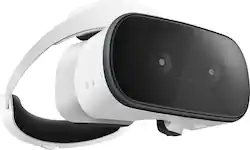
Lenovo - Mirage Solo with Daydream Virtual Reality Headset
- Key Specs
- Display Type: LCD
- Field of View: 110 degrees
- Sensors: Accelerometer Sensor, Gyro Sensor, Magnetometer sensor (Detects stimuli such as heat, light, sound, motion, or pressure and responds accordingly by operating a control or initiating a function of the device.)
- Wireless: true
- Wireless Connectivity: Wi-Fi (The manner in which a device sends data to another device over a short distance without the use of wires or cables.)
- General
- Product Name: Mirage Solo with Daydream Virtual Reality Headset
- Brand: Lenovo
- Model Number: ZA3C0003US
- Display
- Display Type: LCD
- Field of View: 110 degrees
- Features
- Controller(s): true
- Number Of Controllers Included: 1
- Interactive Buttons: true (Interact with virtual buttons to control or interact with various elements of virtual reality gameplay. // Use buttons on the device to control or interact with various elements of virtual reality gameplay.)
- Sensors: Accelerometer Sensor, Gyro Sensor, Magnetometer sensor (Detects stimuli such as heat, light, sound, motion, or pressure and responds accordingly by operating a control or initiating a function of the device.)
- Compatibility
- Operating System: Daydream 2.0 (The operating system manages all software and hardware, including files, memory and connected devices. Most importantly, it lets you interact with your device and your programs in a visual way; otherwise, you'd be typing computer code to get anything done.)
- Connectivity
- Wireless: true
- Wireless Connectivity: Wi-Fi (The manner in which a device sends data to another device over a short distance without the use of wires or cables.)
- Other
- UPC: 192158415895
Explore new worlds from the comfort of your home with the Lenovo Mirage Solo with Daydream. The ergonomic design keeps you immersed in your VR environment while providing comfort throughout each session. More than 250 Daydream apps offer access to live events, VR travel and a host of other exciting adventures. The Lenovo Mirage Solo with Daydream requires no PC, smartphone or extra sensors for a streamlined experience.
- Daydream 2.0 Euphrates Operating System: Access to over 250 Daydream apps, you'll unlock the potential of apps powered by WorldSense tracking. From gaming to VR travel to live events, there are now countless worlds to explore.
- 3 DOF Wireless Daydream Motion Controller: Interact with the virtual world the same way you do in the real world.
- Audio out and microphone support: Android N Pro Audio, 3.5mm Audio Jack with Dual Microphones.
- Google WorldSense technology: Understands your movement in space without the need to set-up any external sensors.
- A powerful engine: Powered by the advanced Qualcomm Snapdragon 835 VR platform and 4GB of RAM.
Whats Included
- Lenovo Mirage Solo with Daydream Virtual Reality Headset
- Wireless Daydream Motion Controller
- Travel adapter
- USB Type-C cable
- 3.5 mm earphones
- User manual
- Quick start guide
- Warranty card
Product Manuals
Q: Is this device comes with a browser.
A: No, this item does not come with a browser.
A: Lenovo Mirage Solo does not need any other device to setup (except the Bluetooth controller which comes with it).
Q: How do I change the pass code
A: undefined
Q: Is there an AIRPLANE MODE? Is it possible to TURN OFF the WI-FI & BLUETOOTH?
A: No, it doesn't have an airplane mode feature
Q: Can i put iPhone 7 in the vr if I get it or what brand of phone does it has to be?
A: Yes, the Star Wars: Jedi Challenges supports the iPhone 7. Have fun! Please find the updated list of phones at jedichallenges.com/compatibility.
Q: Can I plug in an HDMI cable to play my xbox 360 or watch movies on this?
A: The Lenovo Solo with Daydream is not compatible with Xbox at this time, and any other content would need to be compatible with the Daydream 2.0 OS.














