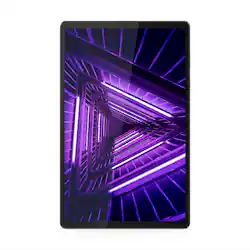
Lenovo - Tab M10 FHD Plus - 10.3" - Tablet - 128GB - Iron Gray
- Key Specs
- Screen Size: 10.3 inches (Size of the screen, measured diagonally from corner to corner.)
- Screen Resolution: 1920 x 1200 (Screens come in a range of resolutions (measured in pixels, horizontal x vertical). The higher the resolution, the greater the picture quality.)
- Processor Model: MediaTek Helio P22T Tab (Your computer's processor is like its brain. Working in combination with system memory, the power of the processor determines the complexity of software you can run, how many programs you can have open at the same time, and how fast those programs will run. Most computers feature an AMD, Intel or Snapdragon processor.)
- Total Storage Capacity: 128 gigabytes
- Operating System: Android 9.0 Pie (The operating system manages all software and hardware, including files, memory and connected devices. Most importantly, it lets you interact with your device and your programs in a visual way; otherwise, you'd be typing computer code to get anything done.)
- 2-in-1 Design: false (A laptop and a tablet combined in one lightweight, portable device. Sometimes referred to as "convertible" or "hybrid" laptops, these devices deliver the processing power and keyboard of a laptop. When you're ready to play, either detach the screen or fold your 2-in-1 into tablet mode to comfortably watch movies, play games, read an e-book and more.)
- General
- Product Name: Tab M10 FHD Plus - 10.3" - Tablet - 128GB
- Brand: Lenovo
- Model Number: ZA5T0237US
- Model Family: Lenovo M10
- Year of Release: 2020
- Display
- Display Type: LED
- Screen Size: 10.3 inches (Size of the screen, measured diagonally from corner to corner.)
- Screen Resolution: 1920 x 1200 (Screens come in a range of resolutions (measured in pixels, horizontal x vertical). The higher the resolution, the greater the picture quality.)
- Processor
- Processor Brand: MediaTek
- Processor Model: MediaTek Helio P22T Tab (Your computer's processor is like its brain. Working in combination with system memory, the power of the processor determines the complexity of software you can run, how many programs you can have open at the same time, and how fast those programs will run. Most computers feature an AMD, Intel or Snapdragon processor.)
- Storage
- Total Storage Capacity: 128 gigabytes
- Memory
- System Memory (RAM): 4 gigabytes (Random-access memory (RAM) is a computing device's short-term data storage, which allows active information to be accessed quickly. The size and type of RAM determines how efficiently the device can handle large amounts of information at one time. For example, gaming or video editing requires more RAM for optimal performance.)
- Expandable Memory Compatibility: microSD
- Compatibility
- Operating System: Android 9.0 Pie (The operating system manages all software and hardware, including files, memory and connected devices. Most importantly, it lets you interact with your device and your programs in a visual way; otherwise, you'd be typing computer code to get anything done.)
- Operating System Compatibility: Android
- Connectivity
- Compatible Wireless Standard(s): Wireless-A, Wireless-B, Wireless-G, Wireless-N, Wireless-AC (The wireless networking standard(s) the device is backwards compatible with. This includes networking protocols based on the IEEE 802.11 standard (alphabetically ascending) and the Wi-Fi Alliance standard (numerically ascending), both of which provide high-throughput wireless local area networks (WLANs). Devices designed to work with specific standard(s) will be backwards compatible with previous versions but may not run at optimal performance when using earlier iterations.)
- Headphone Jack: true (The device features an interface that allows for the connection of headphones.)
- Interface(s): 3.5mm audio, USB Type C (Refers to the types of connections that devices use to interact and communicate with each other.)
- Power
- Charging Interface(s): USB Type C (The connection for transmitting power to charge the device.)
- Charging Interface Generation/Version: 2.0
- Battery Capacity: 5000 milliampere hours (The amount of energy stored in the battery.)
- Camera
- Front-Facing Camera: true
- Front Facing Camera Megapixels: 5 megapixels (The more megapixels, the more detail that the camera facing the user can capture.)
- Rear-Facing Camera: true
- Rear Facing Camera Megapixels: 8 megapixels (The more megapixels, the more detail that the camera facing away from the user can capture.)
- Features
- 2-in-1 Design: false (A laptop and a tablet combined in one lightweight, portable device. Sometimes referred to as "convertible" or "hybrid" laptops, these devices deliver the processing power and keyboard of a laptop. When you're ready to play, either detach the screen or fold your 2-in-1 into tablet mode to comfortably watch movies, play games, read an e-book and more.)
- Keyboard Included: false
- Stylus Dock: None
- Included
- Included Software: Kid’s Mode, Tips, Netflix, Dolby Atmos, Google, Gmail, Lenovo Vantage, Google Chrome, Google Photos, Google Play Store
- Stylus Included: false
- Other
- UPC: 194552946159
Lenovo™ Tab M10 Plus is one impressive media tablet from the 2nd generation tab family. Its standout metal design gives you a premium look and feel with modern simplicity. Inside lies a 10.3" FHD screen and dual speakers for truly immersive entertainment. This is one tablet you will want to use and pass around the house.
- Powerful connectivity with USB-C/USB 2.0: Share files, connect accessories and display content on the big screen with a full-size USB C port.
- Android 9.0 (Pie) operating system: Productivity and entertainment at your fingertips. Download apps, games, movies, music and eBooks from Google Play. Cloud integration provides a seamless experience across all Android device
- 10.3" screen with 1920 x 1200 resolution: This high-resolution screen is ideal for gaming and streaming HD content
- 128GB internal storage plus microSD slot: Store your software, apps, music, movies, photos and more. Expand storage with a microSD card (sold separately).
- Quad-core processor: The right combination of fast performance and power efficiency. It allows rapid multitasking, delivers smooth response and unleashes stunning graphics.
- Dual cameras for photos and face-to-face chat: 5.0MP front camera and 8.0MP rear camera
Whats Included
- Tablet
- User Guide
- USB C Charger
Q: Can you upgrade the OS Android 9 to Android 10?
A: Here is a link to information about the update to Android 10 Operating System for the Lenovo Tab M10 Plus Tablet: https://forums.lenovo.com/t5/Lenovo-Android-based-Tablets-and-Phablets/Regarding-android-10-update-in-Lenovo-Smart-Tab-M10-FHD-Plus/m-p/5046763
A: The Lenovo Tab M10 Plus Tablet, model number ZA5T0237US, does not have a GPS Sensor. This tablet uses WiFi Location Services for location tracking. This function will only work while the tablet is connected to a WiFi network.
Q: What is the maximum size supported for mictoSD?
A: The Lenovo Tab M10 Plus Tablet, has a MicroSD, that has capacitiy up to 256GB.
Q: What is the full specification of this tablet?
A: You can find FULL specs at: https://www.gsmarena.com/lenovo_m10_plus-10360.php
Q: Can this tablet connect to a TV using an HDMI cable, maybe using an adapter on the tablet end?
A: The Lenovo Tab M10 Plus Tablet, model number ZA5T0237US, has one USB-C 2.0 (support data transfer, OTG and Power Delivery). You can use a USB-c to HDMI adapter to connect this tablet to a TV.
A: I don't think the sound has noticeably improved from years ago. But I've mostly used headphones with it so it isn't much of a concern.
A: The APPs that come with the Tab M10 Tablet are not owned by Lenovo. Each APP owner/publisher applies their own Copyright protection to their specific APP. There is nothing within the Android Operating System nor the device itself that would prohibit installing any APP software on to a removable SD card, but APP owners/publishers may Copyright protect their APP by not allowing it to be installed on removable media like an SD card. Assuming there is no Copyright protection prohibiting the installation of the APP on an SD card, here is a link to the process for doing this: https://www.tomsguide.com/us/move-android-apps-to-sd-card,news-21279.html
Q: Is the battery removable/replaceable?
A: No. The internal battery is not user replaceable. It can only be replaced by a certified technician.

















