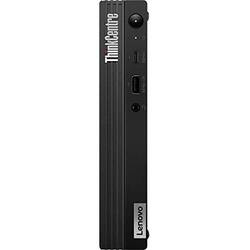
Lenovo - ThinkCentre M90q Tiny Desktop - Intel Core i7-10700 - 16GB Memory - Integrated Intel UHD Graphics 630 - 512 SSD - Black
- Key Specs
- Processor Model: Intel 10th Generation Core i7 (Your computer's processor is like its brain. Working in combination with system memory, the power of the processor determines the complexity of software you can run, how many programs you can have open at the same time, and how fast those programs will run. Most computers feature an AMD, Intel or Snapdragon processor.)
- Storage Type: SSD
- Total Storage Capacity: 512 gigabytes
- System Memory (RAM): 16 gigabytes (Random-access memory (RAM) is a computing device's short-term data storage, which allows active information to be accessed quickly. The size and type of RAM determines how efficiently the device can handle large amounts of information at one time. For example, gaming or video editing requires more RAM for optimal performance.)
- Graphics Type: Integrated (Dedicated graphics uses a separate graphics card for processing video images. Because it does not use memory from the system's RAM, there is no extra burden on the CPU and graphics are processed more efficiently. Integrated graphics shares system RAM to process video images.)
- Graphics: Intel UHD Graphics 630 (Often referred to as a "graphics processing unit" (GPU), this device is responsible for displaying image content and decoding/encoding video content in programs and games.)
- General
- Product Name: ThinkCentre M90q Tiny Desktop - Intel Core i7-10700 - 16GB Memory - Integrated Intel UHD Graphics 630 - 512 SSD
- Brand: Lenovo
- Model Number: 11CR003NUS
- Year of Release: 2021
- Color: Black
- Processor
- Processor Brand: Intel
- Processor Model: Intel 10th Generation Core i7 (Your computer's processor is like its brain. Working in combination with system memory, the power of the processor determines the complexity of software you can run, how many programs you can have open at the same time, and how fast those programs will run. Most computers feature an AMD, Intel or Snapdragon processor.)
- Processor Model Number: 10700
- Storage
- Storage Type: SSD
- Total Storage Capacity: 512 gigabytes
- Solid State Drive Capacity: 512 gigabytes (The amount of data that can be stored on the device's solid state drive (SSD). SSD is a flash-based storage with faster speeds than a hard disk drive (HDD).)
- Memory
- System Memory (RAM): 16 gigabytes (Random-access memory (RAM) is a computing device's short-term data storage, which allows active information to be accessed quickly. The size and type of RAM determines how efficiently the device can handle large amounts of information at one time. For example, gaming or video editing requires more RAM for optimal performance.)
- Type of Memory (RAM): DDR4 (Each type of RAM delivers a different level of speed, bandwidth, energy efficiency and performance.)
- Graphics
- Graphics Type: Integrated (Dedicated graphics uses a separate graphics card for processing video images. Because it does not use memory from the system's RAM, there is no extra burden on the CPU and graphics are processed more efficiently. Integrated graphics shares system RAM to process video images.)
- GPU Brand: Intel
- Graphics: Intel UHD Graphics 630 (Often referred to as a "graphics processing unit" (GPU), this device is responsible for displaying image content and decoding/encoding video content in programs and games.)
- Compatibility
- Operating System: Windows 10 Pro (The operating system manages all software and hardware, including files, memory and connected devices. Most importantly, it lets you interact with your device and your programs in a visual way; otherwise, you'd be typing computer code to get anything done.)
- Connectivity
- Number of HDMI Outputs (Total): 1
- Number of DisplayPort Outputs (Total): 1
- Number of USB Ports (Total): 5
- Wireless Connectivity: Bluetooth, Wi-Fi (The manner in which a device sends data to another device over a short distance without the use of wires or cables.)
- Number Of Ethernet Ports: 1
- Network Connectivity: None (The manner in which a device sends data to another device over a long distance using a cellular network.)
- Cooling
- CPU Cooling System: Air
- Certifications Listings & Approvals
- ENERGY STAR Certified: true (Devices carrying the ENERGY STAR service mark, such as computer products and peripherals, kitchen appliances, and other products, generally use 20% to 30% less energy than required by federal standards.)
- EPEAT Qualified: true (The Electronic Product Environmental Assessment Tool (EPEAT) was designed to provide an environmental assessment tool for purchasers. In order to qualify for EPEAT, a product must meet all 23 required criteria.)
- EPEAT Level: Silver (The Electronic Product Environmental Assessment Tool (EPEAT) was designed to provide an environmental assessment tool for purchasers. In order to qualify for EPEAT, a product must meet all 23 required criteria. Products are rated Bronze, Silver or Gold based on how many of 28 optional criteria they meet (below 50%, 50%, 75%).)
- Included
- Optical Drive Type: None (An optical disk drive (ODD) uses a laser light to read data from or write data to an optical disc. These discs include CDs, DVDs, and Blu-ray Discs. This allows you to play music or watch movies using prerecorded discs.)
- Keyboard Included: true
- Mouse Included: true
- Other
- UPC: 195235457795
The ThinkCentre M90q Tiny desktop boasts full-size processing power that keeps up with the speed of business. With up to 10th Gen Intel Core vPro processors, up to two DDR4 SODIMM (2933MHz), and dual expansion slots, it’s ready to fulfill all your business needs. The Intel vPro platform brings together the best of Intel innovations, so you can accelerate business productivity, better safeguard data and assets, and gain long-term stability.
- Operating System: Windows 10 Pro 64
- Processor: Intel Core i7-10700
- Memory: 16GB SO-DIMM DDR4-2666
- Storage: 512GB SSD M.2 2280 PCIe 3.0x4 NVMe Opal
- Graphics Card: Integrated Intel UHD Graphics 630
Q: Are the keyboard and mouse both wireless?
A: No. The Lenovo ThinkCentre M90q Tiny Desktop, model number 11CR003NUS, ships with a wired, USB Traditional Keyboard, Black, English, and a wired USB Calliope Mouse, Black.
A: That really will depend on the requirements and compatibility of the specific software you will be using with this Lenovo ThinkCentre M90q Tiny Desktop Computer. This computer model ships with Windows 10 Pro 64-bit Operating System installed and uses integrated Intel UHD Graphics 630 graphics processing within its 8-Core/16-Thread Intel Core i7-10700 processor. We recommend you check with the specific software publisher's web sites, of the specific software you will be using, for their compatibility with Windows 10 Pro 64-bit operating system and the minimum/recommended hardware requirements (Is a Graphics card required, the processor speed and the minimum required system RAM and the minimum available hard drive space) to run their program, then compare those requirements to this system's configuration.
Q: Is this computer good for business?
A: The Think Brand is Made For Business. Whether the ThinkCentre M90q Tiny Desktop is the correct configuration for the work your business does will depend on the software you will need to run and the requirements and compatibility of that specific Software. We recommend you check with the specific software publisher's web sites, of the software you will be using, for their compatibility with Windows 10 Pro 64-bit operating system and the minimum/recommended hardware requirements (Is a Graphics card required, the processor speed and the minimum required system RAM and the minimum available hard drive space) to run their programs, then compare those requirements to this system's configuration.



















