Lenovo - ThinkPad Pro Docking Station
More Buying Options
Related Item

About This Item
- Key Specs
- Number of DisplayPort Outputs (Total): 1
- General
- Brand: Lenovo
- Model Number: 40A10090US
- Product Name: ThinkPad Pro Docking Station
- Ports
- Number of DisplayPort Outputs (Total): 1
- Number of VGA Ports: 1 (VGA (Video Graphics Adapter or Video Graphics Array) is a display standard that transmits via analog signals. This type of interface is typically used to connect a computer to a display device such as a monitor, projector, or TV.)
- Number Of Ethernet Ports: 1
- Number of USB Ports (Total): 6
- Headphone Jack: true (The device features an interface that allows for the connection of headphones.)
- Microphone Input: true (The device features an input for connecting an external microphone.)
- Memory Card Slot: false
- Compatibility
- Brand Compatibility: Lenovo
- Model Compatibility: ThinkPad 25, ThinkPad 25, T440*, T440p Dual-Core, T440s*, T450*, T450s*, T460*, T460p**, T460s*, T470, T470p**, T470s, T540p Dual-Core, T550, T560*, T570, A475, L440*, L450*, L460*, L470, L540, L560, L570, P50s, P51s, W550s, X240, X250*, X260*, X270.
- Features
- Cable Lock Slot: Kensington Security Slot (K-Slot)
- Dimensions
- Product Height: 2.19 inches (The out of box height of the item. Height is measured as the vertical distance from the bottom of the item to the top as it would be primarily used or placed.)
- Product Length: 6.4 inches (The out of box length of the item. Length is measured as the longest dimension of the item.)
- Product Width: 13.6 inches (The out of box width of the item. Width is measured as the horizontal distance from one side of the item to the other as it would be primarily used or placed.)
- Product Weight: 32.2 ounces (The out of box weight of the item.)
- Other
- UPC: 887942865689
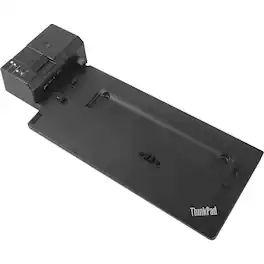
Enhance the functionality of your laptop with this Lenovo ThinkPad dock. It has three USB 3.0 ports and three USB 2.0 ports for linking peripheral devices, and multiple video input options let you easily attach a monitor. This compact Lenovo ThinkPad dock supports always-on charging to power a mobile device even if your laptop isn't connected.
- Compatible with select Lenovo ThinkPad laptops: Including ThinkPad 25, T440*, T440p dual-core, T440s*, T450*, T450s*, T460*, T460p**, T460s*, T470, T470p**, T470s, T540p dual-core, T550, T560* and T570 models.
- Bottom docking connector: You can connect your ThinkPad laptop via the bottom connector.
- DisplayPort 1.2, DVI-D and VGA ports: Let you connect several monitors.
- Multiple USB ports: The docking station features three USB 2.0 and three USB 3.0 ports, one that supports always-on technology, so you can connect a large number of peripherals.
- Gigabit Ethernet port: Ensures a fast wired connection.
- Designed for large enterprise environments: Lenovo helps simplify asset management for IT managers.
- Mirrored power button and mechanical unlock: Make it easy to unlock and go.
- Security lock: Conveniently fixes both your laptop and your docking station on your desk with a single key.
- Compatible with select Lenovo ThinkPad laptops: Including ThinkPad 25, T440*, T440p dual-core, T440s*, T450*, T450s*, T460*, T460p**, T460s*, T470, T470p**, T470s, T540p dual-core, T550, T560* and T570 models.
- Bottom docking connector: You can connect your ThinkPad laptop via the bottom connector.
- DisplayPort 1.2, DVI-D and VGA ports: Let you connect several monitors.
- Multiple USB ports: The docking station features three USB 2.0 and three USB 3.0 ports, one that supports always-on technology, so you can connect a large number of peripherals.
- Gigabit Ethernet port: Ensures a fast wired connection.
- Designed for large enterprise environments: Lenovo helps simplify asset management for IT managers.
- Mirrored power button and mechanical unlock: Make it easy to unlock and go.
- Security lock: Conveniently fixes both your laptop and your docking station on your desk with a single key.
- Compatible with select Lenovo ThinkPad laptops: Including ThinkPad 25, T440*, T440p dual-core, T440s*, T450*, T450s*, T460*, T460p**, T460s*, T470, T470p**, T470s, T540p dual-core, T550, T560* and T570 models.
- Bottom docking connector: You can connect your ThinkPad laptop via the bottom connector.
- DisplayPort 1.2, DVI-D and VGA ports: Let you connect several monitors.
- Multiple USB ports: The docking station features three USB 2.0 and three USB 3.0 ports, one that supports always-on technology, so you can connect a large number of peripherals.
- Gigabit Ethernet port: Ensures a fast wired connection.
- Designed for large enterprise environments: Lenovo helps simplify asset management for IT managers.
- Mirrored power button and mechanical unlock: Make it easy to unlock and go.
- Security lock: Conveniently fixes both your laptop and your docking station on your desk with a single key.
Whats Included
- Lenovo ThinkPad Pro Docking Station
- Two security keys
- ThinkPad 90W AC adapter
- Power cord
- Owner's manual
- Lenovo ThinkPad Pro Docking Station
- Two security keys
- ThinkPad 90W AC adapter
- Power cord
- Owner's manual
- Lenovo ThinkPad Pro Docking Station
- Two security keys
- ThinkPad 90W AC adapter
- Power cord
- Owner's manual
Product Manuals
Q: Is this compatible with a lenovo 5th gen thinkpad X1 carbon laptop
A: No, the Lenovo ThinkPad X1 Carbon 5th Generation Laptop is not on the compatibility list for this dock. You can use a universal Thunderbolt 3.0 dock with the ThinkPad X1 Carbon 5th Generation Laptop like this one - There are many varieties available, this is one example: https://www.bestbuy.com/site/belkin-thunderbolt-3-docking-station/6343826.p?skuId=6343826
Q: is this compatible with the lenovo thinkpad L13 yoga 2-in-1, 13.3 touch-screen laptop
A: No. The Lenovo ThinkPad L13 Yoga is not on the compatibility list for this dock. You can us a universal USB 3.0 dock with the ThinkPad L13 Yoga, like this one, this is one example, there are many varieties available, this is one example: https://www.bestbuy.com/site/kensington-usb-c-and-usb-3-0-universal-docking-station/6259403.p?skuId=6259403
Q: I have a Lenovo T460. Is this compatible? How can I tell if this has integrated graphics?
A: As you point out, this dock is compatible with the Lenovo ThinkPad T460 laptop, with integrated graphics. You can confirm the configuration of your specific model by entering the computer's serial number here: https://pcsupport.lenovo.com/us/en/products/laptops-and-netbooks/thinkpad-t-series-laptops/thinkpad-t460?linkTrack=Homepage%3ABody_Search%20Products&searchType=3&keyWordSearch=T460%20Laptop%20(ThinkPad). Here is a link to a video showing you how to find your computer's serial number: https://smartsupport.lenovo.com/us/en/videos/vid100751
Q: And which accessories are required when adding a 24” LG monitor? Thanks
A: That will depend on the requirements of the monitor you will use. This dock has one VGA, one standard DisplayPort and one DisplayPort Version 1.2 port all for video out. You may need an adapter to connect the monitor you have. We recommend you check with your monitor manufacturer for the requirements of your specific monitor model.
Q: Is this compatible with an HP laptop?
A: We recommend you check with your computer manufacturer for possible compatibility. This dock is made for select Lenovo ThinkPad models.
Q: Is this compatible for an LG monitor?
A: undefined
Q: Is this compatible with a T590? I do not see it listed.
A: No. Here is a link to the dock that is compatible with the ThinkPad T590 laptop: https://www.bestbuy.com/site/lenovo-thinkpad-basic-docking-station/6246506.p?skuId=6246506
Reviews
Customer Images
The vast majority of our reviews come from verified purchases. Reviews from customers may include My Best Buy members, employees, and Tech Insider Network members (as tagged). Select reviewers may receive discounted products, promotional considerations or entries into drawings for honest, helpful reviews.
Compare similar products
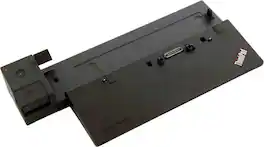
Enhance the functionality of your laptop with this Lenovo ThinkPad dock. It has three USB 3.0 ports and three USB 2.0 ports for linking peripheral devices, and multiple video input options let you easily attach a monitor. This compact Lenovo ThinkPad dock supports always-on charging to power a mobile device even if your laptop isn't connected.

The smarter way to work, Introducing the ThinkPad Universal USB-C Dock. This advanced, universally compatible one-cable docking solution lets you work smarter, not harder. It comes with a vast array of ports, next-gen plug and play functionality, and rapid charging capabilities (up to 100W for most USB-C notebooks*). Smart enough to install critical firmware updates automatically, it’s ideal for any mixed-PC environment and home-based working, and gives you the freedom and power to do more.
Set up a professional workstation with this enterprise-class Lenovo ThinkPad Ultra dock. It has Intel vPro, PXE boot, Wake-on-LAN and MAC address pass-through for versatile network connectivity, and it supports various display devices via its HDMI, DisplayPort and VGA outputs. Count on high-speed data transfers and reliable device charging with the two USB-C ports of this Lenovo ThinkPad Ultra dock.

Enterprise-Grade Universal Thunderbolt 4 Docking Experience. ThinkPad Universal Thunderbolt 4 Dock delivers reliable and consistent industry leading video, data and power connectivity in a Windows based mixed-PC environment. The ThinkPad Universal Thunderbolt 4 is future-proof and fully loaded to take your productivity, efficiency and creativity to the peak.
| Pros for Lenovo - ThinkPad Pro Docking Station | |||
|---|---|---|---|
| There were no pros for this product— | There were no pros for this product— | Overall Performance | There were no pros for this product— |