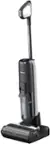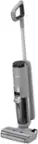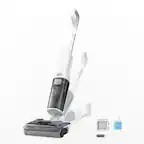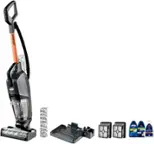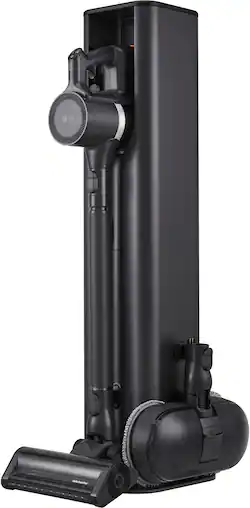
LG - CordZero All-in-One Wet/Dry Cordless Stick Vacuum with Power Mop Pro Nozzle - Graphite
- Key Specs
- Pet: false
- Cleaning Path Width: 10.4 inches
- Vacuum Type: Handheld, Stick
- Bin Capacity: 0.66 gallons
- Product Weight: 7.05 pounds (The out of box weight of the item.)
- Bagless: false
- Compatible Floor Type: All floors
- Corded/Cordless: Cordless
- Amperage: 9 amperes (Strength of electrical current.)
- Carpet Height Adjustments: false
- Wattage: 400 watts (Measurement of electrical power.)
- Wet And Dry Usage: false
- Filter Type: 5-stage, 3-stage
- Hypoallergenic: false
- Multi Surface: true
- Washable Filter: true
- Battery Charge Time: 270 minutes (Battery charge time will vary depending on the product configuration, product model, applications loaded on the product, power management setting of the product and the product features used by the customer. Charging time will likely decrease with time and usage of the battery.)
- Attachments Included: Telescoping Wand, Power Mop Pro, Dual Floor Max Nozzle, Power Mini Nozzle, Combination Tool, Crevice Tool
- Maximum Runtime: 200 minutes
- Crevice Tool: true
- General
- Brand: LG
- Model Number: A949KTMS
- Product Name: CordZero All-in-One Wet/Dry Cordless Stick Vacuum with Power Mop Pro Nozzle
- Color: Graphite
- Dimensions
- Product Height: 44 1/10 inches (The out of box height of the item. Height is measured as the vertical distance from the bottom of the item to the top as it would be primarily used or placed.)
- Product Length: 11 7/10 inches (The out of box length of the item. Length is measured as the longest dimension of the item.)
- Product Width: 10 2/5 inches (The out of box width of the item. Width is measured as the horizontal distance from one side of the item to the other as it would be primarily used or placed.)
- Performance
- Adjustable Suction: true
- Features
- Bagless: false
- Amperage: 9 amperes (Strength of electrical current.)
- Wattage: 400 watts (Measurement of electrical power.)
- Wet And Dry Usage: false
- Filter Type: 5-stage, 3-stage
- Headlight(s): true
- Voltage: 25.2 volts (Amount of power needed to support an electrical current.)
- Full Indicator: true
- Number of Speed Settings: 3
- Certifications Listings & Approvals
- Product Safety Certifications and Standard(s): None (Lists the applicable certifications and/or standards, as stated by the manufacturer, in which the product has met the requirements for the assurance of quality and safety.)
- Warranty
- Warranty - Parts: 1 Year General, 10 Years Smart Inverter Motor
- Warranty - Labor: 1 Year General
- Other
- UPC: 048231346818
Get hands-on cleaning control and hands-off debris removal with the All-in-One Tower—and more. Not only does it automatically keep your LG stick vacuum clean, charged and ready to go, but the vac now includes our most powerful suction¹, more than 3 hours of run time² and enhanced multi-surface cleaning. Dust and debris don’t stand a chance. Done for the day? Return the vac to the tower to recharge, store tools neatly out of sight and let Auto Empty clean out the dust bin for you. Your hands, floor and air stay clean and your CordZero vac is ready to go when you need it next.
- Auto Empty: A clean home and clean hands—thanks to the easiest way ever to empty a dust bin. Dock this LG stick vacuum in its All-in-One Tower and Auto Empty will automatically open the bin and deposit the contents into a larger collection bag, without scattering debris all over your clean home.
- Kompressor Technology: Press the Kompressor lever to compress collected dirt, dust and pet hair in the bin and create 2.4 times more³ bin capacity. Kompressor also lets you easily empty the bin with less scattered dust.
- Consumer Reports Recommended: The A949KTMS CordZero Cordless Stick Vacuum has been named a Consumer Reports Recommended product.
- Power and Performance: Get cleaner floors in a single pass with the more powerful suction of the LG Smart Inverter Motor.
- ThinQ App Wifi Enabled: Use the ThinQ app to check on your vacuum's cleaning history and conduct product diagnostics.
- Power Mop Pro: You can turn your LG stick vacuum into a wet mop that can use detergent for more cleaning power. Snap on the Power Mop Pro attachment, fill the reservoir with floor-safe detergent and the most stubborn stains don’t stand a chance. It’s a convenient, no-mess way to cleaner hard floors.
- Dual Floor Max: Dual Floor Max Nozzle powerfully cleans carpets and hard floors so no matter the surface, you don’t have to fuss with changing attachments to get the deep clean you want. Built-in LED headlight highlights hidden debris so dirt has nowhere to hide.
- 2 Upgraded Quick Release Batteries: Two rechargeable, quick-release batteries deliver more than 3 hours² of fade-free power, so you can go from upstairs to downstairs, hard floors to carpet—all without stopping. Charge one battery while using the other and simply swap when ready.
- All-in-One Tower Design with Tool Storage: With room to hold the LG stick vacuum plus hidden storage for up to 6 tools and accessories, the All-in-One Tower offers ready access in a sleek, beautiful design. It does triple duty charging the battery and auto-emptying the dust bin every time you dock.
- One-touch Control: Turn the vacuum on and off easily, or select different power levels, including Turbo mode, with the touch of a thumb. That means less strain on your hand and a more comfortable clean.
- Telescopic Wand: The adjustable telescopic wand allows for more flexibility and conveniently stores away to save space.
- Washable Cyclone and Filters (All in One Tower): Extend the life of your vacuum with easy to maintain removable and washable filters. LG CordZero lets you remove both the cyclone system on the vacuum and filters on the vacuum and tower to remove dirt and keep your vacuum running at its best.
- 5-Step Filtration System - Vacuum: The 5-step filtration system helps to filter out dust by separating suctioned dust in the dust bin, then filtering the remaining fine dust.
- 3-Step Filtration System - All in One Tower: What’s better than the LG stick vacuum’s 5-step filtration system? The additional 3-step system that’s built into the All-in-One Tower. Three progressively finer filters help to remove dust and dirt, keeping your home and the air inside clean and fresh.
- Detachable Handheld Vacuum: Detach the hand vacuum for quick and easy spot cleaning. Easily switch between floors and furniture with the versatility of the detachable handheld vacuum.
- Power Mini Nozzle: Powerful Pet Hair Pickup. With the Power Mini Nozzle in hand, you can quickly and easily remove pet hair from bedding, furniture and more. The specially designed motorized cleaning head and rubber blade roller effectively lift stubborn pet hair while protecting fabric surfaces.
- Smart Inverter Motor: The Smart Inverter Motor creates powerful suction. The motor is backed by a 10-year limited warranty for lasting peace of mind.
- Auto Empty: A clean home and clean hands—thanks to the easiest way ever to empty a dust bin. Dock this LG stick vacuum in its All-in-One Tower and Auto Empty will automatically open the bin and deposit the contents into a larger collection bag, without scattering debris all over your clean home.
- Kompressor Technology: Press the Kompressor lever to compress collected dirt, dust and pet hair in the bin and create 2.4 times more³ bin capacity. Kompressor also lets you easily empty the bin with less scattered dust.
- Consumer Reports Recommended: The A949KTMS CordZero Cordless Stick Vacuum has been named a Consumer Reports Recommended product.
- Power and Performance: Get cleaner floors in a single pass with the more powerful suction of the LG Smart Inverter Motor.
- ThinQ App Wifi Enabled: Use the ThinQ app to check on your vacuum's cleaning history and conduct product diagnostics.
- Power Mop Pro: You can turn your LG stick vacuum into a wet mop that can use detergent for more cleaning power. Snap on the Power Mop Pro attachment, fill the reservoir with floor-safe detergent and the most stubborn stains don’t stand a chance. It’s a convenient, no-mess way to cleaner hard floors.
- Dual Floor Max: Dual Floor Max Nozzle powerfully cleans carpets and hard floors so no matter the surface, you don’t have to fuss with changing attachments to get the deep clean you want. Built-in LED headlight highlights hidden debris so dirt has nowhere to hide.
- 2 Upgraded Quick Release Batteries: Two rechargeable, quick-release batteries deliver more than 3 hours² of fade-free power, so you can go from upstairs to downstairs, hard floors to carpet—all without stopping. Charge one battery while using the other and simply swap when ready.
- All-in-One Tower Design with Tool Storage: With room to hold the LG stick vacuum plus hidden storage for up to 6 tools and accessories, the All-in-One Tower offers ready access in a sleek, beautiful design. It does triple duty charging the battery and auto-emptying the dust bin every time you dock.
- One-touch Control: Turn the vacuum on and off easily, or select different power levels, including Turbo mode, with the touch of a thumb. That means less strain on your hand and a more comfortable clean.
- Telescopic Wand: The adjustable telescopic wand allows for more flexibility and conveniently stores away to save space.
- Washable Cyclone and Filters (All in One Tower): Extend the life of your vacuum with easy to maintain removable and washable filters. LG CordZero lets you remove both the cyclone system on the vacuum and filters on the vacuum and tower to remove dirt and keep your vacuum running at its best.
- 5-Step Filtration System - Vacuum: The 5-step filtration system helps to filter out dust by separating suctioned dust in the dust bin, then filtering the remaining fine dust.
- 3-Step Filtration System - All in One Tower: What’s better than the LG stick vacuum’s 5-step filtration system? The additional 3-step system that’s built into the All-in-One Tower. Three progressively finer filters help to remove dust and dirt, keeping your home and the air inside clean and fresh.
- Detachable Handheld Vacuum: Detach the hand vacuum for quick and easy spot cleaning. Easily switch between floors and furniture with the versatility of the detachable handheld vacuum.
- Power Mini Nozzle: Powerful Pet Hair Pickup. With the Power Mini Nozzle in hand, you can quickly and easily remove pet hair from bedding, furniture and more. The specially designed motorized cleaning head and rubber blade roller effectively lift stubborn pet hair while protecting fabric surfaces.
- Smart Inverter Motor: The Smart Inverter Motor creates powerful suction. The motor is backed by a 10-year limited warranty for lasting peace of mind.
Whats Included
- A949KTMS CordZero All-in-One Wet/Dry Cordless Stick Vacuum with Power Mop Pro Nozzle
- Telescoping Wand
- Power Mop Pro
- Dual Floor Max Nozzle
- Power Mini Nozzle
- 2 Quick Release Batteries
- Combination and Crevice Tools
- Extra Pre-Filter
- 3 Tower Bags
- Owner Manuals for Vacuum and AIO Tower
- A949KTMS CordZero All-in-One Wet/Dry Cordless Stick Vacuum with Power Mop Pro Nozzle
- Telescoping Wand
- Power Mop Pro
- Dual Floor Max Nozzle
- Power Mini Nozzle
- 2 Quick Release Batteries
- Combination and Crevice Tools
- Extra Pre-Filter
- 3 Tower Bags
- Owner Manuals for Vacuum and AIO Tower
Q: How many filters does the LG stick vacuum have?
A: The LG stick vacuum uses a 5-step filtration system.
Q: Can I wash the filter on this vacuum?
A: Yes, the filter on this vacuum is washable.
Q: What is the maximum runtime of this LG vacuum?
A: This vacuum has a maximum runtime of 200 minutes.
Q: Does this vacuum come with a crevice tool?
A: Yes, a crevice tool is included with this vacuum.
Q: How many speed settings does this vacuum have?
A: This vacuum has 3 speed settings.
Q: Does this vacuum have adjustable suction?
A: Yes, this vacuum has adjustable suction.
Q: Is it possible to have suction on and the brush roller off for bare floors or shag rugs?
A: Thank you for your interest in the LG Cordless Stick Vacuum (A949KTMS) model. Yes, it is possible to have suction on and the brush roller off for bare floors or shag rugs. You can download its owner's manual through this link for more information: https://www.lg.com/us/support/product/lg-A949KTMS.EEGELGA. ^Cris