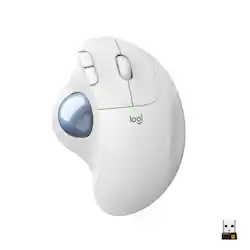
Logitech - ERGO M575 Wireless Trackball Mouse with Ergonomic Design - Off-White
- Key Specs
- Lighting Type: None
- Maximum Sensitivity: 440 dots per inch (Mouse sensitivity is measured in dots per inch (DPI). The higher the DPI, the more sensitive the mouse is and may be more useful for high-density pixel screens. Lower DPI typically means more precision and accuracy in mouse movement.)
- Number of Buttons (Total): 8
- General
- Product Name: ERGO M575 Wireless Trackball Mouse with Ergonomic Design
- Brand: Logitech
- System Requirements: Windows 10, 11 or later, Linux, macOS, iPadOS, Android (The software that a product must have for it to be able to integrate with another product.)
- Model Number: 910-005868
- Features
- Mouse Type: Standard
- Lighting Type: None
- Performance
- Mouse Operation: Button(s), Other
- Mouse Grip Style: Ergonomic (In comparison to many palm and claw grips, ergonomic grip mice are designed for a specific handedness and put the hand and wrist in a position to promote comfort. Customizable grips feature buttons/keys that can be configured to perform specific actions and may also have customizable calibration and sensitivity settings.)
- Handedness: Right-handed
- Tracking Method: Trackball (There are several types of computer mice, optical and laser being among the most common. Optical mice detect less detail and provide more precise and accurate movement. Laser mice detect more detail and can be used on a wider variety of surfaces, but are more sensitive to small movements.)
- Maximum Sensitivity: 440 dots per inch (Mouse sensitivity is measured in dots per inch (DPI). The higher the DPI, the more sensitive the mouse is and may be more useful for high-density pixel screens. Lower DPI typically means more precision and accuracy in mouse movement.)
- Minimum Sensitivity: 320 dots per inch (Mouse sensitivity is measured in dots per inch (DPI). The higher the DPI, the more sensitive the mouse is. Lower DPI typically means more precision and accuracy in mouse movement, but higher DPI may be useful for high-density pixel screens.)
- Number of Buttons (Total): 8
- Number of Thumb Buttons: 0
- Number of Programmable Buttons: 3
- Adjustable Weight: false
- Connectivity
- Operating System Compatibility: Apple iPadOS, Mac, Windows, Linux
- Plug and Play Operation: true
- Power
- Mouse Power Source: Battery-powered
- On/Off Switch: true
- Rechargeable Battery (Mouse): false
- Battery Size: AA (The battery size required for operation.)
- Number of Batteries Required: 1
- Batteries Included: true (Indicates whether the product comes with the required batteries for its operation.)
- Included
- Mouse Pad Included: false
- Dimensions
- Product Height: 6.3 inches (The out of box height of the item. Height is measured as the vertical distance from the bottom of the item to the top as it would be primarily used or placed.)
- Product Width: 2.01 inches (The out of box width of the item. Width is measured as the horizontal distance from one side of the item to the other as it would be primarily used or placed.)
- Product Weight: 210.07 grams (The out of box weight of the item.)
- Warranty
- Manufacturer's Warranty - Parts: 1 year
- Manufacturer's Warranty - Labor: None
- Other
- UPC: 097855160645
A new standard of comfort and precision. Logitech's most advanced trackball for trackball enthusiasts and consumers searching for alternatives to mice and touchpads. Delivers 20% less muscular strain compared to a regular mouse. MX ERGO PLUS features a unique adjustable hinge and extra 10° wedge for customized comfort and the latest tracking, scrolling and power management technology. Logitech FLOW enables effortless multi-computer control.
- Ergonomic comfort design, relaxed hand and arm: The comfortable, sculpted ergonomic shape of this mouse naturally fits your hand.
- Smooth thumb control: Track precisely with great cursor control on any surface and easy thumb-operated trackball and adjust the cursor speed with Logitech Options software.
- Optimal for tight workspaces: Because the trackball doesn't move, it’s excellent for tight workspaces and busy desks and fits in seamlessly alongside your computer and keyboard or laptop.
- Two ways to connect and multi-OS: Connect simply with Bluetooth or the USB receiver and never worry about drop-offs or lag up to a 33 ft range.¹
- Sustainability: Plastic parts in ERGO M575 Off-white include 21% certified post consumer recycled plastic. Uses FSC-certified paper for responsible packaging. Certified carbon neutral: the carbon impact of the product and packaging has been reduced to zero.²
- Long battery life: Up to 24 months of use from a single AA battery with the USB receiver; you may even forget your Logitech wireless trackball uses batteries at all.³
- Convenient controls: Moving between documents or browsing your favorite websites is a breeze with the ergonomic mouse's large, easy-reach back and forward buttons and the precision scroll wheel.
Whats Included
- Logitech ERGO M575 Wireless Trackball Mouse
- USB receiver
- One AA battery
- Owner's manual
A: turn it over, tale a pen or pencil, push the ball out, and clean the inside. then simply pop the ball back in. I do this every so often. you get lint or dust build up over the little pins.
Q: Where is the $20 of additional value in the ERGO M575 compared to the M570?
A: The extra value is the addition of Bluetooth connectivity. The M575 provides Bluetooth for devices that do not have a USB port in addition to the usb receiver for those devices that do not have Bluetooth.
A: Hello, I am sorry to hear about the double click issues you are experiencing. It does come with a 3 year warranty through Logitech so if it is that time span you may file a warranty claim. Here is the link for that: https://support.logi.com/hc/en-us/articles/360025078553-Warranty-Wireless-Trackball-M570. If it is outside that window, you may contact our support team and see if they can help further through that same link. I hope that helps! -Danielle from Logitech
A: I have used these with every windows, from 95 to 10
Q: How does the size and feel compare to the M570?
A: Hey there JayK. The M575 has an extremely similar size and shape to the M570, but tweaked slightly for more ergonomics and ease of use. Personally my wife used both and barely noticed a difference between the two. -Weston from Logitech
Q: Is this compatible with Big Sur or not? I have seen varying comments.
A: Hello Tardis, The ERGO M575 Wireless Trackball Mouse should work with macOS 10.15 or later. If you are a Mac user, starting with macOS Mojave (10.14), Apple has a new policy that requires user permissions for our Options software. Here is a link to the Logitech permission prompts for macOS Big Sur: https://support.logi.com/hc/en-us/articles/360023203954. - Richard from Logitech
A: To be honest, it is too early to tell. I've gone through 5 generations of the prior model (M570), and all of them started to have the "double click" malfunction within the 2 year warranty period. The cause was a very cheap, easy to replace - IF you have the equipment - microswitch. Instructions are well documented on the internet. But for those who didn't want to invest in the soldering iron and solder, and solder "sucker", Logitech was very good about honoring their warranty, The new M575 hasn't been on the market long enough to see if it has the same weakness. Logitech claims they have learned their lesson and now use more robust microswitches. But by the same token, the warranty period on these newest trackballs is only 1 year. So it is still an open question which version of the lesson they learned.
A: Its all-black.. with a translucent light blue-gray colored ball. I included a picture to show the color, hope that helps




















