Logitech - Lift Left Vertical Wireless Ergonomic Left-Handed Mouse with 4 Customizable Buttons - Wireless - Graphite
Logitech - Lift Left Vertical Wireless Ergonomic Left-Handed Mouse with 4 Customizable Buttons - Wireless - Graphite
FREE shipping to
More Buying Options
Related Item

Specifications
- Lighting TypeNoneMaximum Sensitivity4000 dots per inchNumber of Buttons (Total)5Connection TypeWireless
- Key Specs
- Lighting Type: None
- Maximum Sensitivity: 4000 dots per inch (Mouse sensitivity is measured in dots per inch (DPI). The higher the DPI, the more sensitive the mouse is and may be more useful for high-density pixel screens. Lower DPI typically means more precision and accuracy in mouse movement.)
- Number of Buttons (Total): 5
- Connection Type: Wireless
- General
- Brand: Logitech
- Model Number: 910-006467
- Product Name: Lift Left Vertical Wireless Ergonomic Left-Handed Mouse with 4 Customizable Buttons
- Color: Graphite
- System Requirements: Via Bluetooth Low Energy: Windows 10 / 11 or later, macOS 10.15 or later, iPadOS 14 or later, Chrome OS, Linux, Android 8.0 or later. Via Logi Bolt USB receiver: Available USB Port, Windows 10 / 11 or later, macOS 10.15 or later, Chrome OS, Linux (The software that a product must have for it to be able to integrate with another product.)
- Features
- Mouse Type: Standard
- Lighting Type: None
- Performance
- Mouse Operation: Button(s), Scroll wheel
- Mouse Grip Style: Ergonomic, Contoured (In comparison to many palm and claw grips, ergonomic grip mice are designed for a specific handedness and put the hand and wrist in a position to promote comfort. Customizable grips feature buttons/keys that can be configured to perform specific actions and may also have customizable calibration and sensitivity settings.)
- Handedness: Left-handed
- Tracking Method: Optical (There are several types of computer mice, optical and laser being among the most common. Optical mice detect less detail and provide more precise and accurate movement. Laser mice detect more detail and can be used on a wider variety of surfaces, but are more sensitive to small movements.)
- Maximum Sensitivity: 4000 dots per inch (Mouse sensitivity is measured in dots per inch (DPI). The higher the DPI, the more sensitive the mouse is and may be more useful for high-density pixel screens. Lower DPI typically means more precision and accuracy in mouse movement.)
- Minimum Sensitivity: 4000 dots per inch (Mouse sensitivity is measured in dots per inch (DPI). The higher the DPI, the more sensitive the mouse is. Lower DPI typically means more precision and accuracy in mouse movement, but higher DPI may be useful for high-density pixel screens.)
- Number of Buttons (Total): 5
- Number of Thumb Buttons: 2
- Number of Programmable Buttons: 6
- Adjustable Weight: false
- Connectivity
- Connection Type: Wireless
- Wireless Connectivity: Radio Frequency (RF), Bluetooth (The manner in which a device sends data to another device over a short distance without the use of wires or cables.)
- Maximum Wireless Range: 33 feet
- Operating System Compatibility: Windows, Mac, Apple iPadOS, Chrome, Linux
- Plug and Play Operation: true
- Power
- Mouse Power Source: Battery-powered
- On/Off Switch: true
- Rechargeable Battery (Mouse): false
- Number of Batteries Required: 1
- Batteries Included: true (Indicates whether the product comes with the required batteries for its operation.)
- Included
- Mouse Pad Included: false
- Dimensions
- Product Height: 2.79 inches (The out of box height of the item. Height is measured as the vertical distance from the bottom of the item to the top as it would be primarily used or placed.)
- Product Length: 4.25 inches (The out of box length of the item. Length is measured as the longest dimension of the item.)
- Product Width: 2.76 inches (The out of box width of the item. Width is measured as the horizontal distance from one side of the item to the other as it would be primarily used or placed.)
- Product Weight: 4.92 grams (The out of box weight of the item.)
- Warranty
- Warranty - Parts: 1 year
- Warranty - Labor: None
- Other
- UPC: 097855170897
Desk life getting you down? Lift yourself up with Lift Vertical Ergonomic Mouse – a comfy and intuitive wireless mouse with quiet clicks crafted specially for small-to-medium hands. Available in right and left. Lift’s unique 57-degree angle elevates your wrist to give a feeling of relief — and sends a wave of comfort through the forearm and upper body. Scrolling feels second nature with SmartWheel, which easily shifts from precision to speed-scroll. Customize Lift ergo mouse using intuitive Logi Options+ Software.
- Lift yourself up: When the desk life gets you down, lift yourself up with Lift Vertical Ergonomic Mouse - a great fit for small to medium left hands.
- Raise your hand into comfort: Rest on Lift upright mouse throughout the day, with a softly textured grip and snug thumb rest sculpted for left hands.
- 57° of soothe: Lift’s vertical shape helps wrists feel like “ahhh” at work, and promotes a more natural posture in the forearm for day-long comfort and productivity.
- Relax into focus: Settle into work with a wireless computer mouse featuring easy-to-reach customizable buttons, whisper-quiet clicks, and a SmartWheel for smooth, seamless scrolling.
- Ergo-certified: Lift wireless vertical mouse has been designed, developed, tested and approved according to criteria set out by leading ergonomists.
- Connect your way: Connect via Bluetooth Low Energy or Logi Bolt USB to Windows, macOS, iPadOS, Chrome OS, or Linux, and enjoy up to 2 years’ battery life.*
- More sustainable: Plastic parts in Lift Left Graphite include 70% certified post consumer recycled plastic. Uses FSC-certified paper for responsible packaging. Certified carbon neutral: the carbon impact of the product and packaging has been reduced to zero.**
Whats Included
- Lift Left Vertical Ergonomic Mouse
- Logi Bolt USB Receiver
- 1 AA Battery
- Quick Start Guide
Q: Does this mouse control multiple devices like the Master 3S or does it just control one?
A: This mouse controls multiple devices
Q: how is this mouse with graphic design work , and graphic art work ?
A: Hello cmak! The Lift Left Vertical Wireless Ergonomic Left-Handed Mouse with 4 Customizable Buttons is definitely a great product that can help you accomplish many tasks on your computer. It operates just like any other mouse, but with the added ergonomic benefits. So I'd say it all comes down to if you're looking for a mouse with a multitude of buttons that can be programmed for different needs (like the MX Master 3S in example, which a lot of people use for Photoshop editing in example, although that one isn't available on the left hand side), or if the 4 programmable buttons of the Lift would be enough for you. - Mathieu from Logitech
Compare similar products

Desk life getting you down? Lift yourself up with Lift Vertical Ergonomic Mouse – a comfy and intuitive wireless mouse with quiet clicks crafted specially for small-to-medium hands. Available in right and left. Lift’s unique 57-degree angle elevates your wrist to give a feeling of relief — and sends a wave of comfort through the forearm and upper body. Scrolling feels second nature with SmartWheel, which easily shifts from precision to speed-scroll. Customize Lift ergo mouse using intuitive Logi Options+ Software.
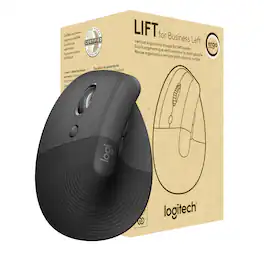
Give everyone a break from laptop touchpads with the Lift Vertical Ergonomic Mouse for Business. It’s designed for all-day comfort, keeping both small and medium hands at an ergonomically ideal 57° angle. Approved by leading ergonomists, it improves posture and reduces forearm muscle fatigue and boosts focus. Lift for Business also conquers IT security challenges for remote or office work. Fully encrypted and featuring Secure Connections Only Mode—BluetoothⓇ Low Energy Security Mode 1, Level 4 protection, it delivers a reliable and secure connection even in congested wireless environments.
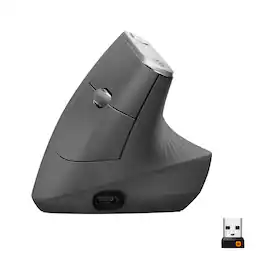
MX Vertical is an advanced ergonomic mouse that combines science-driven design with the elevated performance of Logitech’s MX series. The natural handshake position of MX Vertical reduces wrist pressure and forearm strain. The unique 57° vertical angle has been optimized for an ergonomic posture without compromising a pixel of performance. MX Vertical features a 4000 DPI high-precision sensor, resulting in 4x less hand movement and reducing fatigue. And the cursor speed switch allows you to instantly adjust DPI speed and accuracy with the touch of a button. MX Vertical stays powered for up to four months on a full charge – and gets three hours of use from a one-minute quick charge.
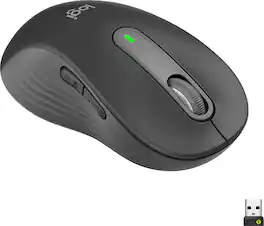
Upgrade to smarter scrolling, better comfort, and more productivity with the Signature M650 L Left. The versatile mouse features an adaptive scroll SmartWheel that delivers line-by-line precision, and auto-switches to super-fast free spin mode with the flick of a finger. A choice of sizes for smaller, larger and left hands means there's a perfect fit for anyone. Seamless wireless connectivity, customizable side buttons, and a comfort shape keep you comfortably and productive hour after hour. Logitech’s SilentTouch technology delivers silent clicks to keep you focused – while the up to 24-month battery life and universal operating system compatibility ensure hassle-free performance.
Specs
Reviews
Customer Images
The vast majority of our reviews come from verified purchases. Reviews from customers may include My Best Buy members, employees, and Tech Insider Network members (as tagged). Select reviewers may receive discounted products, promotional considerations or entries into drawings for honest, helpful reviews.
- Rated 5 out of 5 stars
Very high Quality, silent, ergonomic and very well
I really love how does it feel whenever I m using this vertical left hand mouse, no pressure on your wrist. At first I didn’t like the material but when you touch it you will like it
This review is from Logitech - Lift Left Vertical Wireless Ergonomic Left-Handed Mouse with 4 Customizable Buttons - Wireless - Graphite
Amir Posted
- Rated 5 out of 5 stars
One of the Best Computer Mice. Logitech Don't Mi
I have been searching for a left handed mouse for a while. The Logitech Lift is everything I've ever wanted from a mouse. The build of the mouse feels high quality. I would have liked to see a white version but the dark grey matches my current setup. It has Bluetooth and a USB dongle for connecting to multiple devices as well as having a switch to switch between 3 different devices. Also the buttons are virtually silent which I enjoy and adjustable DPI (nothing that allows super fast gaming inputs). It does take a bit to get used to your left and right clicks as they're inverted and there is a large dead space where the left mouse button is requiring you to move your finger to make inputs. Clearly the benefits of having an ergonomic mouse are there and since I work in an office setting all day and will try to get our unit GPC holder to order some for our office. Overall I love the Logitech Lift Left Handed mouse. I enjoy every device I get from Logitech and this is no different.
This review is from Logitech - Lift Left Vertical Wireless Ergonomic Left-Handed Mouse with 4 Customizable Buttons - Wireless - Graphite
doop22 Posted
- Rated 5 out of 5 stars
Compact & simple to use & still productive
The Lift mouse from out of package to setting up to the usage experience follows quite close to existing models in term of connecting with bluetooth and ogi Bolt USB Receiver, then customizing via Logi Option+. The pattern of its design and functionality are inline to models with Optical Tracking. It has 6 buttons in which Scroll wheel is counted as one of buttons as per Logitech. It use 1 AA Battery that comes included, and as per its spect last 24 months, and give wireless range of 10-m just to mention some of remarks from its manual. Using it, it feels comfortable based on user hand size that use glove size S. The click of right and left sits well as place the hand around it and rest on the thumb next to Back/Forward buttons. Scrolling long documents or browser page feels smooth while using the middle button customized for screenshot fells in same manner. Then it is quite precise as point and select/click the links or navigation and images. It can be connected to 3 devices, and switch accordingly from one to another. Now, what I would like for left hand user: 1. The scrolling control done with thumb. 2 Have Gesture control like in MX 3 and customizable. Then common to rest mice with multiple connection: the control of connection and switching between devices were on the top or side for practical usage without having to flip the mouse and pressing each connecting number to switch. To conclude, the Lift is light and practical, and effective for each of functionality included in the mouse. It feels shirked version of MX Vertical and without fancy finishing. But in overall still good to have and make daily task smoother for those who spend most of day on the screen.
This review is from Logitech - Lift Left Vertical Wireless Ergonomic Left-Handed Mouse with 4 Customizable Buttons - Wireless - Graphite
MigDigital Posted