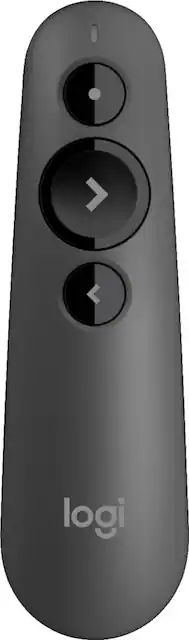
Logitech - R500 Presentation Remote - Black
- General
- Product Name: R500 Presentation Remote
- Brand: Logitech
- Model Number: 910-005333
- Color: Black
- Warranty
- Manufacturer's Warranty - Parts: 1 year
- Manufacturer's Warranty - Labor: 1 year
- Other
- Product Width: 1.4 inches (The out of box width of the item. Width is measured as the horizontal distance from one side of the item to the other as it would be primarily used or placed.)
- Product Height: 4.8 inches (The out of box height of the item. Height is measured as the vertical distance from the bottom of the item to the top as it would be primarily used or placed.)
- Product Weight: 1.9 ounces (The out of box weight of the item.)
- Product Length: 0.9 inches (The out of box length of the item. Length is measured as the longest dimension of the item.)
- Batteries Included: true (Indicates whether the product comes with the required batteries for its operation.)
- Battery Chemistry: Alkaline
- Battery Size: AAA (The battery size required for operation.)
- Number of Batteries Required: 1
- Plug And Play Operation: true (The product can work when first used or connected, without reconfiguration or adjustment by the user.)
- System Requirements: Windows 7 or later, macOS X 10.12 or later, Chrome OS, Linux 2.6 or later, iOS 8 or later, Android 5.0 or later (The software that a product must have for it to be able to integrate with another product.)
- Computer Connectivity: Android, Chrome, Linux, Mac, Windows
- Compatible Software Programs: Powerpoint, Keynote, PDF, Google Slide, Prezi
- Indoor Range: 65 feet
- Integrated Laser Pointer: true
- Interface(s): Bluetooth, USB
- Number Of Buttons: 3
- Receiver Storage: true
- Wireless Frequency: 2.4 gigahertz
- UPC: 097855139658
Give laser-focused presentations with this Logitech presentation remote. Its Bluetooth 4.0 LE technology provides a convenient 65-foot wireless range, and compatibility with most operating systems and presentation software ensures flexibility and reliability when it's needed most. This Logitech presentation remote has individual forward, back and laser pointer buttons for easy operation.
- Universal compatibility: Use R500 on Windows and Mac platforms with PowerPoint, Keynote, PDF, Google Slide, and Prezi presentations.
- Long operating range: Move and present freely from as far as 65'.
- Wireless connectivity: Plug and play the R500 remote presenter instantly on any compatible computer via the USB receiver, or connect with low-energy Bluetooth Smart technology.
- Red laser pointer: Helps point out precise areas of focus in your presentation.
- Secure grip: The soft rubber surface and textured buttons allow for a confident grip while presenting.
- LED indicator: Lets you know about battery life and current connection status.
- 12 months of battery life: A full charge lasts up to 12 months with the included alkaline AAA battery. On low charge the remote will automatically go into power-saving mode by disabling laser pointer, providing an extra week to battery life.
- System requirements: Windows 7 or later, macOS X 10.12 or later, Chrome OS, Linux 2.6 or later, iOS 8 or later, Android 5.0 or later, Bluetooth or free USB port for receiver, and Internet connection for presentation software download.
Whats Included
- Logitech R500 Presentation Remote
- 1 AAA alkaline battery
- USB Receiver
- Owner's manual
Q: Can this pointer be used on an online Zoom presentation?
A: This pointer will operate with the device you have plugged it directly into. So, for example, if you are clicking through a Power Point on your laptop, this remote will advance the slides on your laptop
A: The R500 is optimized to work with Windows®, macOS® and leading presentation software. Logitech Proprietary Receiver: Available USB port required, macOS® X 10.12 or later. Bluetooth connection: Bluetooth Required macOS® X 10.12 or later iOS 8 or later Internet connection for software download. For more, please refer to: https://support.logi.com/hc/en-us/articles/360023459813 - Will, Logitech.
Q: Will this work with macOS Big Sur?
A: Hey there! This remote should work with anything macOS X 10.12 or later, so you should have no compatibility issues with Big Sur.
A: Hi Liagent, the R500 will work with the following operating systems using the provided USB Dongle: Windows® 7,8,10 or later, macOS X 10.12 or later, Chrome OS™, Linux 2.6+. When using the R500 with PowerPoint presentations it is best to have the content directly on the device presenting from.
Q: Can 1 remote control 2 presentations? Like if I had 2 dongles?
A: Hello, unfortunately one remote can not control two presentations simultaneously.
Q: Cn this remote be used with WORD to change pages?
A: Hello, the R500 is designed to be used with presentation software, it will not support Word page changes.
A: Sorry you're having technical difficulties Ed, hopefully this will help: Please make sure the R500 has a new battery inserted, check to see if your Mac has been updated to macOS X 10.12 or later, and also download the free Logitech Presentation app to your Mac if you haven't already.
Q: Does this remote have the capability of controlling the computer cursor?
A: This pointer cannot control cursor. It can only change slides and point on the screen.


















