Logitech - StreamCam Plus 1080 Webcam for Live Streaming and Content Creation - Off-White
Logitech - StreamCam Plus 1080 Webcam for Live Streaming and Content Creation - Off-White
Color
Off-WhiteMore Buying Options
Related Item

Specifications
- Video ResolutionFull HD (1080p)
- Key Specs
- Video Resolution: Full HD (1080p) (Refers to the number of pixels, both horizontally and vertically, used to capture the video. The higher the resolution the finer the video detail that can be seen.)
- General
- Brand: Logitech
- Model Number: 960-001289
- Product Name: StreamCam Plus 1080 Webcam for Live Streaming and Content Creation
- Color: Off-White
- Camera
- Video Resolution: Full HD (1080p) (Refers to the number of pixels, both horizontally and vertically, used to capture the video. The higher the resolution the finer the video detail that can be seen.)
- Maximum Video Frame Rate: 1080p (Full HD) @ 60 FPS (The maximum frequency at which consecutive images can be captured by a video recording device.)
- Megapixels: 2.1 megapixels (Measures the amount of graphic resolution that the product can capture.)
- Image Resolution (Display): 1920 x 1080 (Refers to the number of pixels, both horizontally and vertically, used to either capture an image or display it. The higher the resolution the finer the image details.)
- Autofocus: true (Allows the camera to automatically focus through the lens, rather than by adjusting the lens manually.)
- Features
- Integrated Microphone: true
- Plug And Play Operation: true (The product can work when first used or connected, without reconfiguration or adjustment by the user.)
- 360 Degrees Rotation: false (The product is capable of turning freely about an axis, incorporating horizontal points of view covering 360 degrees.)
- Connectivity
- System Requirements: Windows 10, MacOS 10.14 (The software that a product must have for it to be able to integrate with another product.)
- Connectivity: USB-C
- Dimensions
- Product Height: 3.27 inches (The out of box height of the item. Height is measured as the vertical distance from the bottom of the item to the top as it would be primarily used or placed.)
- Product Width: 2.28 inches (The out of box width of the item. Width is measured as the horizontal distance from one side of the item to the other as it would be primarily used or placed.)
- Product Depth: 1.89 inches (The out of box depth of the item. Depth is measured as the distance from the front of the item to the back as it would be primarily used or placed.)
- Product Weight: 0.84 pounds (The out of box weight of the item.)
- Warranty
- Warranty - Parts: 1 year
- Warranty - Labor: None
- Other
- UPC: 097855153258
The Logitech StreamCam premium webcam streams and records in full 1080p HD resolution at 60 fps, delivering professional-quality results for YouTube videos and Twitch streaming. Create sharp, natural video with smooth motion and crisp details thanks to a premium glass lens and smart features like autofocus. The external computer camera's glass lens delivers vibrant, true-to-life image quality with crisp details. A 78-degree field of view keeps you upfront and center, while autofocus intelligently adjusts the lens in real-time soyou always stay in focus, even when you move toward or away from the camera. The live streaming webcam's intelligent exposure system adjusts the aperture and ISO speed in real-time to ensure accurate skin tones for a more natural, healthy look —even in varying lighting conditions. With StreamCam, you can be confident that you’ll always look great.
- Full HD 1080p at 60 fps: Stream and record in full 1080p HD resolution at 60 fps for sharp, natural video with smooth motion for creating professional quality live streams and videos.
- Premium glass lens with smart autofocus: Capture vibrant, true-to-life image quality with crisp details using StreamCam's premium glass lens and smart autofocus system.
- StreamCam advanced features: Auto-framing keeps you in the center of the shot, even as you move left or right, while intelligent exposure ensures you look good in varying lighting conditions.
- Optimized for popular live streaming software: Effortlessly stream to Twitch, YouTube and more using popular live streaming software like Open Broadcaster Software (OBS), XSplit and Streamlabs OBS.
- Versatile mounting options: Achieve the optimal framing with landscape or portrait modes and mount the external web camera on your desktop monitor or laptop, or directly on a standard tripod.
- Fast USB-C connection: High-bandwidth USB-C connection ensures stable and reliable HD video quality for your gaming streams, YouTube videos, Zoom conferencing, Skype meetings, podcasting and more.
- Enhanced control with Logitech Capture software: Combine StreamCam full HD webcam with the included Logitech Capture software to unlock powerful features that automate focus, exposure and more.
- More sustainable: Certified carbon neutral: the carbon impact of the product and packaging has been reduced to zero.
- Full HD 1080p at 60 fps: Stream and record in full 1080p HD resolution at 60 fps for sharp, natural video with smooth motion for creating professional quality live streams and videos.
- Premium glass lens with smart autofocus: Capture vibrant, true-to-life image quality with crisp details using StreamCam's premium glass lens and smart autofocus system.
- StreamCam advanced features: Auto-framing keeps you in the center of the shot, even as you move left or right, while intelligent exposure ensures you look good in varying lighting conditions.
- Optimized for popular live streaming software: Effortlessly stream to Twitch, YouTube and more using popular live streaming software like Open Broadcaster Software (OBS), XSplit and Streamlabs OBS.
- Versatile mounting options: Achieve the optimal framing with landscape or portrait modes and mount the external web camera on your desktop monitor or laptop, or directly on a standard tripod.
- Fast USB-C connection: High-bandwidth USB-C connection ensures stable and reliable HD video quality for your gaming streams, YouTube videos, Zoom conferencing, Skype meetings, podcasting and more.
- Enhanced control with Logitech Capture software: Combine StreamCam full HD webcam with the included Logitech Capture software to unlock powerful features that automate focus, exposure and more.
- More sustainable: Certified carbon neutral: the carbon impact of the product and packaging has been reduced to zero.
Whats Included
- StreamCam camera with attached cable (USB 3.1)
- Monitor Mount
- User documentation
- StreamCam camera with attached cable (USB 3.1)
- Monitor Mount
- User documentation
Product Manuals
Q: What is the video resolution of this webcam?
A: The video resolution of this webcam is Full HD (1080p).
Q: What kind of connection does this webcam use?
A: This webcam uses a fast USB-C connection.
Q: Can I use this webcam for streaming on Twitch?
A: Yes, you can effortlessly stream to Twitch using this webcam.
Q: Does this webcam have an integrated microphone?
A: Yes, this webcam has an integrated microphone.
Q: Does this webcam have plug and play operation?
A: Yes, this webcam has plug and play operation.
Q: Does this webcam have autofocus?
A: Yes, this webcam features a smart autofocus system.
Q: Does the camera support full HD recording?
A: Yes, the camera supports full 1080p HD recording at 60 fps.
A: You will need a USB C (female) to USB (male) adapter, unless you have a USB C port on your PC. The adapter is simply used to convert the cams USB C connector into a regular USB so you can plug it into a PC without a native C port.
Compare similar products
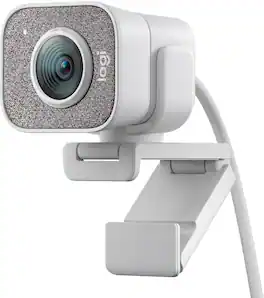
The Logitech StreamCam premium webcam streams and records in full 1080p HD resolution at 60 fps, delivering professional-quality results for YouTube videos and Twitch streaming. Create sharp, natural video with smooth motion and crisp details thanks to a premium glass lens and smart features like autofocus. The external computer camera's glass lens delivers vibrant, true-to-life image quality with crisp details. A 78-degree field of view keeps you upfront and center, while autofocus intelligently adjusts the lens in real-time soyou always stay in focus, even when you move toward or away from the camera. The live streaming webcam's intelligent exposure system adjusts the aperture and ISO speed in real-time to ensure accurate skin tones for a more natural, healthy look —even in varying lighting conditions. With StreamCam, you can be confident that you’ll always look great.

Logitech C920s is a budget-friendly, work-from-anywhere webcam that delivers a professional video meeting experience. It includes features designed to make you look and sound great in your next meeting. A 78º diagonal field of view perfectly frames you and your space, while autofocus adjusts smoothly and precisely. RightLight 2 technology automatically adjusts to your lighting situation even in low-light or backlit conditions. And dual integrated mics accurately capture your voice from multiple angles for greater nuance. If you’re streaming or recording, use Logitech’s Capture app to edit and customize. Flip down the lens cover at any point to protect your privacy.

We think webcams should do more. With Facecam, you get not only 1080p 60fps capture, but also uncompressed, low-latency video in lifelike detail and color. Adept in low-light conditions, Facecam even overcomes tricky high-contrast lighting—like bright office windows—thanks to HDR capability. Its software, Camera Hub, offers not just superficial settings, but instead deep DSLR-style control such as ISO and shutter speed to customize your image. What’s more, your settings won’t disappear when you reboot or change computers. Loaded with features like cinematic FX and Stream Deck compatibility, Facecam does what other webcams don’t—because “good enough“ is no longer good enough.

Meet, stream, master with the Logitech MX Brio Ultra HD 4K Webcam for Collaboration and Streaming. Experience sharp, ultra HD 4k resolution video with AI image enhancement, our in-house designed lens, and our most advanced webcam sensor yet with 70% bigger pixels for 2X better face visibility and 2x finer image details in difficult lighting conditions.. Fine controls on this HD webcam let you precisely adjust lighting and white balance with ISO, Shutter Speed, Temperature, Tint, and Vibrance. Dual omnidirectional microphones reduce background sound so you can be heard clearly with noise-reducing technology. Show Mode lets you share your physical work and notes on video calls by tilting the web camera down.
| Pros for Logitech - StreamCam Plus 1080 Webcam for Live Streaming and Content Creation - Off-White | |||
|---|---|---|---|
| There were no pros for this product— | Setup, Ease of Use, Privacy Feature, Video Quality, Overall Performance | Image Quality, Setup, Ease of Use, Field of View, Frame Rate | Image Quality, Privacy Feature, Ease of Use, Field of View, Connectivity |
| Cons for Logitech - StreamCam Plus 1080 Webcam for Live Streaming and Content Creation - Off-White | |||
| There were no cons for this product— | Focus, Autofocus, Compatibility, Cable Length, Field of View | There were no cons for this product— | Mounting Options |
Specs
Reviews
Customer Images
The vast majority of our reviews come from verified purchases. Reviews from customers may include My Best Buy members, employees, and Tech Insider Network members (as tagged). Select reviewers may receive discounted products, promotional considerations or entries into drawings for honest, helpful reviews.
- Rated 5 out of 5 stars
Best Webcam I've used, big upgrade from the C922x
Setup- Really easy to setup; you just attach the webcam to either the attachment that connects to a monitor or you just spin it onto the tripod, from their you download the Logitech Capture software and you can edit so many things how this webcam will look; so many useful features. Performance- The webcam comes with a 3 month code of xsplit which was a pretty cool program, but I preferred to stick with just the Logitech capture, then link that to streamlabs if your going to me streaming. Very clear picture everyone in zoom meeting asks me what camera I'm using, Also the 60 FPS is a great feature and makes your motion look a lot better; plus their a easy feature that lets you change to exposure mode if your in a not very lite room. Any Problems- I really haven't had any issues with this thing at all to be honest, only thing that might be a problem for some people is you need a usb c port in your pc to hook it up, also would be great if you were able to unplug the wire from the webcam, but its unfortunately not possible. Overall coming from the Logitech C922x this thing is a major upgrade, the quality is better and everyone can notice too! One thing is I wish I could of gotten the white version to go with my setup but the black version is good because it blends in with the bevel of the monitor so it doesn't distract you, also the black one comes with the tripod which is a plus Hope this helps someone :)
This review is from Logitech - StreamCam Plus 1080 Webcam for Live Streaming and Content Creation - Graphite
Lovemycoffee1 Posted
- Rated 5 out of 5 stars
Great quality stream cam
I have been using this Logitech stream cam for a year now and so far it’s still working extremely well. The image quality/resolutions/frame rates are a step above an average video cam. Comes with a built in stand that allows easy placement on top of the laptop. It’s a great choice for video conferencing and streaming!
This review is from Logitech - StreamCam Plus 1080 Webcam for Live Streaming and Content Creation - Off-White
Gamer100 Posted
- Rated 5 out of 5 stars
Jack of all trades
So don’t make fun of me for this but, the first year I had this camera right after I was able to put my rig together finally. I had no idea that it had a mic, and the mic quality is quite impressive, the material around the lens of the camera is made up of some kind of soft texture material that acts as a pop filter and I assume that is where the mic is located ! One thing that really got me was the different ways of mounting it on top of my monitor. I thought it wouldn’t sit in place since my monitor is curved but it actually sits on top perfectly secured. At 1080p running at 60fps, this bad boy delivers the quality you seek ! I still use it to this day and it hasn’t failed me once. Logitech really impressed me with this one.
This review is from Logitech - StreamCam Plus 1080 Webcam for Live Streaming and Content Creation - Graphite
Moea Posted