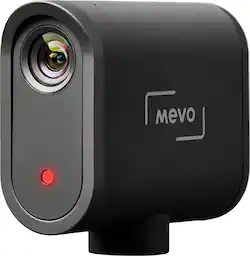
Mevo - Start, The All-in-One Live Streaming Camera - Black
- Key Specs
- Effective Pixels: 2.07 megapixels (The actual number of pixels which make up the viewable image.)
- General
- Product Name: Start, The All-in-One Live Streaming Camera
- Brand: Mevo
- Model Number: A30103A
- Color: Black
- Imaging
- Image Sensor Type: CMOS (CCD and CMOS are the two main technologies used in image sensors. CCD, the older of the two types, turns analog light signals into digital pixels. This conversion happens without distortion, resulting in high-quality images. Newer CMOS sensors use transistors at each pixel to move electrical charges. CMOS sensors are typically less expensive, but also require more light to create distortion-free images.)
- Digital Zoom: None (A digital zoom is accomplished electronically, with no adjustment of the camera's optics, and no optical resolution gained in the process. The existing data is not enhanced or added to, merely displayed at a lower resolution, thereby giving an illusion of an enlarged image.)
- Image Stabilization: None (This feature helps reduce image/video blur or distortion that may occur from unsteady motion.)
- Exposure Control
- Effective Pixels: 2.07 megapixels (The actual number of pixels which make up the viewable image.)
- Display
- Aspect Ratio: 16:9 (The measurement of the width of a screen compared to the height of a screen, expressed as a ratio.)
- Video
- HDR Mode: true (HDR Mode uses multiple photos taken at different exposures to add more dynamic range to photographs. HDR technology displays content with greater contrast between bright and dark, resulting in clearer and more lifelike images.)
- Compatibility
- Tripod/Monopod Mountable: true (A support function that allows the device to be mounted to monopods and tripods for leveling and stability.)
- Memory Card Compatibility: microSD (The type of memory card(s) recommended for use with the product.)
- Connectivity
- Wireless Connectivity: WiFi (The manner in which a device sends data to another device over a short distance without the use of wires or cables.)
- Output(s): USB 3.0, 3.5mm audio
- Microphone Input: true (The device features an input for connecting an external microphone.)
- Power
- Rechargeable Battery: false
- Removable Battery: true
- Battery Size: Other (The battery size required for operation.)
- Included
- Batteries Included: true (Indicates whether the product comes with the required batteries for its operation.)
- Other
- UPC: 853359004867
Mevo’s latest innovation, the Mevo Start, is designed — in detail — for live streaming events and longform video content. The state-of-the-art camera allows you to simultaneously stream and record video at up to 1080p. With the Mevo Camera App, you can have the power of a full production studio in the palm of your hand. Manage video settings, set up streaming destinations, and produce dynamic live edits with a variety of pans, zooms, and cuts. Equipped with an internal built-in microphone and a 3.5mm input for external audio, the Mevo Start ensures high-quality audio recording and thanks to its slim, lightweight, 3-inch tall frame, the camera can be mounted on nearly any conventional microphone stand or camera tripod. Go live to major platforms such as Facebook Live, YouTube, Twitch, and more. Advanced RTMP and NDI® | HX support allows for interfacing with advanced video switching programs like Ecamm Live and Streamlabs OBS. The recently introduced Webcam Mode expands capabilities to popular meeting solutions like Zoom, Google Meet, Microsoft Teams, and Skype. With the Mevo Start, you can live stream anytime, anywhere.
- All-In-One Live Streaming Camera: Wireless HD camera designed for live streaming. Remote control from your smartphone over bluetooth or Wi-Fi from 100ft away.
- Live Stream to Any Platform: Live stream to Facebook Live, YouTube, Twitch, and many more. Simultaneously record in 1080p HD to microSD card.
- Remote Control From Your Phone: Dedicated iOS and Android Mevo Camera App lets you take full control with live editing features including tapping to cut, and pinching to zoom.
- All New Webcam Mode: Turn your Mevo camera into a wireless HD webcam. Compatible with major video conferencing platforms such as Zoom, Skype, and Microsoft Teams.
- Long Battery Life: Over 6+ hours of built in battery life allows you to live stream content from start to finish.
- Flexible Audio Options: Multiple audio options including our built-in 3 MEMS microphone array, a 3.5mm input, and USB-C input.
Whats Included
- Mevo Start Live Streaming Camera
- Microfiber cleaning cloth, USB-C to USB-A cable (2 m)
A: The mevo start camera works with the mevo app where you select different streaming options. I use Facebook live for our church service. The camera uses a micro sd card and saves the video automatically in the default 1080p format and I select 720p for streaming but you can select higher or lower. It streams and saves at the same time. You can just save to the sd if you want.
A: You want to be live you need a connection, cell or WiFi. I suggest getting external microphones of some sort, wireless or wired depending on your situation, they connect to the camera or Mevo microphone app for Apple phone works for a single person who is far away from the camera.
Q: Can you record without streaming and upload later?
A: Yes you can. You must insert a memory card into the camera to allow recording.
A: Once set up, the camera shows its full screen in the app. You can zoom in on any section of the screen by using the usual touch screen motion. So this is a digital zoom. You can also just tap on the touch screen to automatically zoom in on that section to the maximun zoom limit. This maximum zoom limit can be adjusted within the app. There is no optical zoom built into the camera that I know of.
A: The Mevo Start Live Streaming Camera uses Wi-Fi to stream and can connect to a phone app via Bluetooth for setup/control. It can stream to multiple platforms (like Facebook Live and YouTube) simultaneously using its MultiStream feature.
Q: Can you zoom in and out with this.
A: You can zoom but loose some quality and you.cant zoom vert well.
A: Provobly not as you will lose the signal.
Q: Mevo app/cell phone cannot find camera on blue tooth scan.
A: Download the app on the phone as an alternate mic source. Then it will find if its connected to the same network.

















