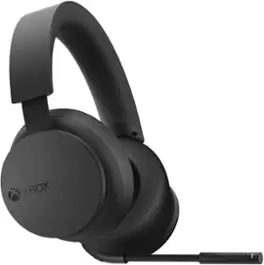
Microsoft - Xbox Wireless Gaming Over-the-Ear Headset for Xbox Series X|S, Xbox One, and Windows 10|11 - Black
- Razer - Basilisk V3 X HyperSpeed Optical Gaming Mouse with 9 Customizable Controls - Wireless - Black$48.46$69.99
More Buying Options

Specifications
- Noise Cancelling (Active)YesSound ModeDolby Atmos, DTS Headphone:XConnection TypeWirelessWireless ConnectivityBluetoothTrue WirelessNoBuilt-In MicrophoneYes
- Key Specs
- Noise Cancelling (Active): true
- Sound Mode: Dolby Atmos, DTS Headphone:X
- Connection Type: Wireless
- Wireless Connectivity: Bluetooth (The manner in which a device sends data to another device over a short distance without the use of wires or cables.)
- True Wireless: false (These headphones not only lack wires between the device and headphones, they also lack wires between the headphones themselves. (true wireless is really only possible with in-ear headphones))
- Built-In Microphone: true
- Carrying Case: false
- Microphone Features: Fixed
- Headphone Fit: Over-the-Ear
- Battery Life: 20 hours (Battery life will vary depending on the product configuration, product model, applications loaded on the product, power management setting of the product and the product features used by the customer. As with all batteries, the maximum capacity of this battery will decrease with time and usage.)
- Compatible Platform(s): Xbox Series X, Xbox Series S, Xbox One, Windows
- Voice Assistant Built-in: No (A digital assistant built into the device that uses voice commands to answer questions and control smart devices.)
- General
- Brand: Microsoft
- Model Number: TLL-00020
- Product Name: Xbox Wireless Gaming Over-the-Ear Headset for Xbox Series X|S, Xbox One, and Windows 10|11
- Color: Black
- Audio
- Noise Cancelling (Active): true
- Sound Isolating: true
- Minimum Frequency Response: 20 hertz (Describes the maximum range of frequencies or musical tones a product can reproduce, from very low tones to very high treble tones. The minimum frequency or musical tone the speaker can reproduce. High treble tones have higher frequencies while low tones and deep bass have lower frequencies.)
- Maximum Frequency Response: 20 kilohertz (Describes the maximum range of frequencies or musical tones a product can reproduce, from very low tones to very high treble tones. The maximum frequency or musical tone the speaker can reproduce. High treble tones have higher frequencies while low tones and deep bass have lower frequencies.)
- Impedance: 32 ohms (Describes the resistance of an electric signal throughout the system. Devices with low impedance require less power to deliver optimal signals but are more at risk for damage from overloading. Higher impedance requires more power but is more protected from overload damage.)
- Sound Mode: Dolby Atmos, DTS Headphone:X
- Driver Size: 40 millimeters
- Connectivity
- Connection Type: Wireless
- Wireless Connectivity: Bluetooth (The manner in which a device sends data to another device over a short distance without the use of wires or cables.)
- True Wireless: false (These headphones not only lack wires between the device and headphones, they also lack wires between the headphones themselves. (true wireless is really only possible with in-ear headphones))
- Bluetooth Version: 5.3 (The Bluetooth specification formalized by the Bluetooth Special Interest Group. All versions of the Bluetooth standard are backwards compatible with previous versions.)
- Number Of Devices Connectable Simultaneously: 1
- Features
- Built-In Microphone: true
- Carrying Case: false
- Microphone Features: Fixed
- Controls: Mute, Volume
- Customizable Lighting: false
- Design
- Headphone Fit: Over-the-Ear
- Style: Gaming
- Power
- Rechargeable: true
- Battery Life: 20 hours (Battery life will vary depending on the product configuration, product model, applications loaded on the product, power management setting of the product and the product features used by the customer. As with all batteries, the maximum capacity of this battery will decrease with time and usage.)
- Charging Interface(s): USB-C (The connection for transmitting power to charge the device.)
- On/Off Switch: Yes
- Compatibility
- Compatible Platform(s): Xbox Series X, Xbox Series S, Xbox One, Windows
- Voice Assistant Built-in: No (A digital assistant built into the device that uses voice commands to answer questions and control smart devices.)
- Material
- Headband Material: Steel, Foam
- Dimensions
- Product Height: 4 inches (The out of box height of the item. Height is measured as the vertical distance from the bottom of the item to the top as it would be primarily used or placed.)
- Product Width: 7.87 inches (The out of box width of the item. Width is measured as the horizontal distance from one side of the item to the other as it would be primarily used or placed.)
- Product Length: 8.52 inches (The out of box length of the item. Length is measured as the longest dimension of the item.)
- Product Weight: 1.36 pounds (The out of box weight of the item.)
- Warranty
- Warranty - Parts: 90 Days
- Warranty - Labor: 90 Days
- Other
- UPC: 196388135851
Game loud and clear with the Xbox Wireless Headset, featuring enhanced auto-mute and voice isolation for crystal-clear chat, intuitive design, plus direct pairing to your console, PC, or phone. Surround yourself with spatial audio technologies including Windows Sonic, Dolby Atmos, and DTS Headphone:X. Enjoy up to 20 hours of battery life with the internal, rechargeable battery. Be heard clearly with enhanced auto-mute and voice isolation that reduce background noise for crystal-clear chat. Experience the flexible, lightweight design with an adjustable headband that provides a more comfortable experience during extended play sessions. Rotate the earcup dials for a quick, intuitive way to adjust volume and game/chat balance. Fine-tune your headset with the Xbox Accessories app for a customized audio experience. Pair directly to your console with Xbox Wireless radio without the need for dongles or a base station. Connect to your PC or mobile device with Bluetooth for on-the-go music or chat—even pair to your phone and Xbox simultaneously to chat with a friend on your phone while playing on your console.*
- Immerse yourself in the game: Featuring enhanced auto-mute and voice isolation for crystal-clear chat, intuitive design, plus direct pairing to your console, PC, or phone.
- Exceptional sound: Surround yourself with spatial audio technologies including Windows Sonic, Dolby Atmos, and DTS Headphone:X.*
- Designed for extended play: Experience the flexible, lightweight design with an adjustable headband that provides a more comfortable experience during extended play sessions. Enjoy up to 20 hours of battery life with the internal, rechargeable battery.*
- Tailored to you: Fine-tune your headset with the Xbox Accessories app for a customized audio experience. Rotate the earcup dials for a quick, intuitive way to adjust volume and game/chat balance.
- Audio untethered: Pair directly to your console with Xbox Wireless radio without the need for dongles or a base station.
- Bluetooth technology: Connect to your PC or mobile device with Bluetooth 5.3 for on-the-go music or chat—even pair to your phone and Xbox simultaneously to chat with a friend on your phone while playing on your console.
Whats Included
- Xbox Wireless Gaming Headset for Xbox Series X|S, Xbox One, and Windows 10|11
Disclaimers
- *Important Information:
- See xbox.com/headset-compatibility. Audio customization available via the Xbox Accessories app for Xbox Series X|S, Xbox One, and Windows 10/11 devices. Dolby Atmos and DTS:X: may require additional purchases, app downloads, and supported hardware. Battery life varies significantly with distance from console, additional accessories, usage, and other factors. Testing conducted by Microsoft using pre-production units.
- The Bluetooth word mark and logos are registered trademarks owned by Bluetooth SIG, Inc. and any use of such marks by Microsoft Corporation is under license. Other trademarks and trade names are those of their respective owners.
Q: What spatial audio technologies does the headset support?
A: It supports Windows Sonic, Dolby Atmos, and DTS Headphone:X spatial audio technologies.
Q: How do I adjust the volume on this headset?
A: You can adjust the volume using the earcup dials.
Q: What is the battery life of this headset?
A: This headset provides up to 20 hours of battery life.
Q: How does the headset connect to a console?
A: The headset pairs to your console using Xbox Wireless radio.
Q: Does this headset have noise cancellation?
A: Yes, it features enhanced auto-mute and voice isolation that reduces background noise for clear chat.
Q: Can I use this headset with my PC?
A: Yes, you can connect to your PC or mobile device with Bluetooth 5.3.
A: Hello, I have seen you are having problems with your new XBOX series X headset. As a owner of its previous edition i can confidently say that there will be a small button on the left ear behind the extended mic, you will have to do these steps in order to hook it up to your XBOX device. #1 You will have to make sure it has battery charge and turn it on by pressing that same button for a short duration. #2 Next you will need to make sure that your xbox is in ¨pairing¨ mode by pressing the small circle button next to your usb drive on your xbox. #3 after your xbox is in pairing mode (its X button will be blinking) then you will need to put your earphones in pairing mode by pressing and holding the small button for a solid 7-10 seconds. #4 after there Lights are both blinking, they should automatically pair together, and then you can enjoy your brand new Xbox Wireless gaming headset. Thank you for allowing the internet to help you out, (you just got help from a 12 year old LOL)
Q: What type of USB cable does it need to charge?
A: It takes a USB "C" cord
Compare similar products
Game loud and clear with the Xbox Wireless Headset, featuring enhanced auto-mute and voice isolation for crystal-clear chat, intuitive design, plus direct pairing to your console, PC, or phone. Surround yourself with spatial audio technologies including Windows Sonic, Dolby Atmos, and DTS Headphone:X. Enjoy up to 20 hours of battery life with the internal, rechargeable battery. Be heard clearly with enhanced auto-mute and voice isolation that reduce background noise for crystal-clear chat. Experience the flexible, lightweight design with an adjustable headband that provides a more comfortable experience during extended play sessions. Rotate the earcup dials for a quick, intuitive way to adjust volume and game/chat balance. Fine-tune your headset with the Xbox Accessories app for a customized audio experience. Pair directly to your console with Xbox Wireless radio without the need for dongles or a base station. Connect to your PC or mobile device with Bluetooth for on-the-go music or chat—even pair to your phone and Xbox simultaneously to chat with a friend on your phone while playing on your console.*

Game loud and clear with the Xbox Stereo Headset which supports high-fidelity Windows Sonic, Dolby Atmos, and DTS Headphone: Xspatial sound and crystal-clear chat in analog audio. The flexible, lightweight design with an adjustable headband utilizes plush cushioning to spread pressure evenly. Hear every crisp high and thunderous low through high-quality, wired audio 40mm drivers. Enjoy ultra-soft large earcups that make for a more comfortable experience during extended play sessions. Adjust the volume or quickly mute incoming noise with convenient on-ear controls. Tuck the adjustable mic away when it’s not in use. Connect directly to the Xbox Wireless Controller through the 3.5mm audio jack, no batteries required.

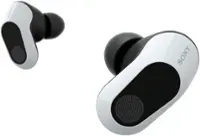
Wireless Earbuds, Now Playing. For Glory. Arctis GameBuds for Xbox bring gaming-grade 2.4GHz wireless with Quick-Switch Wireless for Bluetooth. Easily connect to Xbox, PC, ROG Xbox Ally X handhelds, Switch, and more with a slim USB-C dongle. Tune out the noise with active noise cancellation and immerse deeper with 360° Spatial Sound while enjoying 10-hour sessions.

The A20 Wireless headset Gen 2 is designed to give you gaming audio freedom on several levels. Its 2.4 GHz signal provides an extended wireless range and the microphone delivers clear and accurate communication with easy mute functionality. The USB transmitter allows for easy cross-platform connectivity.
| Pros for Microsoft - Xbox Wireless Gaming Over-the-Ear Headset for Xbox Series X|S, Xbox One, and Windows 10|11 - Black | |||
|---|---|---|---|
| Sound Quality, Comfort, Battery Life, Volume Control, Connectivity | Sound Quality, Comfort, Price, Volume Control, Compatibility | Sound Quality, Comfort, Battery Life, Portability, Fit | Sound Quality, Comfort, Battery Life, Price, Wireless |
| Cons for Microsoft - Xbox Wireless Gaming Over-the-Ear Headset for Xbox Series X|S, Xbox One, and Windows 10|11 - Black | |||
| There were no cons for this product— | Battery Life, Connection, Wire | Volume, Connectivity, ANC, Bass, Compatibility | Volume, Headband |
Specs
Reviews
Customers are saying
Customers express satisfaction with the Xbox Wireless Gaming Headset, highlighting its sound quality and comfortable design. Users appreciate the ease of connectivity with Xbox consoles and the reliable battery life that meets their needs. The convenient volume control dials and the headset's balanced weight are also well-received features. Overall, the headset appears to provide a positive user experience.
Customer Images
The vast majority of our reviews come from verified purchases. Reviews from customers may include My Best Buy members, employees, and Tech Insider Network members (as tagged). Select reviewers may receive discounted products, promotional considerations or entries into drawings for honest, helpful reviews.
- Rated 5 out of 5 stars
Love this headset!
First off, I'd like to say that this is my first ever official Xbox headset. I had high expectations for it, and let me say that it reached my expectations and gone a bit beyond that. I love the audio quality and being able to play around with the equalizer - when I watch movies or videos everything sounds so clear, and I can easily adjust the audio thanks to the ergonomic volume adjusters. When I play games like Call of Duty or Outlast Trials I'm able to hear every little footstep AND the position it came without having to lock-in and strain my ears. My favorite feature though is the ability to connect the headset not just to my Xbox but also to my phone or laptop at the same time, and as someone who had to wear earbuds and a cheap headset just to be able to listen to some music, this is a massive improvement and one of the key features that made me buy this headset specifically. Overall, I really like the product for its audio quality and comfortable fit, and I'd recommend it for anyone who values comfort, sound quality, customization options, and being able to link to other devices while gaming!
Posted by LArri
- Rated 5 out of 5 stars
Xbox headset
Love this headset. Easy to use and very comfortable. Dials on the side provide easy volume control. Mic monitoring is so good I have it all the way down and still get told people can hear me breathing lol.
Posted by JohnR
- Rated 4 out of 5 stars
Review of Xbox headset
This is a headset made for xbox video game console. It plays audio, and sounds alike. You can make it loud or quiet, and you can even hear voices! The bass is a bit too loud but you can configure them. Sometimes I wear sweats when I wear these headphones to increase comfort. Maybe have a hot chocolate. Not coffee though, I stopped drinking coffee a few months ago. For a while it would make me poop then it stopped making me poop and the caffeine made me head hurt so I said nuh-uh mr. Folgers. Also basketball is my favorite sport bye
Posted by PAUL