MSI - MPG 491CQP QD-OLED 49" 5120x1440 (DQHD) Curved OLED Quantum Dot Monitor 144Hz 0.03ms(GTG) HDR400 Type-C DisplayPort HDMI - Black
MSI - MPG 491CQP QD-OLED 49" 5120x1440 (DQHD) Curved OLED Quantum Dot Monitor 144Hz 0.03ms(GTG) HDR400 Type-C DisplayPort HDMI - Black
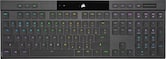
- CORSAIR - K100 Air Wireless Full-Size Bluetooth RGB Mechanical Cherry MX Ultra Low Profile Tactile Switch Gaming Keyboard - Black$249.99The price was $329.99

More Buying Options

Specifications
- Refresh Rate144HzMaximum Resolution5120 x 1440Response Time0.03 millisecondsPanel TypeNot ApplicableSynchronization TechnologyNot ApplicableScreen Size49 inches
- Key Specs
- Refresh Rate: 144Hz (The number of frames per second the device can produce natively without enhancement. Higher rates help produce smooth, seamless pictures.)
- Maximum Resolution: 5120 x 1440 (Maximum resolution refers to the highest number of pixels that a screen can process and display. Higher resolution signals produce more detailed images.)
- Response Time: 0.03 milliseconds (The speed at which pixels can change colors is called response time. It is measured in milliseconds (ms).)
- Panel Type: Not Applicable (Technology that affects response time and image quality.)
- Synchronization Technology: Not Applicable (Generally, these technologies allow syncing between a computer/console game's frame rate and the device's refresh rate for a smoother display without tearing.)
- Screen Size: 49 inches (Size of the screen, measured diagonally from corner to corner.)
- Display Connector(s): 2 x HDMI 2.1, 1 x DisplayPort 1.4 (The number and type of connectors used to connect to an external display.)
- General
- Brand: MSI
- Model Number: MPG 491CQP QD-OLED
- Product Name: MPG 491CQP QD-OLED 49" 5120x1440 (DQHD) Curved OLED Quantum Dot Monitor 144Hz 0.03ms(GTG) HDR400 Type-C DisplayPort HDMI
- Color: Black
- Operating System Compatibility: Android, Apple iOS, Windows
- Display
- Refresh Rate: 144Hz (The number of frames per second the device can produce natively without enhancement. Higher rates help produce smooth, seamless pictures.)
- Maximum Resolution: 5120 x 1440 (Maximum resolution refers to the highest number of pixels that a screen can process and display. Higher resolution signals produce more detailed images.)
- Contrast Ratio: 1,500,000:1 (Measured difference between a displayed image's brightest whites and darkest blacks. The larger the first number, the more detail and color that can be displayed.)
- Response Time: 0.03 milliseconds (The speed at which pixels can change colors is called response time. It is measured in milliseconds (ms).)
- Display Type: OLED
- Panel Type: Not Applicable (Technology that affects response time and image quality.)
- Synchronization Technology: Not Applicable (Generally, these technologies allow syncing between a computer/console game's frame rate and the device's refresh rate for a smoother display without tearing.)
- Aspect Ratio: 32:9 (The measurement of the width of a screen compared to the height of a screen, expressed as a ratio.)
- Curved Screen: true
- Brightness: 1000 candela per square meter (A measure of the total light output.)
- Screen Size: 49 inches (Size of the screen, measured diagonally from corner to corner.)
- High Dynamic Range (HDR): true (An HDR-compatible 4K TV or other HDR-compatible product displays HDR video content when it's available from sources like 4K Ultra HD Blu-ray Discs and 4K streaming services.)
- High Dynamic Range Format: VESA Certified DisplayHDR 400 True Black (There are a few HDR formats that tell the TV or other HDR-compatible product how to best utilize its capabilities to display HDR content. HDR technology can support one or multiple formats, each with various benefits to picture quality.)
- Horizontal Viewing Angle: 178 degrees (The maximum angle at which the display can be viewed with acceptable visual performance from either side.)
- Vertical Viewing Angle: 178 degrees (The maximum angle at which the display can be viewed with acceptable visual performance from above or below.)
- Touch Screen: false (Touch-screen devices make navigating more intuitive. Using a touch-screen display, you can do things such as tap to select, hold and drag to move items, swipe to scroll, and pinch to zoom.)
- On-Screen Display Languages: English (The available language options for displayed text.)
- Display Surface: Anti-glare
- Connectivity
- Number of HDMI Inputs (Total): 2
- Display Connector(s): 2 x HDMI 2.1, 1 x DisplayPort 1.4 (The number and type of connectors used to connect to an external display.)
- Number of USB Ports (Total): 4
- USB Ports: 1 x USB-C, 2 x USB-A 2.0, 1 x USB-B (The number and type of USB ports the product has.)
- Headphone Jack: true (The device features an interface that allows for the connection of headphones.)
- Compatibility
- Wall Mountable: true (The product is able to be secured to a wall. Some products are designed ready to mount, while others may require additional hardware/accessories for installation.)
- VESA Wall Mount Standard: 100mm x 100mm (VESA wall mount standards refer to the spacing of screw holes built into a TV in order to fit with standard TV wall mounts. These standards are implemented into most TVs and monitors.)
- Features
- Tiltable: true
- Adjustable Stand Height: true
- Built-In Webcam: false
- Integrated Speaker(s): false
- Dimensions
- Product Height With Stand: 16.15 inches
- Product Height Without Stand: 14.65 inches
- Product Width: 47.05 inches (The out of box width of the item. Width is measured as the horizontal distance from one side of the item to the other as it would be primarily used or placed.)
- Product Depth (With Stand): 12.92 inches
- Product Depth Without Stand: 7.48 inches
- Product Weight: 22.71 pounds (The out of box weight of the item.)
- Stand Included: true
- Certifications Listings & Approvals
- ENERGY STAR Certified: false (Devices carrying the ENERGY STAR service mark, such as computer products and peripherals, kitchen appliances, and other products, generally use 20% to 30% less energy than required by federal standards.)
- EPEAT Qualified: false (The Electronic Product Environmental Assessment Tool (EPEAT) was designed to provide an environmental assessment tool for purchasers. In order to qualify for EPEAT, a product must meet all 23 required criteria.)
- Other
- UPC: 824142340349
Visualize your victory with the MPG 491CQP QD-OLED gaming monitor. It boasts a 5120x1440 (DQHD) 1800R curved next-gen QD-OLED panel, 144Hz refresh rate, and rapid 0.03ms(GtG) response time. VESA certification for ClearMR 7000 and DisplayHDR True Black 400 ensures exceptionally vivid images and mitigates motion blur. OLED Care 2.0 reduces OLED burn-in risks. For console gamers, the MPG 491CQP QD-OLED provide HDMI 2.1 ports with 48Gbps bandwidth, 120Hz support, VRR, and ALLM.
- 1800R QD-OLED Panel: MSI's renowned QD tech, combined with the latest OLED panel technology, these displays exhibit the best picture quality and incredible high contrast when gaming
- DQHD 5120 x 1440 resolution: High resolutions that deliver a solid gaming or video experience without undue strain on your graphics card.
- Fastest 0.03 response time: Response time is much faster and smoother than conventional LCD displays. The response time is up to 0.03 ms GtG exceeds the most mainstream refresh rates requirements
- 144Hz high refresh rate: Experience smooth gaming with a blazing fast refresh rate, that gives you the upper hand in fast-moving games.
- Graphene film with Custom Heatsink: Graphene film and customized heatsink designs, the synergy between these two elements enables the monitor to operate without an active cooling fan, achieving a fanless design. This ensures efficient and silent heat dispersion, further extending the panel's lifespan.
- OLED Care 2.0: MSI has developed a more advanced version to provide several care services and significantly reduce the chances of OLED screen aging.
- VEASA DisplayHDR True Black 400: It has passed the VESA DisplayHDR True Black 400 Certification, meaning it can provide a display with the most realistic colors.
Whats Included
- MPG 491CQP QD-OLED
- 1*HDMI Cable
- 1*USB AtoB Cable
- 1*Power Cord
Product Manuals
Q: What is the benefit of OLED Care 2.0?
A: It provides several care services and significantly reduces the chances of OLED screen aging.
Q: How many HDMI ports does this monitor have?
A: This monitor has 2 HDMI 2.1 ports.
Q: What is the refresh rate of the monitor?
A: The MSI MPG 491CQP monitor has a 144Hz refresh rate.
Q: Why does this monitor not have a fan?
A: The combination of Graphene film and customized heatsink designs enables the monitor to operate without a fan.
Q: Does this monitor have speakers?
A: No, this monitor does not have integrated speakers.
Q: Does this monitor support HDR?
A: Yes, it has VESA DisplayHDR True Black 400 certification.
Q: What is the response time of this monitor?
A: This monitor boasts a rapid 0.03ms(GtG) response time.
A: For the monitor to automatically perform the OLED Panel Refresh pixel cleaning the following settings must be true. Why this isn't part of the manual, or warned on the monitors menu is beyond me. You must use these settings if you don't want to be interrupted by OLED warnings/cleanings while you are busy!!! Power Button -> "OFF" USB C Powed -> "OFF" Recommended setting for quality of life (not required) Protect Notice -> 16 hrs. The above settings will make it so the monitor performs OLED cleaning once 4hrs of use is true and the monitor is inactive for the specified time during in the monitors settings. I googled "MSI Panel Protect Reddit" and went through tons of complaints before finding the above solution. I've updated my monitor's firmware and am running FW.017 for reference. Also for reference in the newer firmware, MSI fixed the issue where the monitor would power off after OLED cleaning. So if your monitor is powering down on you forcing you to manually power it back on, you can fix this by updating your monitor's firmware. Aside from this OLED issue that is resolved by tweaking settings, the MSI MPG 491CQP is definitely the best OLED monitor I've used between Samsung, LG, MSI, and Gigabyte. Especially for out of the box picture and gaming features.
Compare similar products

Visualize your victory with the MPG 491CQP QD-OLED gaming monitor. It boasts a 5120x1440 (DQHD) 1800R curved next-gen QD-OLED panel, 144Hz refresh rate, and rapid 0.03ms(GtG) response time. VESA certification for ClearMR 7000 and DisplayHDR True Black 400 ensures exceptionally vivid images and mitigates motion blur. OLED Care 2.0 reduces OLED burn-in risks. For console gamers, the MPG 491CQP QD-OLED provide HDMI 2.1 ports with 48Gbps bandwidth, 120Hz support, VRR, and ALLM.

Visualize your victory with the MPG 491CQPX QD-OLED gaming monitor. It boasts a 5120x1440 (DQHD) 1800R curved next-gen QD-OLED panel, 240Hz refresh rate, and rapid 0.03ms(GtG) response time. VESA certification for ClearMR 7000 and DisplayHDR True Black 400 ensures exceptionally vivid images and mitigates motion blur. OLED Care 2.0 reduces OLED burn-in risks. For console gamers, the MPG 491CQP QD-OLED provide HDMI 2.1 ports with 48Gbps bandwidth, 120Hz support, VRR, and ALLM.
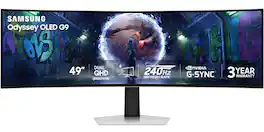
Samsung’s 49" Odyssey OLED G9 Dual QHD Curved Gaming Monitor takes gaming to new heights. Content springs to life with a wider color spectrum and vibrant images on a 5120 x 1440 resolution screen. OLED technology delivers near instant reaction time with 0.03ms (GtG) and a 240Hz refresh rate. G-Sync compatibility keeps the GPU and panel in perfect sync, which reduces choppiness, screen lag, and image tearing. The wide 32:9 screen in Dual QHD resolution and 110 PPI provides an unparalleled level of clarity. OLED Glare Free technology significantly reduces glare from external sources for a distraction-free presentation. OLED Safeguard automatically adjusts brightness, reduces heat, and dims during breaks. Deep Black Levels depict truer black and dark colors on screen for supreme depth in every game. The ergonomic height-adjustable stand with tilting enables the ideal angles during game play. HDMI 2.1, Micro HDMI, DisplayPort, USB-C Upstream and Downstream ports provide increased flexibility and reduce cable clutter. CoreSync & Core Lighting+ add color and enhance the screen’s surroundings for an immersive experience. Picture-in-Picture and Picture-by-Picture makes multitasking easy and efficient. 3-Year Warranty.
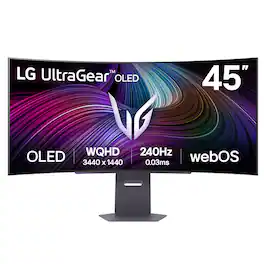
Experience lightning-quick speed with up to a 240Hz refresh rate¹ and 0.03ms response time on a huge 45" WQHD curved OLED monitor. UltraGear Fact: The 45-inch 21:9 45” UltraGear OLED monitor delivers more screen area than a 49-inch 32:9 aspect ratio screen. The sweeping, steep 800R curve surrounds you in the action. And with the 240Hz refresh rate, and 0.03ms response time, the action is fast, the play seamless and precise. Dive into UltraGear OLED’s immaculate visuals with up to 98.5% of DCI-P3 color coverage and a 1,500,000:1 contrast ratio for stunning blacks and vibrant colors. LG's game-changing webOS streaming platform adds ease and versatility, letting you enjoy your favorite entertainment streaming platforms as well as cloud gaming services from one, simple to access home screen. Adaptive sync technologies FreeSync Premium Pro and NVIDIA G-SYNC compatibility ensure tear-free, stutter-free performance, whether you're on PC or next-gen consoles. Plus, the UltraGear's 2-year OLED limited warranty and OLED Care features give you peace of mind, keeping your UltraGear monitor in top shape. Designed for gamers, the virtually borderless design complements any gaming setup, with height, tilt, and pivot adjustments for optimal comfort. The RBG backlighting creates the mood that’ll upgrade any battlestation.
| Pros for MSI - MPG 491CQP QD-OLED 49" 5120x1440 (DQHD) Curved OLED Quantum Dot Monitor 144Hz 0.03ms(GTG) HDR400 Type-C DisplayPort HDMI - Black | |||
|---|---|---|---|
| Color Quality, Connectivity, KVM Functionality | Refresh Rate, Image Quality | Screen Size, Overall Performance, Refresh Rate, OLED Quality, Resolution | Overall Performance, Screen Size, OLED Quality, Refresh Rate, Resolution |
| Cons for MSI - MPG 491CQP QD-OLED 49" 5120x1440 (DQHD) Curved OLED Quantum Dot Monitor 144Hz 0.03ms(GTG) HDR400 Type-C DisplayPort HDMI - Black | |||
| There were no cons for this product— | There were no cons for this product— | Speakers, Port Selection | Text Clarity, Connectivity, Software |
Specs
Reviews
Customers are saying
Customers frequently mention the MPG 491CQP QD-OLED monitor's exceptional color quality. Many users highlight how rich and vibrant the colors appear on the display. With no cons listed, the monitor seems to be well-received for its visual performance.
Customer Images
The vast majority of our reviews come from verified purchases. Reviews from customers may include My Best Buy members, employees, and Tech Insider Network members (as tagged). Select reviewers may receive discounted products, promotional considerations or entries into drawings for honest, helpful reviews.
- Rated 5 out of 5 stars
Extra Wide and Extra Quality
I’ve been using this ultrawide monitor for a few months now, and it has completely transformed my workspace. The wide curved display gives me the perfect balance between productivity and immersion. I can comfortably run multiple windows side by side—video calls, editing software, and browser tabs—without ever feeling cramped. The picture quality is crisp, colors are vibrant, and the refresh rate keeps everything smooth, whether I’m working or gaming. The curve makes a real difference too—it pulls me right into the screen without straining my eyes during long sessions. Build quality feels solid, and setup was super easy. I’ve paired it with a dual monitor setup (as you can see in my photo), and it integrates perfectly. No issues with connectivity—HDMI and DisplayPort both work flawlessly. If you spend long hours at your desk, whether for work or play, this monitor is a game changer. It’s one of those upgrades you don’t realize you needed until you have it. Highly recommend!
LucasDantas Posted
- Rated 5 out of 5 stars
Stunning
I was worried about getting an ultrawide, especially a 49" one but I had a friend who recommended it. I was very excited at the prospect of a QD-OLED and thought I'd give it a go. I will never be able to game on anything but a huge ultrawide monitor ever again, its level of immersion can not be matched by a regular monitor. The Panel is gorgeous and the HDR content in games is absolutely incredible, I've been setting to 1,000 HDR for maximum brightness but even the true black 400 HDR looks stunning. I strongly recommend this monitor for anyone who has the space.
JonathanM Posted
- Rated 5 out of 5 stars
First ultrawide
Shipping box design was a nice feature from the start. Very easy to open, get to and setup the monitor right from the packaging, also very secure. This is my first ultrawide coming from a pretty old 16:9 32 inch Samsung. I immediately appreciated the extra space. I mainly do coding, photo editing and your basic stuff with the intention to expand my sim racing to pc. At first, text was a bit hard for me to read, but with some quick adjustments, I'm pretty happy with it even without any scaling. The colors on this monitor are just amazing, so vivid and intense yet fully distinguishable. I did hook a console up and had no issues getting full console mode. Colors are excellent on console as well. Since my first pc build several decades ago, I have used MSI and every subsequent build since. This is however my first MSI monitor. I am quite pleased with this monitor thus far with no real complaints. Minor issue of the bottom trim plate not fully seating on the apex of both the left and right side curve. This is only noticable when standing above view line and looking down. This was only visible due to light reflection in that area otherwise I would never know. All in all I am happy with my purchase and glad I held out for a bit and got this MSI monitor. Overall recommend.
Deee Posted