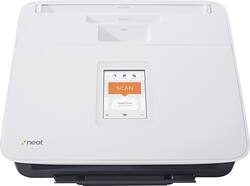
Neat - NeatConnect Premium Sheetfed Scanner - Multi
Model: 2005151
SKU: 7052037
This item is no longer available in new condition. See similar items below
- Key Specs
- Networking: Wireless
- Scan (Color) Speed: 24 copies per minute (The number of color pages able to be scanned per minute.)
- Scan Method: Single pass
- Duplex Scan Function: true
- General
- Product Name: NeatConnect Premium Sheetfed Scanner
- Brand: Neat
- Model Number: 2005151
- Color: Multi
- Connectivity
- Scanner Connectivity: USB
- Minimum System Requirements: PC: Windows 7 or later; Mac: OS X 10.8 or later
- Dimensions
- Product Height: 7.5 inches (The out of box height of the item. Height is measured as the vertical distance from the bottom of the item to the top as it would be primarily used or placed.)
- Product Width: 11 inches (The out of box width of the item. Width is measured as the horizontal distance from one side of the item to the other as it would be primarily used or placed.)
- Maximum Document Length: 30 inches
- Maximum Document Width: 8.5 inches
- Product Weight: 5.3 pounds (The out of box weight of the item.)
- Features
- Automatic Document Feeder Capacity: 50 sheets
- Automatic Document Feeder Included: true
- Scanner Type: Sheetfed
- Scanner Resolution: Up to 600 (Refers to the number of pixels/dots, both horizontally and vertically, of the image produced by the scanner. Generally, the higher the resolution, the sharper and cleaner the produced image.)
- Included
- Included Software: Neat Premium (1-year subscription)
- Scanner Info
- Scanner Bit Depth: 48 (Refers to the number of bits used to define each pixel in the captured image and determines the number of colors or tones that can be represented. Generally, the greater the bit depth, the better the image quality.)
- Certifications Listings & Approvals
- ENERGY STAR Certified: false (Devices carrying the ENERGY STAR service mark, such as computer products and peripherals, kitchen appliances, and other products, generally use 20% to 30% less energy than required by federal standards.)
- TWAIN Compliant: true (Products with this label are compliant with standards set by the TWAIN Working Group for regulating communication between software and digital imaging devices. Devices that are TWAIN compliant are compatible for use with each other without requiring additional software, even if they have different capabilities.)
- Warranty
- Warranty - Parts: 1 year limited
- Warranty - Labor: 1 year limited
- Other
- UPC: 857312005151
This Neat NeatConnect Premium 2005151 scanner features a 50-sheet ADF (automatic document feeder), so you can easily keep track of your receipts, business cards and documents. Built-in wireless networking simplifies use.
- Up to 600 dpi resolution: Promotes clear receipt, business card and document reproduction.
- 48-bit color depth: Allows you to maintain faithful colors.
- Up to 24 ppm color scanning: Enables fast performance.
- NeatVerify: Helps ensure up to 99% accuracy for data extracted from receipts and business cards, so you can easily manage your budget and keep track of contacts.
- 50-sheet ADF (automatic document feeder): Allows you to scan multiple documents with ease.
- Includes basic Neat Cloud service: So you can store plenty of information. Advanced capture enables inbox scraping and use with other applications, such as Dropbox.
- Wireless networking: Enables simple connection to your home or office network.
- USB interface: Makes it easy to connect your compatible PC or Mac. The scanner comes with a 1-year subscription of Neat Premium software and also works with QuickBooks Online, Xero, Campaign Monitor, Constant Contact and MailChimp.
- Up to 600 dpi resolution: Promotes clear receipt, business card and document reproduction.
- 48-bit color depth: Allows you to maintain faithful colors.
- Up to 24 ppm color scanning: Enables fast performance.
- NeatVerify: Helps ensure up to 99% accuracy for data extracted from receipts and business cards, so you can easily manage your budget and keep track of contacts.
- 50-sheet ADF (automatic document feeder): Allows you to scan multiple documents with ease.
- Includes basic Neat Cloud service: So you can store plenty of information. Advanced capture enables inbox scraping and use with other applications, such as Dropbox.
- Wireless networking: Enables simple connection to your home or office network.
- USB interface: Makes it easy to connect your compatible PC or Mac. The scanner comes with a 1-year subscription of Neat Premium software and also works with QuickBooks Online, Xero, Campaign Monitor, Constant Contact and MailChimp.
Whats Included
- NeatConnect Premium Sheetfed Scanner
- USB cable, power supply
- Scanner calibration paper
- Software activation card
- Owner's manual
- NeatConnect Premium Sheetfed Scanner
- USB cable, power supply
- Scanner calibration paper
- Software activation card
- Owner's manual














