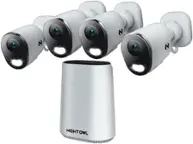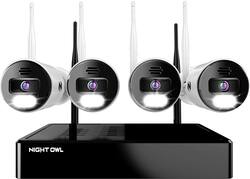
Night Owl - 10 Channel Bluetooth Wi-Fi NVR with 4 Wi-Fi IP 4K HD 2-Way Audio Cameras and 1TB Hard Drive - White
- Key Specs
- Camera Resolution: 3840 x 2160 (Refers to the number of pixels, both horizontally and vertically, used to capture video/images. The higher the resolution the finer the detail that can be seen.)
- Field Of View: 100 degrees (The area of a target, measured as an angle from the location of viewing, that can be observed.)
- Night Vision: true
- Number Of Cameras Included: 4
- Camera Power Source: Cable with AC Adapter/Plug-in
- Works With: Google Assistant (Compatible with or able to be connected to other smart devices or applications.)
- Wireless Connectivity: Wi-Fi, Bluetooth (The manner in which a device sends data to another device over a short distance without the use of wires or cables.)
- Number Of Channels: 10
- Recording Resolution: 3840 x 2160 (Refers to the number of pixels, both horizontally and vertically, used to capture video. The higher the resolution the finer the video detail that can be seen.)
- Storage Type: NVR
- Indoor Or Outdoor Use: Indoor and outdoor (Indicates the appropriate environment product was designed to be used in.)
- Minimum Operating Temperature: -4 degrees fahrenheit (The lowest recommended ambient (surrounding) temperature in which the product can ideally operate stated by the manufacturer. Generally long-term exposure of the product to temperatures less than the minimum can result in ineffective operation.)
- Maximum Operating Temperature: 140 degrees fahrenheit (The highest recommended ambient (surrounding) temperature in which the product can ideally operate stated by the manufacturer. Generally long-term exposure of the product to temperatures more than the maximum can result in ineffective operation.)
- Audio Communication: 2-way (1-way communication devices allow a user to hear detected audio, while 2-way communication adds the ability for a user to talk back through the device.)
- General
- Product Name: 10 Channel Bluetooth Wi-Fi NVR with 4 Wi-Fi IP 4K HD 2-Way Audio Cameras and 1TB Hard Drive
- Brand: Night Owl
- Model Number: BTWN8-4L1
- Color: White
- Camera
- Video Camera Resolution: 4K (2160p) (Refers to the number of pixels, both horizontally and vertically, used to capture video/images. The higher the resolution the finer the detail that can be seen.)
- Camera Resolution: 3840 x 2160 (Refers to the number of pixels, both horizontally and vertically, used to capture video/images. The higher the resolution the finer the detail that can be seen.)
- Field Of View: 100 degrees (The area of a target, measured as an angle from the location of viewing, that can be observed.)
- Night Vision: true
- Night Vision Distance: 100 feet
- Night Vision Image: Color
- Camera Movement: Fixed
- Zoom Mode: Digital
- Number Of Cameras Included: 4
- Number Of Cameras Supported: 10
- Day/Night Mode: true (Captures images/video with optimal clarity by automatically adjusting settings to various light levels.)
- IP Camera: WiFi (An Internet Protocol (IP) camera is able to record and display image/video data via the internet, without need for a local recording device.)
- Camera Iris: Manual (The iris is the opening on a camera that controls how much light reaches its image sensor, which in turn affects image/video clarity. Fixed and manual irises are generally suited for locations with consistent levels of light. Automatic and "P" (precise) irises automatically adjust in response to changing levels of light and are suited for a wider variety of environments. "P" irises feature additional capabilities for improving footage clarity.)
- Image Sensor Type: CMOS (CCD and CMOS are the two main technologies used in image sensors. CCD, the older of the two types, turns analog light signals into digital pixels. This conversion happens without distortion, resulting in high-quality images. Newer CMOS sensors use transistors at each pixel to move electrical charges. CMOS sensors are typically less expensive, but also require more light to create distortion-free images.)
- Camera Mount Type: Wall mount
- Power
- Camera Power Source: Cable with AC Adapter/Plug-in
- Sensor Power Source: Plug-in
- Compatibility
- App Compatible: true (The product can be connected to a program or software application on a mobile device, which then receives collected data from the product.)
- App Features: Single Sign-On and 2-Step Verification
- Camera Compatibility: WNIP2 and WNIP8 Series Cameras
- Operating System Compatibility: Android, Apple iOS, Windows, Mac
- Works With: Google Assistant (Compatible with or able to be connected to other smart devices or applications.)
- Connectivity
- Camera Connectivity: Wireless (Security system cameras can be set up in several ways. Wired cameras require cables for power and footage transmission, while wire-free cameras don't need cables for either. Wireless cameras still require cables for receiving power but are able to transmit footage via a wireless network.)
- Wireless Connectivity: Wi-Fi, Bluetooth (The manner in which a device sends data to another device over a short distance without the use of wires or cables.)
- Network Connectivity: 4G, 4G LTE, 5G (The manner in which a device sends data to another device over a long distance using a cellular network.)
- Maximum Wireless Range: 300 feet
- Minimum Upload Speed: 3 megabits per second (The minimum connection speed necessary to upload or stream content from the device.)
- Recording & Playback
- Records Audio: true
- Number Of Channels: 10
- Video Compression Type: Advanced
- Recording Resolution: 3840 x 2160 (Refers to the number of pixels, both horizontally and vertically, used to capture video. The higher the resolution the finer the video detail that can be seen.)
- Video Recording Prompt: Motion detection
- Storage
- Storage Type: NVR
- DVR Storage Capacity: 1000 gigabytes
- Performance
- Indoor Or Outdoor Use: Indoor and outdoor (Indicates the appropriate environment product was designed to be used in.)
- Protective Qualities: Weather resistant
- Minimum Operating Temperature: -4 degrees fahrenheit (The lowest recommended ambient (surrounding) temperature in which the product can ideally operate stated by the manufacturer. Generally long-term exposure of the product to temperatures less than the minimum can result in ineffective operation.)
- Maximum Operating Temperature: 140 degrees fahrenheit (The highest recommended ambient (surrounding) temperature in which the product can ideally operate stated by the manufacturer. Generally long-term exposure of the product to temperatures more than the maximum can result in ineffective operation.)
- Features
- Audio Communication: 2-way (1-way communication devices allow a user to hear detected audio, while 2-way communication adds the ability for a user to talk back through the device.)
- Mobile Notifications: true
- Audio-Only Option: true
- 3-Axis Adjustable: true
- Auto-On Detection: Motion
- Alarm Type: Audible, Voice
- Alarm Location: On camera
- Dimensions
- Camera Height: 3 inches
- Camera Depth: 6 inches
- Camera Weight: 0.5 pounds
- DVR Height: 2 inches
- DVR Width: 8 inches
- DVR Depth: 10 inches
- DVR Weight: 2.5 pounds
- DVR Cord Length: 6 feet
- Sensor
- Sensors: Motion sensor, Light sensor (Detects stimuli such as heat, light, sound, motion, or pressure and responds accordingly by operating a control or initiating a function of the device.)
- Output
- DVR Output(s): HDMI
- Display
- Clock Display: true
- Camera Color Display: true
- Included
- Camera(s) Included: true
- DVR Included: true
- Monitor Included: false
- Remote Control Included: false
- Included Software: True
- Cable(s) Included: true
- Other
- UPC: 816522024178
Night Owl is excited to offer our U.S. designed and engineered 4K Wi-Fi Bluetooth Network Video Recorder with Wi-Fi IP 4K Spotlight Cameras and Pre-Installed Hard Drive. With secure app-based Bluetooth setup, there is no need to connect a TV or monitor for setup or viewing (optional). You can easily configure your system right from the app on your smartphone or tablet with the Bluetooth connection. While a TV or monitor is not required, with Google Assistant you can use simple voice commands to stream camera footage directly to your TV or monitor, all while remaining hands free. Each camera has 2-Way audio (talk and listen) as well as a built-in siren and preset voice alerts. From within the app, you can easily activate the built-in siren, startling intruders and sending them packing. Have a guest but can’t get to them? Use a preset voice alert to let them know! Smart detection technology including human detection, facial capture, and vehicle alerts reduce the risk of false alarms, keeping you safe and well protected. Facial capture lets you see who is on your property by snapping a photo and sending the image to your Smart Device. Motion-activated dual spotlights flood your yard with bright lights when human motion is detected, instantly warding off trespassers. Proudly designed and engineered in the USA, our security system uses a built-in wireless connection for uninterrupted viewing with no delays. Our app gives you control of your system and easy access to your recordings, regardless of where you are. Night Owl never charges fees for storage or access to your videos. All recordings are securely stored on a pre-installed hard drive for convenience. You can view and download the recordings as you need them. This system provides the latest technology to give you the ultimate security experience. NOTE: Your Wi-Fi recorder is compatible with our BWNIP2 (Wire Free), WNIP2 (Wi-Fi IP) and WNIP8 (Wi-Fi IP) Series devices and is not backward compatible with other Night Owl products.
- Designed and engineered in the USA: All Night Owl products are proudly designed and engineered in the United States.
- Secure app-based Bluetooth setup: Set up and control the system right from the app on your Smart Device via a secure Bluetooth wireless connection. Our app and your system are password protected to shield your data. While not required, you can connect a TV or monitor via HDMI output.
- Prioritize your privacy: We value your privacy as much as you do. Your recordings and data are for your eyes only and are kept secure on the pre-installed hard drive. Additionally, with 2-Step Verification and Single Sign-On we protect your information while making access convenient.
- Secure wireless network: Your security camera feed and personal data are securely stored on the hard drive and your system is not reliant on cloud storage. An independent wireless network provides uninterrupted video transmission for recording, playback or live view from a TV or monitor.
- AC powered Wi-Fi IP indoor/outdoor cameras: Your cameras plug into an outlet and can be quickly installed inside or outside in minutes. With an enhanced range, the cameras are also easily movable as your viewing needs change.
- Amplified coverage with built-in audio features: Use the app to send a preset message to a guest, ward off trespassers with a loud siren or listen & talk with someone on your property with our clear and static free 2-way audio (half duplex).
- Built-in dual spotlights: Powerfully bright motion-activated dual spotlights put intruders on notice and provide full-color viewing and recording at night.
- Smart detection technology: Instantly be alerted with human detection, facial capture and vehicle alerts right to your smartphone or tablet.
- No monthly fees: All recordings are stored locally on the pre-installed 1TB hard drive to safeguard your privacy. No hidden costs or subscription fees.
- Free Night Owl mobile app: Monitor and manage your security system in real-time from your mobile device.
- Sharp 4K HD video resolution: Enjoy clear and detailed live view and recording with your new 4K cameras.
- Detailed night vision with ultra wide angle viewing: Your 4K cameras have a 100° field of view with up to 100 ft. of night vision. With available ambient light your cameras will provide full-color night time viewing. If no ambient light, cameras will switch to black and white.
- Integrated voice control: Your system works with Google Assistant. Stream your live camera footage instantly to your TV or monitor all while remaining hands free.
- Ceiling and wall mountable: Easily mount your cameras to a wall or ceiling atleast 7 ft. above the ground. A 3-axis vandal-proof mounting bracket prevents exposure from potential intruders.
- View and record up to 10 channels: Your system includes 4 Wi-Fi IP cameras. However, you can add up to 10 total Wi-Fi devices to get the coverage you need.
A: The cameras will wirelessly connect to the Wi-Fi NVR using the NVR's built-in Wi-Fi. However, these cameras are AC Powered and must be powered on using the provided camera power adapters. The cameras can be up to 300 ft. from the Wi-Fi NVR, with line of sight. If there are obstacles between the camera and Wi-Fi NVR, the signal strength will be reduced. Thank you.
A: Yes, you can switch the recording mode from motion to continuous, to record 24/7. Keep in mind, this will eat through your available hard drive space at a much quicker rate. Once the hard drive becomes full, it is set to auto-overwrite old footage. Thank you for choosing Night Owl!
Q: What is the difference between DVR and NVR?
A: Great question. A DVR is a Digital Video Recorder that functions with our compatible wired BNC cameras. The cameras connect to the DVR using wired BNC coaxial cabling. An NVR is a Network Video Recorder that is compatible with our wired IP cameras and connects via Ethernet cabling. A Wi-Fi NVR is a Wireless Network Video Recorder that works with our wireless IP cameras. Which type of system you get would depend on your setup needs. Typically with our wired systems, an Ethernet cable connection allows the camera to be placed further from the recorder than a wired BNC connection. And please note, with our Wi-Fi NVR there are range limitations that you will want to consider with your particular setup. The wireless IP cameras can be up to 300 ft. from the Wi-Fi NVR, but obstacles between the Wi-Fi NVR and cameras can and will impede the signal strength. Thank you for the questions and for shopping Night Owl!
A: Hi Mark. With 4 x cameras recording at 4K, you will get just over 7 days on continuous record with the pre-installed 1TB hard drive. Thank you for choosing Night Owl!
Q: Do you have to connect to the internet? Also can I use a 1080 p tv?
A: Your Night Owl device only needs to be connected to a modem/router if you wish to view it remotely on a PC/MAC or a Smart Device. To remotely view your system, you must manually connect an Ethernet cable from your modem/router to the DVR/NVR. If you do not want remote viewing, you can connect the system to a TV or monitor to view live video feed and recordings. Yes, you can use a 1080p TV, just keep in mind... you will not receive the full benefit of the 4K resolution as you will be capped at 1080p viewing. Thanks for choosing Night Owl!
Q: How this camera can be adjusted right and left? Looks like it is fixed.
A: Hi Hoan. There is a handle on the side of the camera that allows you to move it up and down. To adjust the angle side-to-side, you would twist at the base of the camera, loosening the camera from the mount (slightly). Then manually adjust the angle, left-to-right, and then retighten. Thank you for choosing Night Owl!
Q: How far ( Feet ) does it pick up motion to alert you?
A: Hi trish. These cameras can capture motion within a 40 ft. to 100 ft. range, depending on the size of the object and how the camera is mounted and angled. For optimal viewing, we recommend placing the cameras 7 to 10 ft. above the ground and angling them slightly down. Thank you for choosing Night Owl!
Q: Can I disable the flood lights? HOA does not permit motion detected lights.
A: Yes, the spotlight can be disabled for one or more cameras if desired. This can be done at the DVR/NVR level or remotely via the App. This may come in handy for cameras that are installed inside the home, or during special events where you anticipate a lot of camera activity. For more information on disabling the spotlight, please refer to your product's support material on our support site, linked below. Thank you for choosing Night Owl! https://support.nightowlsp.com/hc/en-us