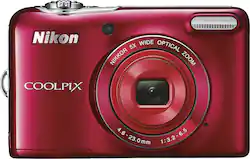
Nikon - Coolpix L32 20.1-Megapixel Digital Camera - Red
- General
- Product Name: Coolpix L32 20.1-Megapixel Digital Camera
- Brand: Nikon
- Model Number: 26482
- Color: Red
- Digital Camera Type: Point and Shoot Cameras
- Imaging
- Image Sensor Type: CCD (CCD and CMOS are the two main technologies used in image sensors. CCD, the older of the two types, turns analog light signals into digital pixels. This conversion happens without distortion, resulting in high-quality images. Newer CMOS sensors use transistors at each pixel to move electrical charges. CMOS sensors are typically less expensive, but also require more light to create distortion-free images.)
- Image Resolution (Display): 5152 x 3864 (Refers to the number of pixels, both horizontally and vertically, used to either capture an image or display it. The higher the resolution the finer the image details.)
- Digital Zoom: 4x (A digital zoom is accomplished electronically, with no adjustment of the camera's optics, and no optical resolution gained in the process. The existing data is not enhanced or added to, merely displayed at a lower resolution, thereby giving an illusion of an enlarged image.)
- Low Light/High Sensitivity: false (High sensitivity digital imaging devices are designed to work in low light conditions to produce a high dynamic range image.)
- Image File Format(s): JPEG (Standardized software format(s) of storing digital images. The type of format chosen for capturing and compressing the image can determine quality, level of detail, and storage space required.)
- Focus
- Autofocus: true (Allows the camera to automatically focus through the lens, rather than by adjusting the lens manually.)
- Exposure Control
- Shutter Speeds: 1/2000 - 1 sec.; 4 sec. (fireworks show) (The length of time the shutter remains open when the shutter release is activated, expressed in fractions of seconds. The longer the shutter is open, the more light that is able to be captured by the camera sensor.)
- Minimum Aperture: 6.5 f/ (The smallest opening of a lens, typically expressed in f-numbers. The larger the number, the smaller the aperture and the less light that can enter the lens. A smaller aperture creates a larger depth of field, which keeps both foreground and background in focus.)
- Maximum Aperture: 3.2 f/ (The limit to how wide a lens can be open, typically expressed in f-numbers. The smaller the number, the larger the aperture and the more light that can enter the lens. A larger aperture creates a shallower depth of field, helpful for keeping subjects in focus and blurring background details.)
- Brightness Control: true (Allows the camera to adjust the brightness of a captured image for optimal exposure.)
- Burst Mode: true (Also referred to as continuous shooting. This feature captures multiple shots in rapid succession.)
- Self Timer: true
- Shooting Modes: Scene auto selector, scene, special effects, smart portrait, auto (Exposure modes employed by the photographer to control the optimal aperture, shutter speed, ISO, and other settings for capturing specific subjects/scenes. Examples include Aperture-Priority, Macro, and Manual modes.)
- Panorama Mode: true
- Scene Modes: Backlighting, beach, close-up, dusk/dawn and more (Exposure modes with predetermined optimal settings for capturing specific scenes. Examples include Landcape, Portrait, and Sports modes.)
- White Balance Modes: Auto, daylight, incandescent, fluorescent, cloudy, flash, preset WB (Settings that calibrates how the color white is rendered in an image/video, reducing the appearance of unnatural contrasts caused by various light sources.)
- Lens
- Lens Mount Compatibility: Not Applicable
- Flash
- Flash Modes: Auto, Fill-in, Red-eye reduction (The flash feature emits light to increase the brightness of a subject in dimly lit environments. Common modes include Auto and Red-Eye Reduction.)
- Integrated Flash: true
- Display
- Display Type: LCD
- Screen Size: 3 inches (Size of the screen, measured diagonally from corner to corner.)
- Screen Resolution: Approximatley 230,000 dots (Screens come in a range of resolutions (measured in pixels, horizontal x vertical). The higher the resolution, the greater the picture quality.)
- Touch Screen: false (Touch-screen devices make navigating more intuitive. Using a touch-screen display, you can do things such as tap to select, hold and drag to move items, swipe to scroll, and pinch to zoom.)
- Varying Angle Screen: false (The camera's screen can be flipped out and adjusted to rotate, tilt, and/or swivel.)
- Video
- HD Movie Mode Focus: Auto
- Compatibility
- Tripod/Monopod Mountable: Yes (A support function that allows the device to be mounted to monopods and tripods for leveling and stability.)
- Socket Size: 1/4 in.
- Memory Card Compatibility: Secure Digital, Secure Digital High Capacity (SDHC), Secure Digital Extended Capacity (SDXC) (The type of memory card(s) recommended for use with the product.)
- Features
- Face Detection: true (A function that automatically detects human faces and then sets focus and appropriate exposure to capture them.)
- Integrated GPS: No
- Records Audio: true
- Connectivity
- Output(s): USB, HDMI
- PictBridge Enabled: true (PictBridge allows digital cameras, camcorders and other image capture devices to connect and print directly to photo printers and other output devices without using a computer.)
- Power
- AC Adapter Compatible: false (The device is able to be charged using an external power adapter which meets input and output voltages specified by the manufacturer.)
- Included
- Batteries Included: true (Indicates whether the product comes with the required batteries for its operation.)
- Memory Card Included: false (Indicates whether a memory card is included.)
- Dimensions
- Product Height: 2.37 inches (The out of box height of the item. Height is measured as the vertical distance from the bottom of the item to the top as it would be primarily used or placed.)
- Product Width: 3.76 inches (The out of box width of the item. Width is measured as the horizontal distance from one side of the item to the other as it would be primarily used or placed.)
- Product Depth: 1.14 inches (The out of box depth of the item. Depth is measured as the distance from the front of the item to the back as it would be primarily used or placed.)
- Product Weight: 0.36 pounds (The out of box weight of the item.)
- Other
- UPC: 018208264827
Capture realistic photos and high-definition video footage with this Nikon Coolpix L32 digital camera, which features a 20.1-megapixel CCD sensor and a NIKKOR 26-130mm glass lens with vibration reduction.
Memory card sold separately.
- 20.1-megapixel CCD sensor: Captures high-resolution images up to 5152 x 3864 pixels.
- 4x digital/10x Dynamic Fine zoom: Through a NIKKOR 26-130mm glass lens with vibration reduction for precise zooming and accuracy.
- 3" TFT-LCD: With an antireflective coating, 5-level brightness adjustment and approximately 230,000 dots resolution makes it easy to set up and review shots.
- Dedicated movie record button: Enables you to capture high-definition video footage in AVI (motion JPEG compliant) format.
- Electronic image stabilization: Helps reduce the effects of camera shake and vibration to minimize blurring.
- Scene modes: Include backlighting, beach, close-up, dusk/dawn, easy panorama, fireworks show, food, landscape, night landscape, night portrait, party/indoor, pet portrait, portrait, scene auto selector, snow, sports and sunset.
- Burst mode: Allows you to capture images in rapid succession at up to 1.1 fps for up to 6 shots.
- Shooting modes: Include scene auto selector, scene, special effects, smart portrait and auto for versatility.
- White balance modes: Include auto, daylight, incandescent, fluorescent, cloudy, flash and preset WB for shooting in various lighting conditions.
- TTL (through-the-lens) auto flash with monitor preflashes: With auto, fill flash and red-eye modes lets you add light to scenes when necessary.
- Autofocus: Helps you bring subjects into clear view. A Smart Portrait System makes it simple to take portraits and self-portraits.
- Card slot: Supports SD, SDHC and SDXC formats.
- Store more photos!: Find compatible memory cards in our Memory Card Finder.
- 20.1-megapixel CCD sensor: Captures high-resolution images up to 5152 x 3864 pixels.
- 4x digital/10x Dynamic Fine zoom: Through a NIKKOR 26-130mm glass lens with vibration reduction for precise zooming and accuracy.
- 3" TFT-LCD: With an antireflective coating, 5-level brightness adjustment and approximately 230,000 dots resolution makes it easy to set up and review shots.
- Dedicated movie record button: Enables you to capture high-definition video footage in AVI (motion JPEG compliant) format.
- Electronic image stabilization: Helps reduce the effects of camera shake and vibration to minimize blurring.
- Scene modes: Include backlighting, beach, close-up, dusk/dawn, easy panorama, fireworks show, food, landscape, night landscape, night portrait, party/indoor, pet portrait, portrait, scene auto selector, snow, sports and sunset.
- Burst mode: Allows you to capture images in rapid succession at up to 1.1 fps for up to 6 shots.
- Shooting modes: Include scene auto selector, scene, special effects, smart portrait and auto for versatility.
- White balance modes: Include auto, daylight, incandescent, fluorescent, cloudy, flash and preset WB for shooting in various lighting conditions.
- TTL (through-the-lens) auto flash with monitor preflashes: With auto, fill flash and red-eye modes lets you add light to scenes when necessary.
- Autofocus: Helps you bring subjects into clear view. A Smart Portrait System makes it simple to take portraits and self-portraits.
- Card slot: Supports SD, SDHC and SDXC formats.
- Store more photos!: Find compatible memory cards in our Memory Card Finder.
Whats Included
- Coolpix L32 20.1-Megapixel Digital Camera
- 2 alkaline batteries
- Wrist strap
- Owner's manual
- Coolpix L32 20.1-Megapixel Digital Camera
- 2 alkaline batteries
- Wrist strap
- Owner's manual
Q: How do I copy my pictures from my camera ?
A: If you saved your pictures to your SD card, you can take the SD card to any Kodak Kiosk snd make copies
Q: Does this camera have a zoom and crop feature once the picture has been taken?
A: yes it does have a zoom, macro and a crop in the editing tools
Q: does it come with a SB connector
A: No. It just has camera with free batteries in it.
A: I don't use one but it does have a screw hole on the bottom
Q: I am looking for the power cord of the cool pix L32
A: The L32 runs on AA batteries and does not require a power cord. Please see page 6 of the L32 Reference Manual for details on applicable AA batteries for the L32. The EH-65A AC adapter can be used operate the L32 while plugged into an outlet instead of using batteries. The UC-E16 USB cable can be used to connect the camera to a computer for image transfer, but will not charge the camera's batteries.
Q: I am try to look at pic I take but I don't see any buttons to Touch for the pic to come up
A: The button on the Nikon COOLPIX L32 digital camera that is used to display your images is called the playback button. This button is located on the right hand side of the back of the camera and is underneath the red-dotted, movie-record button. You can see your images when the camera is off by pressing and holding the playback button down briefly. Your image will appear on the LCD screen and you can then scroll through all your images by pressing left or right on the multi-selector button (the big button around the "OK" button). If you have any more questions regarding the use of your camera please contact Nikon Support for help.
Q: does this have the hated power save feature?
A: The Nikon COOLPIX L32 does have an Auto Off setting that cannot be turned off. On this camera model the Auto Off setting can be set to 30 seconds (default), 1 minute, 5 minutes or 30 minutes while in the Auto Off menu setting.
Q: memory card
A: I am not really sure. I have this memory card SanDisk - 16GB SDHC and it works good with this