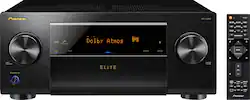
Pioneer - Elite 7.2-Ch. Hi-Res 4K Ultra HD A/V Home Theater Receiver - Black
- Key Specs
- Number of Channels: 7.2 (The number of discrete channels of sound output. This can be a single number or multiple numbers separated by decimal(s). The first number is the primary, horizontally directed audio channels. The number after the first decimal, if applicable, is the number of subwoofer outputs or channels. The number after the second decimal, if applicable, is the number of height or atmospheric channels designed to immerse the listener by producing overhead sound effects.)
- Video Pass-through: 2160 (4K) (Devices with this feature allow video signals to travel from their source to a target device without alteration. For example, a receiver with 4K pass-through would allow 4K video signal from a Blu-ray player to pass to a target TV with surround sound; without the pass-through ability, the receiver would not allow both 4K video and surround sound to be transmitted simultaneously.)
- General
- Product Name: Elite 7.2-Ch. Hi-Res 4K Ultra HD A/V Home Theater Receiver
- Brand: Pioneer
- Model Number: SCLX502
- Audio
- Number of Channels: 7.2 (The number of discrete channels of sound output. This can be a single number or multiple numbers separated by decimal(s). The first number is the primary, horizontally directed audio channels. The number after the first decimal, if applicable, is the number of subwoofer outputs or channels. The number after the second decimal, if applicable, is the number of height or atmospheric channels designed to immerse the listener by producing overhead sound effects.)
- High Resolution Audio: true (Hear music the way musicians and sound technicians intended it to be heard. Products that support hi-res audio deliver audio signals with a dynamic range and bandwidth far greater than that of a standard CD so you'll be able to enjoy pure music with outstanding sound quality. The device supports high-resolution audio signals, which more closely resemble the quality of music as it was originally recorded, with more texture and detail than can be heard via typical music streaming services or CDs.)
- Surround Sound Supported: DTS 96/24, DTS:X, Dolby Atmos, Dolby Digital Plus, Dolby TrueHD (Surround sound systems use multiple audio channels and speakers to create an immersive sound experience for the listener. There are also various proprietary technologies that imitate this kind of sound via a device's built-in speakers or soundbar.)
- Maximum Sampling Rate Supported: 11.2 MHz DSD (Generally, the higher the sampling rate, the greater the quality of audio and/or video.)
- Speaker A/B Switching: true (Allows a user to select between one of two sets of primary speakers.)
- Supported File Formats: AAC, AIFF, Apple Lossless, DSD, FLAC, MP3, WAV, WMA
- Equalizer: true (Allows for the control of different frequencies within an audio signal, such as adjusting treble and bass levels.)
- Inputs
- Front Facing Inputs: HDMI, USB
- Video
- Video Pass-through: 2160 (4K) (Devices with this feature allow video signals to travel from their source to a target device without alteration. For example, a receiver with 4K pass-through would allow 4K video signal from a Blu-ray player to pass to a target TV with surround sound; without the pass-through ability, the receiver would not allow both 4K video and surround sound to be transmitted simultaneously.)
- Outputs
- Speaker Connection Type: Binding posts
- Headphone Jack: true (The device features an interface that allows for the connection of headphones.)
- Features
- Auto Calibration: true (Home theater systems and receivers with an autocalibration function can automatically determine basic settings like speaker volume, crossover point, equalization, and more.)
- Digital Content Protection: HDCP 2.2 (High-bandwidth Digital Content Protection (HDCP) is designed to prevent copying of digital audio and video content as it travels across connections. Newer versions of HDCP support more connection types, increase security, and resolve weaknesses of previous versions.)
- Remote Control Included: true
- Connectivity
- Wireless Multi-Room Audio: true (Technology that allows multiple speakers and/or soundbars to be connected wirelessly and play audio in separate rooms.)
- Wireless Multi-Room Technology: Apple AirPlay, DTS Play-Fi, Google Cast (Proprietary technology that allows multiple speakers and/or soundbars to be connected wirelessly and play audio in separate rooms.)
- IP Control: true (Allows electronic devices to be controlled over a home network via a web-based interface. Typically refers to devices not traditionally controlled in this manner, such as A/V receivers.)
- Dimensions
- Product Height: 7.3 inches (The out of box height of the item. Height is measured as the vertical distance from the bottom of the item to the top as it would be primarily used or placed.)
- Product Width: 17.2 inches (The out of box width of the item. Width is measured as the horizontal distance from one side of the item to the other as it would be primarily used or placed.)
- Product Depth: 15.6 inches (The out of box depth of the item. Depth is measured as the distance from the front of the item to the back as it would be primarily used or placed.)
- Product Weight: 26.2 pounds (The out of box weight of the item.)
- Certifications Listings & Approvals
- ENERGY STAR Certified: true (Devices carrying the ENERGY STAR service mark, such as computer products and peripherals, kitchen appliances, and other products, generally use 20% to 30% less energy than required by federal standards.)
- Warranty
- Manufacturer's Warranty - Parts: 3 Years
- Manufacturer's Warranty - Labor: 3 years
- Other
- UPC: 889951001003
Optimize surround sound performance with this 7.2-channel Pioneer Elite network A/V receiver. Its seven HDMI inputs support 4K, HDR and Dolby Vision video, and it works with 5.1.2-channel Dolby Atmos and DTS:X speaker configurations for a cinematic audio experience. This Pioneer Elite network A/V receiver has two HDMI outputs for connecting Zone 2 components. Includes HDMI 4K Ultra HD and 3D pass-through technologies for compatibility with 3D TVs, Blu-ray players and gaming consoles and 4K Ultra HD TVs.
- Connect to the Internet: Via built-in Wi-Fi for access to Pandora, Deezer, Spotify, TuneIn, TIDAL and Chromecast.
- 4K and 3D passthrough: Allows high-quality 3D and 4K video through the receiver straight to your media device.
- Surround sound decoders: Include Dolby Digital Plus, Dolby TrueHD, Dolby Atmos, Dolby Vision, DTS-ES decoder, DTS 96/24 and more for crystal surround sound.
- Apple® AirPlay support: Supports distributed audio playback in another room, so you can enjoy music throughout your home.
- Speaker A/B switching: Lets you switch between 2 sets of speakers to expand your listening environment.
- x.v.Color, Deep Color and HDR10 color technology: Produce vibrant hues for a lifelike picture.
- 0.08% total harmonic distortion: Ensures clear audio.
- Advanced surround modes: Include classic, unplugged, entertainment, pop/rock, action, drama, sports, advanced game, extended stereo and mono for quality sound in almost any genre.
- Bass and treble controls: Enable simple sonic customization, so you can tailor the sound to suit your preferences.
- Hi-Res audio support: Lets you enjoy high-quality audio playback via LAN, USB, Bluetooth.
- Advanced MCACC automatic room calibration: Automatically optimizes receiver output to optimum sound for the room acoustics.
- AM/FM tuner: With 40 station presets lets you program your favorites for simple one-touch recall.
- Headphone jack: Enables private listening.
- USB port: Enables simple connection of a variety of USB-enabled devices.
- Auxiliary input: Makes it easy to connect a variety of devices.
- 7 HDMI inputs, 2 HDMI outputs: HDMI cable not included. High-speed HDMI cable is the only connection that can deliver a full high-definition experience with a full 1080p picture and digital surround sound.
- Pure Direct mode: Bypasses the buffer amp and tone, loudness and balance controls for pure sound.
- ENERGY STAR certified: Assures a high standard of energy efficiency.
Whats Included
- Pioneer Elite 7.2-Ch. Hi-Res 4K Ultra HD A/V Home Theater Receiver
Q: Does it have an optical input??
A: Yes. This A/V receiver has two inputs.
Q: can i hook up 4ohm speakers and 8ohm with this amplifier?
A: Yes, this amplifier supports 4, 6 and 8 ohm speaker connections.
Q: Does the 502 decode Dts X as well as Dolby Atmos?
A: Yes, though I only played atmos on mine (no dts x red box rental discs yet). I have mine hooked up for 7.1 normally, and switch to 5.2 via the configuration option in the menu (when needed). You need two extra speakers for this, though this is a much more cost effective option than the higher cost recievers (my old sc-95 which never worked right). The 502 is a great reciever, especially given the close out prices. The newer 503 handles the two extra speakers better, but you lose many features (eq for each channel, class d amps) and is double the price. Given the limited source content, I really don't miss the exra two speakers (can only drive 7 at a time instead of 9).
Q: Will this transmit to a Bluetooth or wireless speaker??
A: Unfortunately, it will not transmit to a Bluetooth device (without adding an external Bluetooth transmitter). However, it does receive Bluetooth signals so you can stream music from a Bluetooth source (e.g., a cell phone) to the AV Receiver.
Q: My 502 Pioneer will not connect Bluetooth with my phone why
A: undefined
Q: Can this drive a 4ohm speakers? Thank you!
A: Yes, 4, 6 and 8 Ohms
A: No, the receiver must be plugged in for the video to pass through. I believe all new pass through receivers are the same. However, depending on the type of TV you are using you may be able to go from media source ie cable box, directv to the TV first and then output the sound via HDMI out or optical cable to your receiver. Then you would be able to unplug the receiver and get normal video but using your TV speakers. I hope this info will help.
A: CALL THEM!!!! Pioneer has the best customer support ever!











