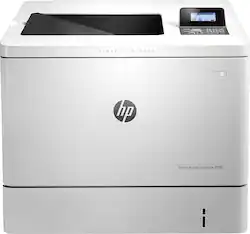
HP - Color LaserJet Enterprise M553n - Color - 1200 x 1200 dpi Print - Plain Paper Print - Desktop Laser Printer - White
- Key Specs
- Networking: Wired
- ENERGY STAR Certified: true (Devices carrying the ENERGY STAR service mark, such as computer products and peripherals, kitchen appliances, and other products, generally use 20% to 30% less energy than required by federal standards.)
- Printer Type: Printer
- Duty Cycle: Up to 80,000 (The maximum number of pages per month that the device can produce without failing, as specified by the manufacturer.)
- ISO Color Print Speed: 40 pages per minute (The number of color pages able to be printed per minute in the device's default single-side mode, as tested by the International Standards Organization (ISO).)
- ISO Mono Print Speed: 40 pages per minute (The number of black ink (grayscale) pages able to be printed per minute in the device's default single-side mode, as tested by the International Standards Organization (ISO).)
- Monochromatic/Color: Color
- General
- Product Name: Color LaserJet Enterprise M553n - Color - 1200 x 1200 dpi Print - Plain Paper Print - Desktop Laser Printer
- Brand: HP
- Display Screen: false
- Model Number: B5L24A#BGJ
- Dimensions
- Product Height: 15.7 inches (The out of box height of the item. Height is measured as the vertical distance from the bottom of the item to the top as it would be primarily used or placed.)
- Product Width: 18 inches (The out of box width of the item. Width is measured as the horizontal distance from one side of the item to the other as it would be primarily used or placed.)
- Product Weight: 59.5 pounds (The out of box weight of the item.)
- Features
- Automatic Document Feeder: true
- Photo Printing: false
- Automatic Reduction/Enlargement: false
- Automatic Two-Sided Printing: false
- Certifications Listings & Approvals
- EPEAT Qualified: false (The Electronic Product Environmental Assessment Tool (EPEAT) was designed to provide an environmental assessment tool for purchasers. In order to qualify for EPEAT, a product must meet all 23 required criteria.)
- Paper Info
- Automatic Document Feeder Capacity: 550 sheets
- Maximum Document Length: 14 inches
- Maximum Document Width: 8.5 inches
- Paper Feeder: Multipurpose tray
- Paper Handling: 100-Sheet Multipurpose Tray, 250-Sheet Output Bin, 550-Sheet Input Tray
- Supported Paper Sizes: A4, Custom Size, legal, letter
- Tray Capacity: 550
- Ink
- Compatible Cartridges: HP 508A: CF360A, CF361A, CF362A, CF363A, 508X; CF360X, CF361X, CF362X, CF363X
- Ink Subscription Service Available: false (The printer monitors ink usage and alerts the subscription provider when levels are low. A purchased subscription provides refills of ink based on usage.)
- Performance
- Approximate Page Yield (Black): 6000
- Printer Resolution (Black): Up to 1200 x 1200 (Refers to the number of pixels/dots, both horizontally and vertically, of the image produced by the printer in black ink. Generally, the higher the resolution, the sharper and cleaner the produced image.)
- Printer Resolution (Color): Up to 1200 x 1200 (Refers to the number of pixels/dots, both horizontally and vertically, of the image produced by the printer in colored ink. Generally, the higher the resolution, the sharper and cleaner the produced image.)
- Output Tray Capacity: 250 sheets
- Recommended Monthly Volume: 2000 to 6000 pages (The maximum number of pages that can be printed per month, as recommended by the manufacturer. Printing in excess of this number may reduce the machine's overall lifespan or print quality over time.)
- First Page Out Time: 6 seconds (The time it takes the printer to print and deliver the first page in the output tray. May depend on the complexity of the copy being printed.)
- Connectivity
- Minimum System Requirements: N/A
- Other
- UPC: 888182487266
Enjoy flexibility at the office with this HP Color LaserJet Enterprise M553n color printer, which features Apple® AirPrint, HP ePrint, Ethernet connectivity and a USB port for a simple wired and mobile device printing solution.
- Be sure you have the right cartridge: Enter your printer's model number into our Ink and Toner Finder to find compatible cartridges. Get started ›
Whats Included
- HP Color LaserJet Enterprise M553n Color Printer
- 4 HP 508A LaserJet toner cartridges (black, cyan, magenta, yellow)
- Power cord, 2 input trays
- Owner's manual
- Software CD
A: The difference between the M553n and the M553dn models is the M533dn model can do automatic double-sided printing. With the M553n, you would have to manually turn the paper over.
A: Hi, Yes, they are all separate cartridges (black, cyan, magenta, & yellow). It depends on your needs. If you do print in color monthly and do not want to go to Staples or another office supply store to print in color, i would say get the color option; it would be a bigger waste of money to purchase a separate printer just for color. This is toner, not ink. It will last much longer than an ink jet printer so you won't really be 'wasting' the toner. I think that once you get the printer, you may start printing more in color. The prints are amazing; you won't be disappointed by this printer.
A: This is only a printer that prints. It does not have the capability to copy or scan.
Q: Will this printer print on glossy paper for pictures?
A: No, it will not print on glossy photo paper, since photo paper is almost always made for inkjet printers. You can use glossy laser presentation paper, brochure paper or any other premium glossy paper made for laser printers.
Q: Does this printer print on cardstock?
A: Yes, you can use a card stock to this printer.
A: This model will use the HP 508A toner. Black can print up to 6000 pages. The color toner is up to 5000 pages. It will not work with instant ink.
A: You can print on Avery (or other brand) labels that are made for laser printers with this HP Laserjet Enterprise M553n.
Q: Can this printer handle card stock and envelopes?
A: This printer can handle paper up to 58 pounds. And it can print on envelopes.