Logitech - MX Mechanical Mini Compact Wireless Mechanical Clicky Switch Keyboard for Windows/macOS with Backlit Keys - Graphite
Logitech - MX Mechanical Mini Compact Wireless Mechanical Clicky Switch Keyboard for Windows/macOS with Backlit Keys - Graphite
Key Switch Behavior
ClickyMore Buying Options
Related Item

Specifications
- Lighting TypeSingle colorForm FactorCompact (60%), ErgonomicKeyboard TechnologyMechanicalKey Switch BehaviorClickyConnection TypeWireless
- Key Specs
- Lighting Type: Single color
- Form Factor: Compact (60%), Ergonomic (The size, arrangement, and physical configuration of the product.)
- Keyboard Technology: Mechanical (Type of technology that detects a key press.)
- Key Switch Behavior: Clicky (Refers to the mechanisms under the keycaps on a keyboard that enable you to type faster and more precisely. Linear switches move straight up and down without any sound or bump. Tactile switches provide a noticeable bump in the key press, and no sound. Clicky switches provide a bump in the key press and "clicky" sound.)
- Connection Type: Wireless
- General
- Brand: Logitech
- Model Number: 920-010552
- Product Name: MX Mechanical Mini Compact Wireless Mechanical Clicky Switch Keyboard for Windows/macOS with Backlit Keys
- Color: Graphite
- Features
- Lighting Type: Single color
- Customizable Lighting: false
- Numeric Keypad: false
- Touchpad: false
- Palm Rest: false
- Spill Resistant: false (Designed to resist some degree of accidental liquid spill. The level of spill-resistance is indicated by the product manufacturer, but the degree of protection may not be guaranteed after normal wear of the product.)
- Foldable: false
- Keycap Material: ABS
- Functions
- Form Factor: Compact (60%), Ergonomic (The size, arrangement, and physical configuration of the product.)
- Keyboard Technology: Mechanical (Type of technology that detects a key press.)
- Dedicated Macro Keys: false (Perform shortcuts of key sequences to carry out commands with a single key. Key sequences may include key strokes, mouse actions, and/or menu actions.)
- Adjustable Tilt Function: false
- Key Switch Behavior: Clicky (Refers to the mechanisms under the keycaps on a keyboard that enable you to type faster and more precisely. Linear switches move straight up and down without any sound or bump. Tactile switches provide a noticeable bump in the key press, and no sound. Clicky switches provide a bump in the key press and "clicky" sound.)
- Multimedia Keys: true
- Number Of Programmable Keys: 0
- Connectivity
- Connection Type: Wireless
- Wireless Connectivity: Radio Frequency (RF), Bluetooth (The manner in which a device sends data to another device over a short distance without the use of wires or cables.)
- Maximum Wireless Range: 33 feet
- Number Of USB Port(s): 1 (The total number of USB ports including all generations and versions.)
- Compatibility
- Operating System Compatibility: Universal, Mac, Chrome, Linux, Apple iPadOS, Apple iOS, Android
- Plug and Play Operation: true
- System Requirements: Bluetooth Low Energy technology enabled device: Windows 10, 11, or later, macOS 10.15 or later, iOS 14 or later, iPadOS 14 or later, Linux, ChromeOS, Android 8.0 or later. Available USB-A port required to connect via receiver. (The software that a product must have for it to be able to integrate with another product.)
- Power
- Battery Chemistry: Lithium
- On/Off Switch: true
- Dimensions
- Product Height: 1.02 inches (The out of box height of the item. Height is measured as the vertical distance from the bottom of the item to the top as it would be primarily used or placed.)
- Product Width: 12.3 inches (The out of box width of the item. Width is measured as the horizontal distance from one side of the item to the other as it would be primarily used or placed.)
- Product Depth: 5.17 inches (The out of box depth of the item. Depth is measured as the distance from the front of the item to the back as it would be primarily used or placed.)
- Product Weight: 21.5 ounces (The out of box weight of the item.)
- Mouse
- Mouse Included: false
- Warranty
- Warranty - Parts: 1 year
- Warranty - Labor: None
- Other
- UPC: 097855174628
Introducing MX Mechanical Mini- a minimalist keyboard with extraordinary feel, precision, and performance. Low-profile mechanical typing delivers satisfying feedback in your choice of key switches – Tactile Quiet, Clicky, or Linear. MX Mechanical Mini is crafted for ergonomic comfort, with smart illumination and Easy-Switch – allowing you to connect up to 3 devices and stay in your flow for hours.
- Fluid and quiet mechanical typing: MX Mechanical Mini keyboard features Tactile Quiet switches that deliver next-level feel and flow with less noise - Clicky and Linear switches are also available.
- Low-profile keys, ergonomic comfort: A keyboard layout designed for effortless precision, with a small, compact form factor and low-profile mechanical switches for better ergonomics.
- Smart illumination: Backlit keys light up the moment your hands approach the cordless keyboard and automatically adjust to suit changing lighting conditions.
- Faster workflow, more customization: Customize Fn keys, assign backlighting effects, enable Flow cross-computer, multi-device control, and more in the improved Logi Options+ .¹
- Multi-device, multi-OS wireless keyboard: Pair MX Mechanical Mini Bluetooth wireless keyboard with up to 3 devices on nearly any operating system via Bluetooth Low Energy or included Logi Bolt receiver.²
- USB-C quick charging: MX Mechanical Mini keyboard stays powered up to 15 days on a full charge or up to 10 months with the backlighting turned off.³
- MX Mechanical full-size cordless keyboard: If you crunch numbers frequently, a full-size keyboard form factor with an integrated numpad is also available.
- Sustainable design: Plastic parts in MX Mechanical Mini (Graphite) include 47% certified post-consumer recycled plastic (excludes plastic in printed wiring assembly (PWA), cables, and packaging.). Certified carbon neutral.
- Fluid and quiet mechanical typing: MX Mechanical Mini keyboard features Tactile Quiet switches that deliver next-level feel and flow with less noise - Clicky and Linear switches are also available.
- Low-profile keys, ergonomic comfort: A keyboard layout designed for effortless precision, with a small, compact form factor and low-profile mechanical switches for better ergonomics.
- Smart illumination: Backlit keys light up the moment your hands approach the cordless keyboard and automatically adjust to suit changing lighting conditions.
- Faster workflow, more customization: Customize Fn keys, assign backlighting effects, enable Flow cross-computer, multi-device control, and more in the improved Logi Options+ .¹
- Multi-device, multi-OS wireless keyboard: Pair MX Mechanical Mini Bluetooth wireless keyboard with up to 3 devices on nearly any operating system via Bluetooth Low Energy or included Logi Bolt receiver.²
- USB-C quick charging: MX Mechanical Mini keyboard stays powered up to 15 days on a full charge or up to 10 months with the backlighting turned off.³
- MX Mechanical full-size cordless keyboard: If you crunch numbers frequently, a full-size keyboard form factor with an integrated numpad is also available.
- Sustainable design: Plastic parts in MX Mechanical Mini (Graphite) include 47% certified post-consumer recycled plastic (excludes plastic in printed wiring assembly (PWA), cables, and packaging.). Certified carbon neutral.
Whats Included
- MX Mechanical Mini Keyboard
- Logi Bolt receiver
- USB-C charging cable (USB-A to USB-C)
- User documentation
- MX Mechanical Mini Keyboard
- Logi Bolt receiver
- USB-C charging cable (USB-A to USB-C)
- User documentation
Compare similar products
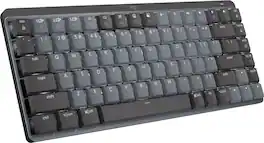
Introducing MX Mechanical Mini- a minimalist keyboard with extraordinary feel, precision, and performance. Low-profile mechanical typing delivers satisfying feedback in your choice of key switches – Tactile Quiet, Clicky, or Linear. MX Mechanical Mini is crafted for ergonomic comfort, with smart illumination and Easy-Switch – allowing you to connect up to 3 devices and stay in your flow for hours.

Introducing MX Mechanical Mini- a minimalist keyboard with extraordinary feel, precision, and performance. Low-profile mechanical typing delivers satisfying feedback in your choice of key switches – Tactile Quiet, Clicky, or Linear. MX Mechanical Mini is crafted for ergonomic comfort, with smart illumination and Easy-Switch – allowing you to connect up to 3 devices and stay in your flow for hours.
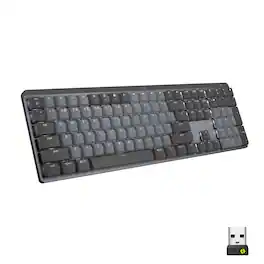
Introducing MX Mechanical - a full-size keyboard with extraordinary feel, precision, and performance. Low-profile mechanical typing delivers satisfying feedback in your choice of key switches – Tactile Quiet, Clicky, or Linear. MX Mechanical is crafted for ergonomic comfort, with smart illumination and easy-switch – allowing you to connect up to 3 devices and stay in your flow for hours.

A minimalist keyboard mastered for Mac with extraordinary feel, precision, and performance. Low-profile mechanical switches deliver a satisfying and quiet typing experience. Dual colored keycaps with a key layout for Mac computers help improve precision through your peripheral vision. Plus, get a complimentary 1-month Creative Cloud subscription with your purchase of MX Mechanical Mini For Mac and create, make, and do like never before.
| Pros for Logitech - MX Mechanical Mini Compact Wireless Mechanical Clicky Switch Keyboard for Windows/macOS with Backlit Keys - Graphite | |||
|---|---|---|---|
| There were no pros for this product— | Keyboard Quality, Battery Life, Key Feel, Connectivity, Size | Keyboard Quality, Battery Life, Key Feel, Connectivity, Ease of use | There were no pros for this product— |
| Cons for Logitech - MX Mechanical Mini Compact Wireless Mechanical Clicky Switch Keyboard for Windows/macOS with Backlit Keys - Graphite | |||
| There were no cons for this product— | Price, Number Pad, Weight | Price, Noise Level, Software, Space Bar | There were no cons for this product— |
Specs
Reviews
Customer Images
The vast majority of our reviews come from verified purchases. Reviews from customers may include My Best Buy members, employees, and Tech Insider Network members (as tagged). Select reviewers may receive discounted products, promotional considerations or entries into drawings for honest, helpful reviews.
- Rated 5 out of 5 stars
Excellent iPad Mechanical Keyboard - Clicky Type
Absolutely perfect. The clicky type mechanical keyboard is exactly what I was looking for. The keys are nicely spaced - not cramped, nor too expansive. Love the layout with the Function keys across the top. Paired easily via Bluetooth with my iPad 2020. My productivity has jumped 100-fold. Bought the Logitech iPad mouse after enjoying this experience so much. Using an iPad has become so much better - I’ve gone from being an occasional iPad user to really cranking out on it. I didn’t know it could connect up to three devices and toggle between them - that has been a major bonus. I would highly recommend this to anyone who uses mechanical keyboards and really needs one on the go
This review is from Logitech - MX Mechanical Mini Compact Wireless Mechanical Clicky Switch Keyboard for Windows/macOS with Backlit Keys - Graphite
Four48 Posted
- Rated 5 out of 5 stars
Perfect Compact Keyboard
Fantastically clicky and fun to use. Has Bluetooth functionality for switching between devices. Highly recommend if you need a compact keyboard, especially if you are working between computers. Rechargeable USB-C is really nice, but might be a drain if you hook into a laptop or tablet. I paired this with the Logitech MX Master 3S via its dongle using the Logi Options software.
This review is from Logitech - MX Mechanical Mini Compact Wireless Mechanical Clicky Switch Keyboard for Windows/macOS with Backlit Keys - Graphite
ShaneM Posted
- Rated 3 out of 5 stars
A nice but disappointing keyboard.
I like this keyboard a lot, but it needs some work. The keys are a cheaper plastic (ABS) with a disappointing surface finish that turns shiny from use VERY FAST. I find myself being meticulous, washing my hands constantly, wiping the keys off multiple times daily, attempting to keep the keyboard clean. This is a terrible experience to have to be so careful when using a product your hands are supposed to interact with daily for long periods of time. It induces a lot of stress into my already stressful workflow. Despite my best efforts the keys have permanently taken damage, with very visible shinny wear markings from where your fingers touch. My keys began developing permanent wear marks within DAYS from beginning to use the keyboard new out of the box. After a few weeks use, my keyboard keys look worse than any keyboard I have used heavily for over 10 years! This is highly disappointing in a product that costs this much. Logitech, you NEED to revise this keyboard immediately with PBT or higher quality keycaps. This is unacceptable for a high cost product aimed at the professional working market. And I would suggest you offer replacement keys on request to anyone who owns this expensive MX Mechanical keyboard.
This review is from Logitech - MX Mechanical Mini Compact Wireless Mechanical Clicky Switch Keyboard for Windows/macOS with Backlit Keys - Graphite
FeelThePixels Posted