Logitech - Signature K650 Full-Size Wireless Keyboard for PC/Window/Mac with Wrist Rest - Graphite
Logitech - Signature K650 Full-Size Wireless Keyboard for PC/Window/Mac with Wrist Rest - Graphite
Color
GraphiteFREE shipping to
More Buying Options
Related Item

Specifications
- Lighting TypeNoneForm FactorFull-sizeKeyboard TechnologyMembraneConnection TypeWireless
- Key Specs
- Lighting Type: None
- Form Factor: Full-size (The size, arrangement, and physical configuration of the product.)
- Keyboard Technology: Membrane (Type of technology that detects a key press.)
- Connection Type: Wireless
- General
- Brand: Logitech
- Model Number: 920-010908
- Product Name: Signature K650 Full-Size Wireless Keyboard for PC/Window/Mac with Wrist Rest
- Color: Graphite
- Features
- Lighting Type: None
- Numeric Keypad: true
- Touchpad: false
- Palm Rest: true
- Spill Resistant: true (Designed to resist some degree of accidental liquid spill. The level of spill-resistance is indicated by the product manufacturer, but the degree of protection may not be guaranteed after normal wear of the product.)
- Foldable: false
- Keycap Material: ABS
- Functions
- Form Factor: Full-size (The size, arrangement, and physical configuration of the product.)
- Keyboard Technology: Membrane (Type of technology that detects a key press.)
- Dedicated Macro Keys: false (Perform shortcuts of key sequences to carry out commands with a single key. Key sequences may include key strokes, mouse actions, and/or menu actions.)
- Adjustable Tilt Function: true
- Multimedia Keys: true
- Internet Keys: true
- Number Of Programmable Keys: 0
- Connectivity
- Connection Type: Wireless
- Wireless Connectivity: Bluetooth, Radio Frequency (RF) (The manner in which a device sends data to another device over a short distance without the use of wires or cables.)
- Maximum Wireless Range: 33 feet
- Number of Devices Connectable Simultaneously: 1
- Compatibility
- Operating System Compatibility: Windows, Mac, Chrome, Linux, Apple iPadOS, Apple iOS, Android
- Plug and Play Operation: true
- System Requirements: Via Logi Bolt: available USB Port, Windows 10/11 or later, macOS 10.15 or later, Chrome OS, Linux. Via Bluetooth: Windows 10 or later, macOS 10.15 or later, iPadOS 14.0 or later, iOS 14.0 or later, Chrome OS, Linux, Android 5.0 or later. (The software that a product must have for it to be able to integrate with another product.)
- Power
- Rechargeable Battery: false
- Number of Batteries Required: 2
- Battery Chemistry: Alkaline
- Batteries Included: true (Indicates whether the product comes with the required batteries for its operation.)
- On/Off Switch: true
- Dimensions
- Product Height: 0.94 inches (The out of box height of the item. Height is measured as the vertical distance from the bottom of the item to the top as it would be primarily used or placed.)
- Product Width: 18 inches (The out of box width of the item. Width is measured as the horizontal distance from one side of the item to the other as it would be primarily used or placed.)
- Product Depth: 7.62 inches (The out of box depth of the item. Depth is measured as the distance from the front of the item to the back as it would be primarily used or placed.)
- Product Weight: 24.7 ounces (The out of box weight of the item.)
- Mouse
- Mouse Included: false
- Warranty
- Warranty - Parts: 1 year
- Warranty - Labor: None
- Other
- UPC: 097855179449
Type in comfort and get more done with the Logitech Signature K650 Wireless Comfort Keyboard. Featuring a built-in soft-touch palm rest and deep-cushioned keys, this comfortable keyboard lets you type with ease all day long. The adjustable feet offer two different tilt angles so you can customize your typing position, and the full-size keyboard layout provides convenient access to all the right keys. Logitech’s upgraded shortcut keyboard helps you save time with 24 different commands including mic mute and unmute, screenshot, and web navigation.
- All day comfort: Integrated soft-touch keyboard palm rest meets deep-cushioned keys with that instantly familiar feeling for a satisfying typing experience.
- Achieve more with less effort: Wireless full-size keyboard layout with convenient access to all the right shortcut keys; save time with commands like mic mute, unmute, screenshot, and web navigation.
- Connect the way you like: Wireless connectivity via BLE (Bluetooth Low Energy) wireless technology or the included Logi Bolt receiver.
- Works on multiple platforms: Signature K650 Logitech Wireless Keyboard works with multiple operating systems—Windows, macOS, Chrome OS, Linux, iPadOS, iOS and Android.
- Reliable and hassle-free wireless keyboard: Your cordless keyboard won’t require new batteries for up to 36 months; it is also easy to clean and spill-resistant.¹
- Simply better together: Upgrade to better productivity and flexibility by combining your K650 with the M650 Logitech mouse; personalize via Logi Options+ Software.²
- A design choice you’ll feel good about: Plastic parts in Signature K650 include certified post-consumer recycled plastic (Graphite: 28%, Off-White: 21%).³
Whats Included
- K650 Wireless Comfort Keyboard
- 2 AA batteries (pre-installed)
- Logi Bolt USB Receiver
- User documentation
A: When you press F2 only, the brightness will increase by one level. Continue pressing F2 increase the brightness. To use the other feature such as entering cell in Excel, you need to press the "fn" button, and while it's pressed, press the F2 button. The "fn" button is located to the right side of the space bar, between the "alt" and "ctrl" buttons.
A: Yes, this keyboard does have a function-lock capability. This allows the function keys to function as intended within various software programs.
Q: Does it have a Cap and numbers light?
A: Caps lock light, yes. Num lock light, no.
Q: When do you expect this keyboard in?
A: It’s in stock for delivery.
Q: does it work with any apple mac mini?
A: Works fine with Mac Mini via wireless USB connectivity.
Compare similar products

Type in comfort and get more done with the Logitech Signature K650 Wireless Comfort Keyboard. Featuring a built-in soft-touch palm rest and deep-cushioned keys, this comfortable keyboard lets you type with ease all day long. The adjustable feet offer two different tilt angles so you can customize your typing position, and the full-size keyboard layout provides convenient access to all the right keys. Logitech’s upgraded shortcut keyboard helps you save time with 24 different commands including mic mute and unmute, screenshot, and web navigation.
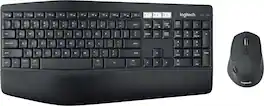
Experience next-level comfort and productivity with the MK850 Performance. Hyper-fast scrolling and a full-size keyboard help you get more done at your desk – and a cushioned palm rest, curved keyframe and contoured mouse let you power through in comfort. Type and switch seamlessly between your computer, tablet, and phone. And pair your mouse with up to 3 devices. The combo has been optimized for use with all your operating systems – including Windows, Mac, and Chrome OS.

MK540 Advanced is an instantly familiar wireless keyboard and mouse combo built for precision, comfort and reliability. The full-size keyboard features a familiar key shape, size, and feeling – optimized for precision and noise reduction. The palmrest and adjustable tilt legs keep you comfortable for long stretches and the contoured mouse is designed to fit perfectly into either palm. Plug and play your keyboard and mouse with one tiny USB receiver with Logitech Unifying technology. You’ll get a reliable – and encrypted – wireless connection up to 32.8 ft away with virtually no delays or dropouts.
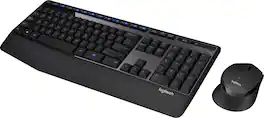
The Logitech Wireless Combo MK345 pairs a comfortable full-size keyboard with a right-handed mouse. It comes with comfortable and textured palm rest, spill-resistant design, and glossy finish. Its wireless connectivity gives the reliability of a cord plus wireless convenience and freedom. Its energy efficient engineering delivers 36-month keyboard and 18-month mouse battery life.
| Pros for Logitech - Signature K650 Full-Size Wireless Keyboard for PC/Window/Mac with Wrist Rest - Graphite | |||
|---|---|---|---|
| Connectivity, Overall Performance, Comfort, Noise Level, Size | Keyboard Quality, Ease of use, Connectivity, Battery Life | Keyboard Quality, Ease of use, Wireless, Price, Battery Life | Keyboard Quality, Ease of use, Wireless, Price, Battery Life |
| Cons for Logitech - Signature K650 Full-Size Wireless Keyboard for PC/Window/Mac with Wrist Rest - Graphite | |||
| Key Action | Lag, Price | Lag, Connection | Lag |
Specs

- SteelSeries - Arctis Nova Pro Wireless Multi Gaming Headset for PC, PS5, PS4, Switch - White$299.99The price was $379.99


Reviews
Customers are saying
Customers are positive about the Signature K650 Full-Size Wireless Keyboard. Customers find the key design legible and the overall performance suits their needs. In addition, many find the keyboard to be comfortable.
Customer Images
The vast majority of our reviews come from verified purchases. Reviews from customers may include My Best Buy members, employees, and Tech Insider Network members (as tagged). Select reviewers may receive discounted products, promotional considerations or entries into drawings for honest, helpful reviews.
- Rated 5 out of 5 stars
Exactly what I wanted
Great size, angle and feel! I love the wrist pad and feel super comfortable typing on this keyboard.
This review is from Logitech - Signature K650 Full-Size Wireless Keyboard for PC/Window/Mac with Wrist Rest - Graphite
BelaB Posted
- Rated 5 out of 5 stars
Nice upgrade!
Great upgrade over my basic keyboard. I like the quiet keys and the comfort of the layout. Switching Bluetooth devices is not as smooth as it could be but is manageable.
This review is from Logitech - Signature K650 Full-Size Wireless Keyboard for PC/Window/Mac with Wrist Rest - Graphite
Mike Posted
- Rated 5 out of 5 stars
Keyboard with wrist rest.
Easy setup. Worked right out of the box, like the Bluetooth feature. Excellent purchase.
This review is from Logitech - Signature K650 Full-Size Wireless Keyboard for PC/Window/Mac with Wrist Rest - Off-White
ClemFandango Posted