Logitech - MX Keys S Universal Full-size Wireless Scissor Keyboard for PC and Mac with Backlit keys - Pale Gray
Logitech - MX Keys S Universal Full-size Wireless Scissor Keyboard for PC and Mac with Backlit keys - Pale Gray
Color
Pale Gray- Logitech - Zone Vibe 100 Wireless Bluetooth Over-the-Ear Headphones with Noise-Cancelling Microphone - Graphite$99.99
More Buying Options
Specifications
- Lighting TypeSingle colorForm FactorFull-sizeKeyboard TechnologyScissorConnection TypeWireless
- Key Specs
- Lighting Type: Single color
- Form Factor: Full-size (The size, arrangement, and physical configuration of the product.)
- Keyboard Technology: Scissor (Type of technology that detects a key press.)
- Connection Type: Wireless
- General
- Brand: Logitech
- Model Number: 920-011559
- Product Name: MX Keys S Universal Full-size Wireless Scissor Keyboard for PC and Mac with Backlit keys
- Color: Pale Gray
- Features
- Lighting Type: Single color
- Customizable Lighting: false
- Numeric Keypad: true
- Touchpad: false
- Keyboard Type: Programmable
- Palm Rest: false
- Spill Resistant: false (Designed to resist some degree of accidental liquid spill. The level of spill-resistance is indicated by the product manufacturer, but the degree of protection may not be guaranteed after normal wear of the product.)
- Keyboard Features: Spherically dished keys, smart illumination, programmable keys, Smart Keys layout, Easy Switch to pair with up to 3 devices
- Functions
- Form Factor: Full-size (The size, arrangement, and physical configuration of the product.)
- Keyboard Technology: Scissor (Type of technology that detects a key press.)
- Adjustable Tilt Function: false
- Multimedia Keys: true
- Connectivity
- Connection Type: Wireless
- Wireless Connectivity: Radio Frequency (RF - 2.4 Ghz/Low Latency), Bluetooth (The manner in which a device sends data to another device over a short distance without the use of wires or cables.)
- Maximum Wireless Range: 33 feet
- Number Of USB Port(s): 1 (The total number of USB ports including all generations and versions.)
- Number of Devices Connectable Simultaneously: 3
- Compatibility
- Operating System Compatibility: Windows, Mac, Apple iPadOS, Chrome, Android, Linux
- Plug and Play Operation: true
- System Requirements: Via Bluetooth Low Energy technology: Windows 10, 11 or later, macOS 10.15 or later, Linux, Chrome OS, iPadOS 14 or later, Android 8.0 or later. Via Logi Bolt USB Receiver: Windows 10, 11 or later, macOS 10.15 or later, Linux, Chrome OS (The software that a product must have for it to be able to integrate with another product.)
- Power
- Rechargeable Battery: true
- Battery Chemistry: Lithium
- On/Off Switch: true
- Dimensions
- Product Height: 0.81 inches (The out of box height of the item. Height is measured as the vertical distance from the bottom of the item to the top as it would be primarily used or placed.)
- Product Width: 16.94 inches (The out of box width of the item. Width is measured as the horizontal distance from one side of the item to the other as it would be primarily used or placed.)
- Product Depth: 5.18 inches (The out of box depth of the item. Depth is measured as the distance from the front of the item to the back as it would be primarily used or placed.)
- Product Weight: 28.57 ounces (The out of box weight of the item.)
- Mouse
- Mouse Included: false
- Warranty
- Warranty - Parts: 1 year
- Warranty - Labor: None
- Other
- UPC: 097855187857
MX Keys S Logitech Wireless Keyboard — a low-profile full-size keyboard that offers a fluid, precise typing experience and customizable, time-saving Smart Actions that automate your most repetitive tasks with a single keystroke. The backlit keyboard features smart backlighting that lights up when your hands approach it and automatically adjusts to suit the time of day.
- Fluid typing experience: Laptop-like profile with spherically-dished keys shaped for your fingertips delivers a fast, fluid, precise and quieter typing experience.
- Automate repetitive tasks: Easily create and share time-saving Smart Actions shortcuts that perform multiple actions with a single keystroke with the Logi Options+ app.¹
- Smarter illumination: Backlit keyboard keys light up as your hands approach and adapt to the environment; now with more lighting customizations on Logi Options+.¹
- More comfort, deeper focus: Work for longer with a solid build, low-profile design and an optimum keyboard angle that is better for your wrist posture.
- Multi-device, multi OS Bluetooth keyboard: Pair with up to 3 devices on nearly any operating system (Windows, macOS, Linux) via Bluetooth Low Energy or included Logi Bolt USB receiver.²
- USB C rechargeable keyboard: Stays powered for up to 10 days on a full charge or up to 5 months (backlighting turned off); quick charge with the included USB-C charging cable.³
- Team with MX Master 3S mouse: Pair any MX wireless keyboard and mouse with Logi Options+ and seamlessly work, transfer text and files between up to 3 computers (Windows & macOS).
- Recycled plastic: Plastic parts in MX Keys S Wireless Keyboard include certified post-consumer recycled plastic — 15% for Black and 11% for Pale Grey.⁴
- 1-month of Adobe Creative Cloud on us (a value of $59.99)*: Pair two of the world’s top creative tools. Buy one MX Keys S and claim your free 1-month Adobe Creative Cloud membership. *Value calculated based on Adobe Creative Cloud All Apps monthly value of $59.99 valid on Adobe.com on Sept 12, 2024. Terms & Conditions apply.¹ ² ³
- Fluid typing experience: Laptop-like profile with spherically-dished keys shaped for your fingertips delivers a fast, fluid, precise and quieter typing experience.
- Automate repetitive tasks: Easily create and share time-saving Smart Actions shortcuts that perform multiple actions with a single keystroke with the Logi Options+ app.¹
- Smarter illumination: Backlit keyboard keys light up as your hands approach and adapt to the environment; now with more lighting customizations on Logi Options+.¹
- More comfort, deeper focus: Work for longer with a solid build, low-profile design and an optimum keyboard angle that is better for your wrist posture.
- Multi-device, multi OS Bluetooth keyboard: Pair with up to 3 devices on nearly any operating system (Windows, macOS, Linux) via Bluetooth Low Energy or included Logi Bolt USB receiver.²
- USB C rechargeable keyboard: Stays powered for up to 10 days on a full charge or up to 5 months (backlighting turned off); quick charge with the included USB-C charging cable.³
- Team with MX Master 3S mouse: Pair any MX wireless keyboard and mouse with Logi Options+ and seamlessly work, transfer text and files between up to 3 computers (Windows & macOS).
- Recycled plastic: Plastic parts in MX Keys S Wireless Keyboard include certified post-consumer recycled plastic — 15% for Black and 11% for Pale Grey.⁴
- 1-month of Adobe Creative Cloud on us (a value of $59.99)*: Pair two of the world’s top creative tools. Buy one MX Keys S and claim your free 1-month Adobe Creative Cloud membership. *Value calculated based on Adobe Creative Cloud All Apps monthly value of $59.99 valid on Adobe.com on Sept 12, 2024. Terms & Conditions apply.¹ ² ³
Whats Included
- Keyboard
- Logi Bolt USB receiver
- USB-C charging cable (USB-A to USB-C)
- User documentation
- Keyboard
- Logi Bolt USB receiver
- USB-C charging cable (USB-A to USB-C)
- User documentation
Q: Does this have a caps lock light and number lock light?
A: Hi Jbird, What an interesting and good question. You're right to raise this question. The confusing answer to your question is yes and no. As a matter of fact, the caps/num lock does light up in my Mac setup, as well as in my Mac OS world as well as my virtual Windows environment on my Mac (parallels), but when I switch to my native Windows laptop the keyboard behave differently, here neither of these keys lights up on the MX keys itself when I press it, but instead of this it lights up on the original keyboard built-in to my windows laptop. I get your question as I had the same concern but can tell you that the keys are in general supposed to work, but for some reasons they behave just a little different, depending if you're working on a mac or on a native windows system. Hope this helps.
A: Hey there! Please note that the MX Keys S is a completely wireless keyboard and cannot be used in wired mode. The USB charging cable included in the box (USB-A to USB-C) is only to charge the keyboard and cannot transfer any data through it.
Q: Once fully charged, how long does the battery last until needing to recharge again? Daily? Monthly?
A: Good day! The MX Keys S comes with a Li-Po (1500 mAh) battery which will last up to 10 days on a full charge with predefined settings or up to 5 months with backlighting off (Battery life may vary based on user and computing conditions)
A: Both way of connecting the Keyboard are fast options for some reason however I find Bluetooth to be the less finicky. As in when using usb I noticed every now and then it would be unresponsive for a couple seconds.
Q: do you have the keyboard in spanish?
A: Hey! Yes, the keyboard is available in Spanish layout.
Q: Can you keep charging all the time ?
A: Yes, the Logitech MX Keys S can be kept plugged in and charging continuously. It is designed to handle being connected to a power source even when fully charged, so you don't have to worry about overcharging or damaging the battery by keeping it plugged in.
Q: Is there any way to get a replacement dongle?
A: Yes, the Logitech MX Keys S comes with a Logi Bolt USB receiver. If you need a replacement, you can purchase a new Logi Bolt receiver online through our website or from various third-party retailers.
Q: what is a scissor keyboard?
A: Scissor keyboards use a scissor-like mechanism under each key for stability and a more responsive, quieter typing experience compared to traditional membrane keyboards. They're common in slim keyboards like the MX Keys S.
Compare similar products

MX Keys S Logitech Wireless Keyboard — a low-profile full-size keyboard that offers a fluid, precise typing experience and customizable, time-saving Smart Actions that automate your most repetitive tasks with a single keystroke. The backlit keyboard features smart backlighting that lights up when your hands approach it and automatically adjusts to suit the time of day.
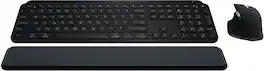
Master your flow with the MX Keys S Combo Wireless Mouse and Keyboard — the ultimate combo that combines the power of the fluid, fast precision typing of MX Keys S Wireless Keyboard with the precise, fast scrolling experience of MX Master 3S Wireless Mouse.
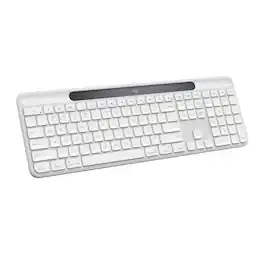
Signature Slim Solar+ K980 for Mac is always ready. This sleek, durable wireless keyboard draw§m solar and artificial light sources for cable-free, hassle free typing with a familiar, laptop-style feel. Using Logi LightCharge technology, the light-absorbing strip harvests energy from any light source and stores it efficiently for up to four months in a durable, replaceable battery with lifespan up to 10 years. Designed for your minimal, elegant Mac setup and built to last for up to 10 million keystrokes, featuring high quality construction materials including recycled plastic, it’s better for longer. Save time by automating repetitive tasks to one keystroke with the Action Key, customizable using the Logi Options+ App, and switch between up to three devices in a single tap. Pair it with a Logitech multi-device mouse for effortless typing and clicking across computers.

The slim profile and minimalist design transform your keyboard and mouse into a visual statement that elevates your desk setup. A slim profile and compact design make typing and mousing a pleasure. Low-profile keys give you that laptop-like typing experience you know and love. Whisper-quiet keys and a 90% noise-reduced mouse let you power through in near-silence. Long battery life and an easy plug-and-play 2.4GHz USB receiver ensure a reliable, hassle-free experience.
| Pros for Logitech - MX Keys S Universal Full-size Wireless Scissor Keyboard for PC and Mac with Backlit keys - Pale Gray | |||
|---|---|---|---|
| Keyboard Quality, Battery Life, Ease of use, Connectivity, Key Feel | Keyboard Quality, Battery Life, Ease of use, Connectivity, Scroll Wheel | There were no pros for this product— | Keyboard Quality, Ease of use, Size, Design, Weight |
| Cons for Logitech - MX Keys S Universal Full-size Wireless Scissor Keyboard for PC and Mac with Backlit keys - Pale Gray | |||
| There were no cons for this product— | Palm Rest, Price | There were no cons for this product— | Caps Lock Indicator, Compatibility |
Specs
Reviews
Customers are saying
Customers admire the MX Keys S keyboard for its quality, comfortable key feel, and ease of use with both PC and Mac. The long battery life and wireless connectivity are also appreciated. Some find the keyboard to be expensive compared to alternatives, while others feel the size is smaller than expected for the price. Overall, the keyboard's positive attributes seem to outweigh the concerns.
Customer Images
The vast majority of our reviews come from verified purchases. Reviews from customers may include My Best Buy members, employees, and Tech Insider Network members (as tagged). Select reviewers may receive discounted products, promotional considerations or entries into drawings for honest, helpful reviews.
- Rated 5 out of 5 stars
The Perfect Multi-Device Keyboard
I recently switched from my Keychron keyboard to the Logitech MX Keys, and it has been a fantastic upgrade for my multi-PC setup. With the Bolt adapter, switching between devices is seamless and effortless. The typing experience is smooth and comfortable, making long hours of coding and work much more enjoyable. What really stands out is how well it performs across both Windows and macOS — the layout and functionality feel natural on each platform. Honestly, I can’t fault it. It is a little on the expensive side, but when you spend long hours working or coding, investing in good equipment is absolutely worth it. For anyone looking for a reliable, versatile, and professional keyboard, the MX Keys is the best option I’ve used.
This review is from Logitech - MX Keys S Universal Full-size Wireless Scissor Keyboard for PC and Mac with Backlit keys - Black
MichaelD Posted
- Rated 5 out of 5 stars
Full featured customizable lighted keyboard
I bought this to replace my last keyboard whish was a Logitech k800 which was the best keyboard I had ever owned. This is a close second and since they no longer make the K800, this is a good option for a lighted keyboard with a lot of customizable key options. Takes up less space that the older full size keyboards without giving up any features. Easy to type on and will work with both Windows and Mac. I'm very pleased with this one.
This review is from Logitech - MX Keys S Universal Full-size Wireless Scissor Keyboard for PC and Mac with Backlit keys - Black
gdbaker Posted
- Rated 5 out of 5 stars
Top-tier wireless keyboard
I bought the Logitech MX Keys S to replace an older keyboard I was constantly fighting with during long workdays. The difference was immediate. The keys are quiet, stable, and well-spaced, which noticeably reduced typing fatigue. I type a lot, and accuracy feels better without having to press hard. One feature I didn’t expect to appreciate so much is the smart backlighting. It turns on only when needed and adjusts to the room lighting, which is surprisingly practical. Switching between devices is smooth and reliable, and it connects instantly every time. The keyboard feels solid and premium, not flimsy like many wireless options. Battery life has been excellent, and setup took only a few minutes. Overall, this is a thoughtfully designed product that genuinely improves everyday productivity.
This review is from Logitech - MX Keys S Universal Full-size Wireless Scissor Keyboard for PC and Mac with Backlit keys - Black
Hasan Posted