A:AnswerI would have to say VC. This has on board Intel HD graphics. It does have a dedicated slot for a video card, but cannot find out how much wattage the power supply outputs. Heavy gamers and photo/video editors using high end cards require more power to run the processor on the graphics card.
A:AnswerWithout upgrading the PSU you could probably install GTX1050 and GTX1050Ti. This case has ample room for long graphics cards. If you wanted to upgrade the PSU you could install a Corsair CX650M 650 watt (sleeve bearing, single 12V rail, ATX 2.4, EPS 2.92, semi modular) or SeaSonic M12ii 620 watt (fluid dynamic bearing, dual 12V rails, ATX 2.3, EPS 2.91, fully modular). Both are 80+ Bronze certified PSU, both cost the same ($40 after rebate), the SeaSonic has the better reputation. Also, I believe both brands come with all the protections (short circuit protection, over power protection, over voltage protection, under voltage protection). EVGA makes a good PSU also. You wouldn't have to go with a 650 watt PSU, but its almost the same price as a 500 watt to 600 watt PSU. Semi modular and fully modular are nice.
INSTALLATION M32CD: Plenty of vids on youtube to follow, pretty straight forward. The Corsair semi modular PSU would be easier to install because of the clearance behind the DVD optical drive. NOTE: The fully modular design on SeaSonic, its a tight fit because of the connectors (motherboard 24 pin connector on the back of the PSU (TWO connectors)). In order to install the SeaSonic you have to remove the side panels (2 screws each), the plastic foot plate on the front (press the 2 black tabs down inside the PC) , the front panel (grab from the bottom and pull off), then remove the 4 screws on the DVD optical drive and slide it forward to give you some room to install the SeaSonic PSU. Reassembly: Install the front panel flat (not top first). The top will snap in, then install the front base/foot plate and side plates.
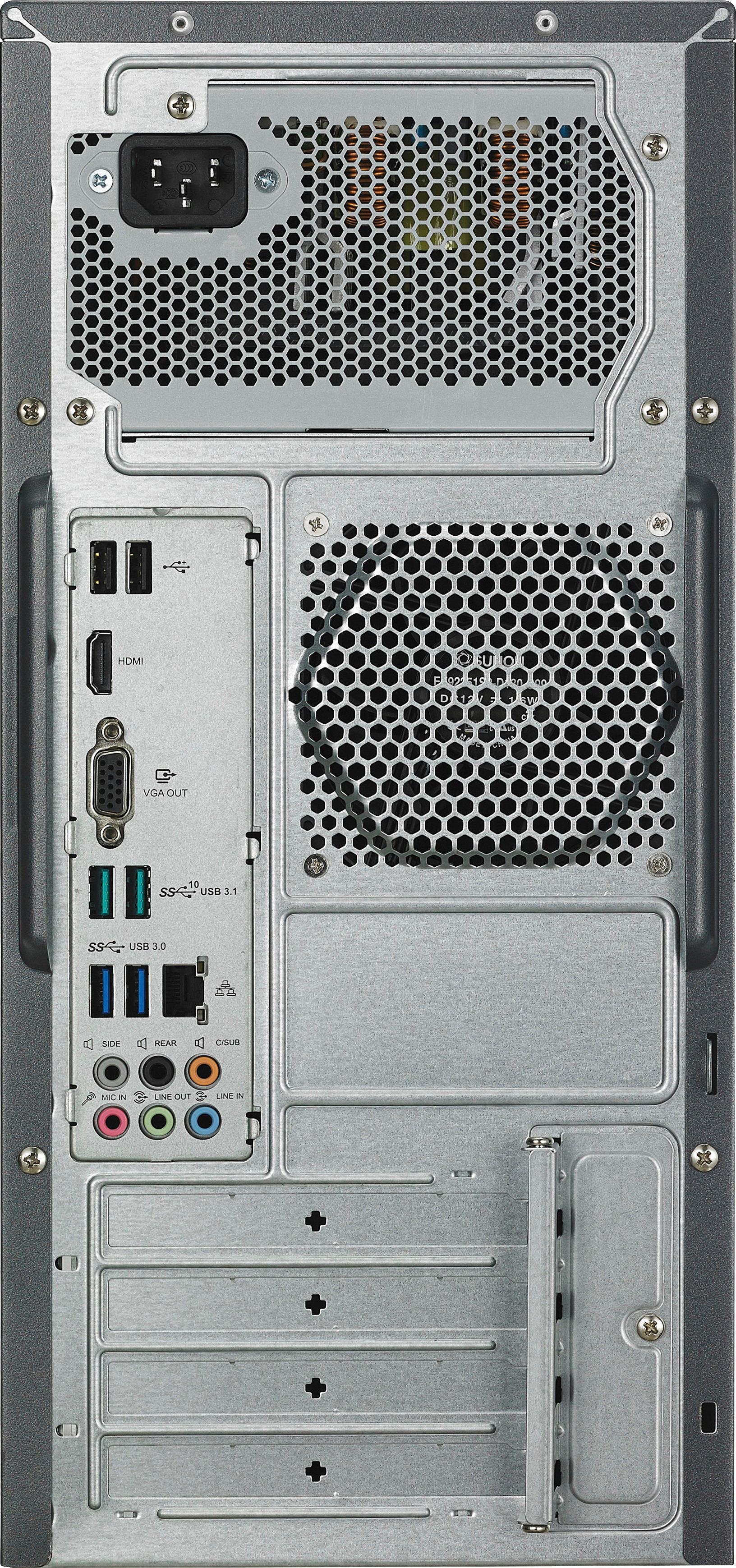
I also installed a 92mm rear case fan venting out (ARTIC F9 PWM PST speed control, fluid dynamic bearing, 6 year warranty, 4 pin plug and socket for the motherboard, high airflow, very low noise). This plugs right into the motherboard on M32CD-B14 above the PCIE slot, plug and play. The cost is around $8 and free shipping. You could also use ANTEC fans, the 3 pin connector also plugs in the 4 pin socket on the motherboard (the socket is keyed offset for this reason), they cost around $10. Front fan slot is also 92mm I believe. You could buy 2 fans and chain them together (motherboards usually allow 1 watt for fans, each fan is 0.15 or 0.16 watts). Have a few zip ties ready from the dollar store (small and medium) for some wire management.
A:AnswerThis PC only comes with a CPU fan. The case has spots for a rear 92mm fan and a front 92mm fan. Since motherboards typically allow 1.0 AMP for fans, you could buy 2 92mm fans (fans usually use 0.15 to 0.17 amps, some use 0.33 amps), hook them up together (if they come with a 3 or 4 pin plug and a socket), and plug them into the motherboard right above the PCIE slot. You could also connect the fans together on a 4 pin molex connector of the power supply if you have that adapter (ANTEC fans come with this adapter). I used ARTIC F9 PWN PST speed control fans (These come with a 4 pin plug and socket that plugs into the motherboard, fluid dynamic bearing, 6 year warranty). Case fans are cheap, cost $8 to $11 and free shipping.
A:AnswerOn start up or restart before windows loads, hold F2 for the bios screen options, then hit F7, then use the arrows on keyboard for Advanced at the top, system agent SA config, enter, graphics config, enter, primary display: change auto to PEG (PCI Express Graphics), use the keyboard arrows for exit at the top, hit F10 to save changes and restart. I hope this helps you.
A:AnswerMy understanding at the store is that it wouldn't work well or not at all with W7. Call/see GEEK SQUAD they are very helpful with this type situation.
A:AnswerI'm not sure why you would use this graphics card other than the DVI out. The GeForce 6200 is direct x9.0c, Open GL 2.1, only 256mb DDR2 Vram, and G3D score of only 44. Honestly, I would use the onboard HD 630 graphics that has a G3D score of 1215, should be direct x12, should be Open GL 4.5. An HDMI to DVI cable costs around $5 and free shipping at online retailers. Make sure you get the 24+1 pin DVI connector and not the 18+1 connector (missing middle pins) for that price.
A:AnswerFor home stuff (and even 1080p video editing) either of the two you listed is great, but I love the SSD in mine for booting (14 seconds with tweaks) 34 seconds to boot! My ONLY complaint is that there is no room for an additional HD in my 12gb Asus, but a creative mind can get around that, so I have 128 SSD, 1 TB HD, 3 TB HD installed. Asus is the best.
A:AnswerAccording to the Asus specifications for the Asus VivoPC model M32CD-B14, there at three power supply configurations: 200 W Peak, 300 W Peak, 500 W Peak. One review I read said it would not have enough power to drive a high end gaming type video board.
A:AnswerDoesn't look to hard but voids the warranty if you do. Check the video and compatible graphics cards here. http://www.pcbuildadvisor.com/asus-m32cd-review/