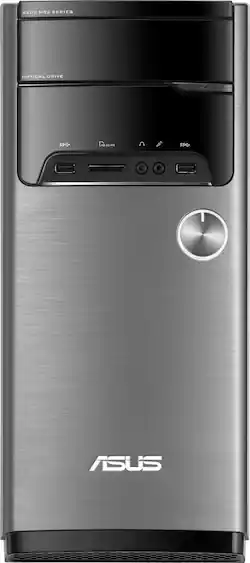
ASUS - VivoPC M32CD Desktop - Intel Core i7 - 12GB Memory - 128GB Solid State Drive + 1TB Hard Drive - Gray
- Key Specs
- Processor Model: Intel 7th Generation Core i7 (Your computer's processor is like its brain. Working in combination with system memory, the power of the processor determines the complexity of software you can run, how many programs you can have open at the same time, and how fast those programs will run. Most computers feature an AMD, Intel or Snapdragon processor.)
- Storage Type: HDD, SSD
- Total Storage Capacity: 1128 gigabytes
- System Memory (RAM): 12 gigabytes (Random-access memory (RAM) is a computing device's short-term data storage, which allows active information to be accessed quickly. The size and type of RAM determines how efficiently the device can handle large amounts of information at one time. For example, gaming or video editing requires more RAM for optimal performance.)
- General
- Product Name: VivoPC M32CD Desktop - Intel Core i7 - 12GB Memory - 128GB Solid State Drive + 1TB Hard Drive
- Brand: ASUS
- Model Number: M32CD-B14
- Processor
- Processor Brand: Intel
- Processor Model: Intel 7th Generation Core i7 (Your computer's processor is like its brain. Working in combination with system memory, the power of the processor determines the complexity of software you can run, how many programs you can have open at the same time, and how fast those programs will run. Most computers feature an AMD, Intel or Snapdragon processor.)
- Processor Model Number: i7-7700
- Storage
- Storage Type: HDD, SSD
- Total Storage Capacity: 1128 gigabytes
- Solid State Drive Capacity: 128 gigabytes (The amount of data that can be stored on the device's solid state drive (SSD). SSD is a flash-based storage with faster speeds than a hard disk drive (HDD).)
- Hard Drive Capacity: 1000 gigabytes (The amount of data that can be stored on the device's mechanical hard drive. Hard disk drives (HDDs) typically have larger capacities than solid state drives (SSDs) but may have slower speeds.)
- Hard Drive RPM: 7200 revolutions per minute (A hard drive's data is stored on disks, or platters, that spin while transferring information to the host system. The higher the RPM, the faster the hard drive's performance.)
- Hard Drive Accelerator: None (A module integrated (or added) into a PC to improve performance speed. By acting as a high-speed cache, an accelerator speeds up access times to the hard drive, which results in faster web browsing, improved gaming experience, and overall more responsiveness.)
- Memory
- System Memory (RAM): 12 gigabytes (Random-access memory (RAM) is a computing device's short-term data storage, which allows active information to be accessed quickly. The size and type of RAM determines how efficiently the device can handle large amounts of information at one time. For example, gaming or video editing requires more RAM for optimal performance.)
- Type of Memory (RAM): DDR4 SDRAM (Each type of RAM delivers a different level of speed, bandwidth, energy efficiency and performance.)
- System Memory RAM Speed: 2400 megahertz (How fast the information-storing hardware operates. The faster the RAM, the faster memory can be transferred to other system components. Ultimately, faster RAM improves operational efficiency.)
- Number of Memory Sticks Included: 1
- System Memory RAM Expandable To: 16 gigabytes (Adding more random-access memory (RAM) to a computer speeds up performance and improves efficiency. Upgrades to memory are limited by the number of expansion slots for additional RAM and existing RAM installed on the device.)
- Compatibility
- Operating System: Windows 10 Home (The operating system manages all software and hardware, including files, memory and connected devices. Most importantly, it lets you interact with your device and your programs in a visual way; otherwise, you'd be typing computer code to get anything done.)
- Operating System Architecture: 64-bit (An operating system (OS) manages computer hardware, software resources, and programs in conjunction with the system's processor. 64-bit operating systems can handle more data at once than 32-bit systems, resulting in faster speeds, more effiency, and overall improved performance.)
- Connectivity
- Number of Thunderbolt Ports (Total): 0
- Number of VGA Ports: 1 (VGA (Video Graphics Adapter or Video Graphics Array) is a display standard that transmits via analog signals. This type of interface is typically used to connect a computer to a display device such as a monitor, projector, or TV.)
- Number Of DVI Ports: 0
- Expansion
- Number of M.2 Slots: 0 (This interface is most commonly used for high-speed solid state drives (SSDs), and is often used in laptops due to its small size.)
- Number Of Internal 2.5" Bays: 0
- Number Of Internal 3.5" Bays: 2
- Number Of Internal 5.25" Bays: 0
- Number Of External 3.5" Expansion Bays: 0
- Number Of External 5.25" Expansion Bays: 0
- Features
- Customizable Keyboard Lighting: No
- Media Card Reader: true (A hardware device that allows for access to data on a memory card and enables the transfer of its files to a computer. These devices may have one or multiple slots for various types of memory cards, and may be integrated into the computer or available as an external device.)
- Customizable Case Lighting: false
- Audio Technology: 7.1 channel surround
- Size: Standard
- Dimensions
- Product Height: 16.1 inches (The out of box height of the item. Height is measured as the vertical distance from the bottom of the item to the top as it would be primarily used or placed.)
- Product Width: 6.9 inches (The out of box width of the item. Width is measured as the horizontal distance from one side of the item to the other as it would be primarily used or placed.)
- Product Depth: 15 inches (The out of box depth of the item. Depth is measured as the distance from the front of the item to the back as it would be primarily used or placed.)
- Certifications Listings & Approvals
- ENERGY STAR Certified: false (Devices carrying the ENERGY STAR service mark, such as computer products and peripherals, kitchen appliances, and other products, generally use 20% to 30% less energy than required by federal standards.)
- EPEAT Qualified: false (The Electronic Product Environmental Assessment Tool (EPEAT) was designed to provide an environmental assessment tool for purchasers. In order to qualify for EPEAT, a product must meet all 23 required criteria.)
- Included
- Included Software: Microsoft Office (Trial), Asus WebStorage, Asus Manager Suite, MaxxAudio, McAfee Internet Security (Trial) and Asus Launcher
- Keyboard Included: true
- Mouse Included: true
- Wireless Keyboard: true
- Wireless Mouse: true
- Other
- UPC: 889349644355
Upgrade your home computer to this Asus desktop. It has an Intel Core i7 processor and 12GB of RAM for smooth multitasking between programs, and the 1TB hard drive lets you store documents, photos and other files securely.
- Windows 10 operating system: Windows 10 brings back the Start Menu from Windows 7 and introduces new features, like the Edge Web browser that lets you markup Web pages on your screen. Learn more ›
- 7th Gen Intel® Core™ i7-7700 processor: Powerful quad-core, eight-way processing performance. Intel Turbo Boost Technology delivers dynamic extra power when you need it, while increasing energy efficiency when you don't.
- 12GB system memory for full-power multitasking: Plenty of high-bandwidth RAM to smoothly run your games and photo- and video-editing applications, as well as multiple programs and browser tabs all at once.
- SuperMulti DVD/CD burner: Reads and writes to a wide variety of media formats, including DVD+R/RW, DVD-R/RW, CD-R/RW, DVD-RAM and double-layer DVD.
- 1TB hard drive and 128GB solid state drive (SSD) for a blend of storage space and speed: The hard drive provides ample storage, while the SSD delivers faster start-up times and data access.
- Built-in media reader for simple photo transfer: Supports Memory Stick, Memory Stick PRO, MultiMediaCard, SD and SDHC memory card formats.
- 4 USB 3.0 ports maximize the latest high-speed devices: Also includes 2 USB 2.0 ports to connect more accessories and peripherals. The USB 3.0 ports are backward-compatible with USB 2.0 devices (at 2.0 speeds).
- Next-generation wireless connectivity: Connects to your network or hotspots on all current Wi-Fi standards. Connect to a Wireless-AC router for speed nearly 3x faster than Wireless-N. Gigabit LAN port also plugs into wired networks.
- Bluetooth interface syncs with compatible devices: Wirelessly transfer photos, music and other media between the desktop and your Bluetooth-enabled cell phone or MP3 player, or connect Bluetooth wireless accessories.
- Basic software package included: Trial of Microsoft Office.
- Additional ports: Microphone and headphone jacks. Subwoofer port.
Whats Included
- Asus VivoPC M32CD Desktop - Intel Core i7 - 12GB Memory - 128GB Solid State Drive + 1TB Hard Drive
- Keyboard
- Mouse
Product Manuals
A: I would have to say VC. This has on board Intel HD graphics. It does have a dedicated slot for a video card, but cannot find out how much wattage the power supply outputs. Heavy gamers and photo/video editors using high end cards require more power to run the processor on the graphics card.
A: Yes, you can install a dedicated Video Card, it has one PCI slot available for a video card. I bought a 4GB video card and installed it
A: Yes, this supports dual monitors.
A: Without upgrading the PSU you could probably install GTX1050 and GTX1050Ti. This case has ample room for long graphics cards. If you wanted to upgrade the PSU you could install a Corsair CX650M 650 watt (sleeve bearing, single 12V rail, ATX 2.4, EPS 2.92, semi modular) or SeaSonic M12ii 620 watt (fluid dynamic bearing, dual 12V rails, ATX 2.3, EPS 2.91, fully modular). Both are 80+ Bronze certified PSU, both cost the same ($40 after rebate), the SeaSonic has the better reputation. Also, I believe both brands come with all the protections (short circuit protection, over power protection, over voltage protection, under voltage protection). EVGA makes a good PSU also. You wouldn't have to go with a 650 watt PSU, but its almost the same price as a 500 watt to 600 watt PSU. Semi modular and fully modular are nice. INSTALLATION M32CD: Plenty of vids on youtube to follow, pretty straight forward. The Corsair semi modular PSU would be easier to install because of the clearance behind the DVD optical drive. NOTE: The fully modular design on SeaSonic, its a tight fit because of the connectors (motherboard 24 pin connector on the back of the PSU (TWO connectors)). In order to install the SeaSonic you have to remove the side panels (2 screws each), the plastic foot plate on the front (press the 2 black tabs down inside the PC) , the front panel (grab from the bottom and pull off), then remove the 4 screws on the DVD optical drive and slide it forward to give you some room to install the SeaSonic PSU. Reassembly: Install the front panel flat (not top first). The top will snap in, then install the front base/foot plate and side plates. I also installed a 92mm rear case fan venting out (ARTIC F9 PWM PST speed control, fluid dynamic bearing, 6 year warranty, 4 pin plug and socket for the motherboard, high airflow, very low noise). This plugs right into the motherboard on M32CD-B14 above the PCIE slot, plug and play. The cost is around $8 and free shipping. You could also use ANTEC fans, the 3 pin connector also plugs in the 4 pin socket on the motherboard (the socket is keyed offset for this reason), they cost around $10. Front fan slot is also 92mm I believe. You could buy 2 fans and chain them together (motherboards usually allow 1 watt for fans, each fan is 0.15 or 0.16 watts). Have a few zip ties ready from the dollar store (small and medium) for some wire management.
Q: What type of mother board is installed? Also What type of RAM memory is installed i.e. DDR3 or DDR4?
A: DDR4 / 2133 There is 1 x 4Gb stick and 1 x 8Gb stick of Hynex memory.
A: Go to www.ASUS.com and find ypur computer. From there you will find a motherboard layout or pic of the back to see which usb port to use
A: This PC only comes with a CPU fan. The case has spots for a rear 92mm fan and a front 92mm fan. Since motherboards typically allow 1.0 AMP for fans, you could buy 2 92mm fans (fans usually use 0.15 to 0.17 amps, some use 0.33 amps), hook them up together (if they come with a 3 or 4 pin plug and a socket), and plug them into the motherboard right above the PCIE slot. You could also connect the fans together on a 4 pin molex connector of the power supply if you have that adapter (ANTEC fans come with this adapter). I used ARTIC F9 PWN PST speed control fans (These come with a 4 pin plug and socket that plugs into the motherboard, fluid dynamic bearing, 6 year warranty). Case fans are cheap, cost $8 to $11 and free shipping.
A: On start up or restart before windows loads, hold F2 for the bios screen options, then hit F7, then use the arrows on keyboard for Advanced at the top, system agent SA config, enter, graphics config, enter, primary display: change auto to PEG (PCI Express Graphics), use the keyboard arrows for exit at the top, hit F10 to save changes and restart. I hope this helps you.


















