“Can you link / use 3 or 4 of theses camera's throughout your home, if yes can you explain how they can be viewed?”
Answer This Question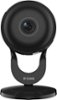
1-3 of 3 Answers
Yes, all the cameras can be accessed via an app on your smartphone. It's so easy to setup.
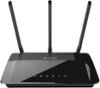
Sorry, there was a problem. Please try again later.Yes, multiple cameras can be set up at home in different rooms. When you set up the 1st camera, you'll create a free mydlink.com account and can use their mobile app to view the camera. The other cameras can be set up using that same account and you can view them in the app too. You can also view the cameras from a computer using a web browser. I view mine mostly via my cellphone. I like using a 3rd party app called IP Cam Viewer Pro since I have cameras other than dlink. This way I get to view all the cameras on a single app. The mydlink app works fine, though. Important: Make sure you have a good wireless router that has a signal that can reach the locations where you intend to set up a camera. This camera model can be a little finicky with regard to wifi, but works well for me. I've suggested a basic D-link router, but there are many reliable brands and models to choose from.
I would recommend:
Sorry, there was a problem. Please try again later.Yes you can. you can view the cameras via the dlink app. or were you wondering if you can view them simultaneously? i dont think so.
Sorry, there was a problem. Please try again later.