“is there any way to make the print size bigger? and to turn off the bright screen at night???”
Answer This Question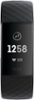
1-3 of 3 Answers
Yes, you can hold the button on the left side of the face of the watch and tap the screen wake and the bulb light will go out then when you move your arm like at night it will not come on unless you push the button on the side in the night time. to turn back on just hold the button till the screen wake shows then tap and the bulb will come back on.
Sorry, there was a problem. Please try again later.I had the same issue. Yes to both questions, within limits. Under the set-up options there are several choices of what gets displayed on the screen. At least one of the options has larger font for the time, but not for the other data. Also, under the settings tab, you can dim the brightness to your liking.
Sorry, there was a problem. Please try again later.You can adjust the brightness directly on the device via the setting page, however when it comes to text I can only see where you can chage the clock size and nothing else.
Sorry, there was a problem. Please try again later.