“New batteries in Insignia mouse, restarted Mac, turned on mouse and pressed Connect button, and after several minutes, nothing. Checked for how to maneuver using keyboard so as to get to Bluetooth setting, cannot make it navigate. What now?”
Answer This Question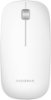
1-1 of 1 Answer
This mouse is compatible with Mac computers. On your Mac computer you need to: 1. Open System Preferences in the dock. 2 Click the Bluetooth icon . 3 Click + in the lower-left corner. Your computer searches for your mouse. 4 Double-click Ultra Slim Wireless Mouse. Note: If your computer has never connected to a Bluetooth device, click Set Up New Device to pair your mouse to your computer. When pairing is complete, the LED indicator lights turn off.
Sorry, there was a problem. Please try again later.