A:AnswerHello,
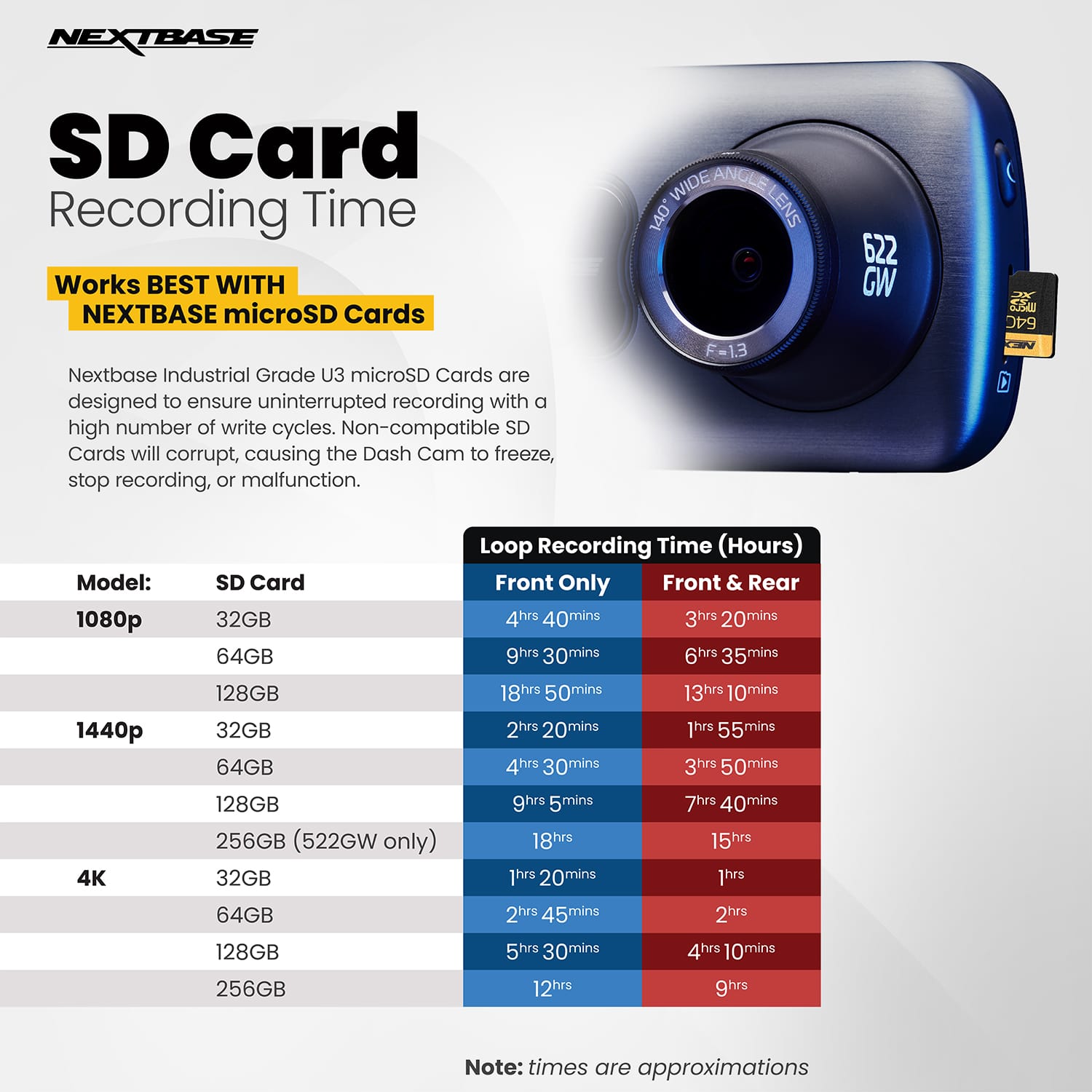
Regarding the recording lengths, the camera will record continuously in small segments (1,2, or 3 minutes). It will record these segments consecutively until the SD card is full. Then the oldest piece of footage will be deleted and the newest will be saved in it's place. This will continue looping and is called Continuous Overwriting. The Dash Cam does this automatically to allow for more footage to be recorded and the old, unnecessary footage to be deleted without manual intervention.
However Protected Files are not overwritten in the same way as normal files. If you do not format regularly, these files can build up and reduce the capacity of storage available for normal footage. It is essential to format every two weeks to delete any protected files and clear the card ready for continued usage.
SD cards only have limited lifespans. In our manuals we recommend formatting every 2-3 weeks to prolong the life of the card. Without this regular formatting, or if the card is non-compatible or damaged, the card could corrupt which would cause a failure of data writing.
Symptoms of SD card failure are: an audible 'alarm' tone, non-functional buttons, freezing, corrupted files on playback, image missing from files, lack of file recording etc.
Unfortunately the SanDisk Ultra SD Card that you are using is only U1 and is therefore does not fulfil the minimum requirements to meet compatibility. This is why you were experiencing issues with your camera and missing footage.
I'd recommend a Dash Cam compatible U3 SD card, specifically designed for Dash Cam or CCTV usage. Using one of these cards will allow your Dash Cam to function as it is designed to.
We'd recommend using a Nextbase SD card to guarantee functionality.
A:AnswerThe adapter that came with mine was only for the cigarette adapter. I think you can order one for USB. I have not used voice commands as I just use the basic, turn it on and forget it.
A:AnswerYes, check with your local Best Buy, when I purchased my dash cam, they had a promotion going on that included free installation. Otherwise pricing can be found on the Geek Squad page.
A:AnswerOnly if you also buy the separate rear-view camera that attaches to the side via built-in HDMI port. Careful - there are TWO rear facing camera attachments to choose from: one is wide angle that captures the interior of the car, including the front passenger seat (and/or driver, depending on where you mount the camera), and the other is more telephoto that captures the view through the back window.
A:AnswerHello. Yes, audio recording can be disabled via the menu settings for the Dash Cam. Emergency SOS mode does not need to be activated if you do not wish to use it. Thanks, Nextbase
A:AnswerHello Joey. To confirm the 622GW is the only Dash Cam in our range with 4K resolution, the 522GW is at 1440p Quad HD. Yes, you can disable Alexa for the Dash Cams if you don't need to use it. Thanks, Nextbase
A:AnswerTheoretically the Dash Cam could be mounted upside down, however the stamps on the footage (time, date, speed etc) would be the upside down on playback.
There is no setting in the menu to be able to flip the image vertically. There is however a setting to mirror image the rear camera image for use when reversing.
Regards,
Nextbase
A:AnswerPush the cog shaped symbol on the screen then press set up (top right symbol)
Bottom symbol P then press it to on it then turn blue then press ok ...and that is it go back , back , back then on main screen
A:AnswerThe nextbase gw522 car camera does this .
Simple answer do not buy nextbase products they are way over priced and are not up to the job .
Reset the camera, format the sd card and it works again .i payed £279 from halfords , please dont buy these cameras absolute rubbish ..buy a cheap smart phone second hand and use the video and at least you will get 1 hour of recording guaranteed and quarter or the price ..also the park mode is absolutely pathetic it does not work .THUMBS DOWN FOR THE NEXTBASE GW522...AND THE NICE LOOKING ZOOM ON THE FRONT DOES NOTHING AND IS JUST FOR SHOW ..
A:AnswerHello,
Your message is clear, but here’s a slightly refined version with some small spelling and grammatical improvements:
If it's your first time using the camera, we recommend charging it indoors for a couple of hours before installing it in the vehicle. Once installed, the camera should be constantly charging. You will know this by the blue LED light on the side and the charging bolt on the battery icon on the screen. If this is not the case, we recommend checking the wiring, and perhaps even trying a different fuse. If the issue persists, please contact our support team for further troubleshooting.
-The Nextbase Reviews Team
A:AnswerHello,
Thank you for reaching out! This camera is designed to start recording when the ignition is turned on and stop recording when the vehicle is turned off. The footage is recorded in segments of 1, 2, or 3 minutes, depending on your settings, and is automatically saved to the SD card.
If you have any further questions or need additional assistance, please don't hesitate to reach out. We're happy to help!
- The Nextbase Reviews Team
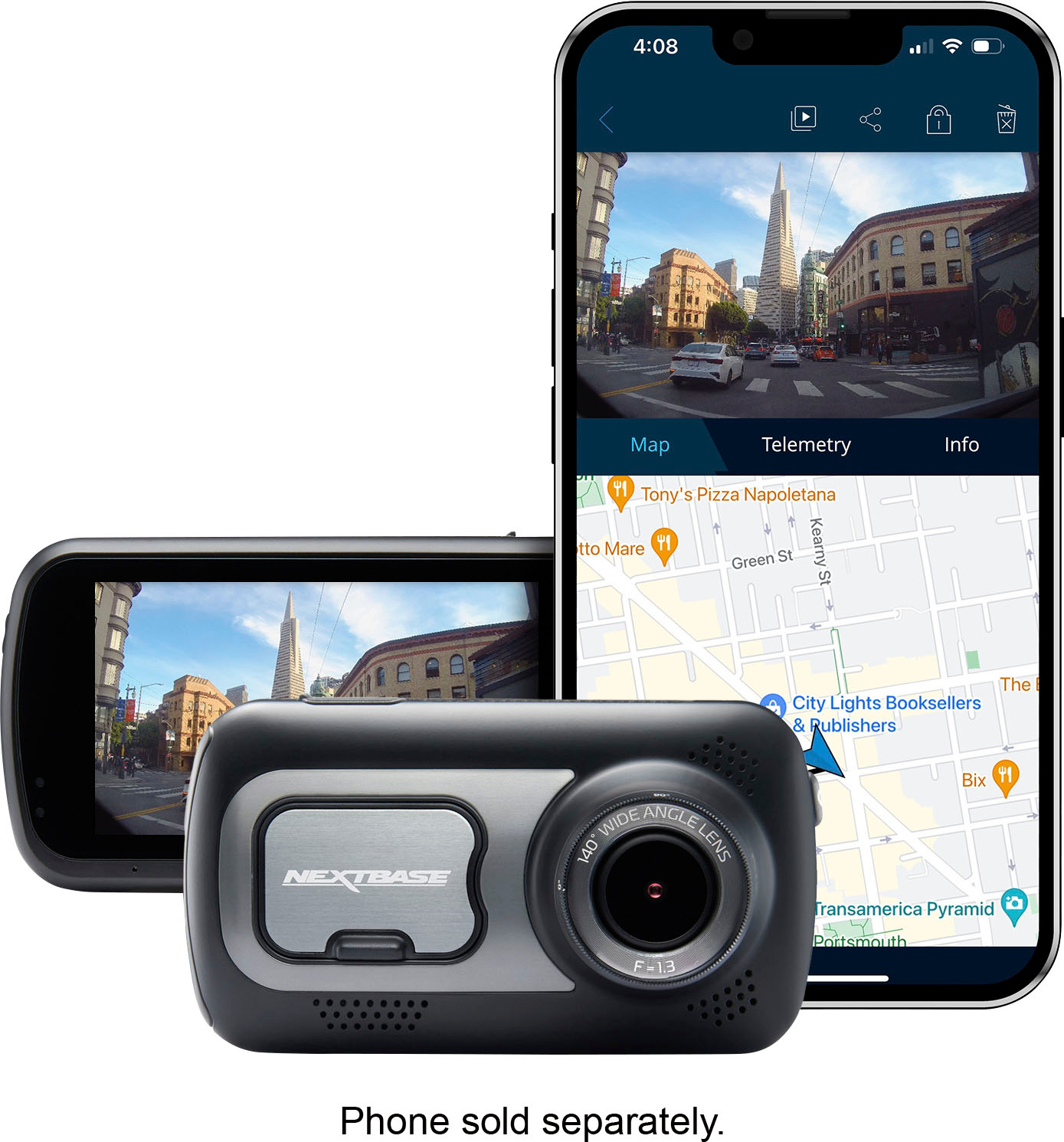
A:AnswerThe gps can be seen on a smart phone, down load the app set it up then on the smart phone in tge recordings you can see gps , speed , time , date , location .
I would not recommend the nextbase gw 522 car camera
A:AnswerHello, Thank you Thank you for reaching out! We understand that time can be tight. To make it easier, we’ve provided a review link where you can share feedback on any part of your experience you see fit, whether it's the purchase process, installation, or the product itself. Your feedback is valuable, please feel free to provide it once you've downloaded the MyNextbase Connect app and tried it. If you're having any issues downloading it please reach our contact support at nasupport@nextbase.com - The Nextbase Review Team