“saw question on m.2 slot.......... but if i just wanted to put a std SSD (evo) .... i could remove current HD and use that sata connection right ??”
Answer This Question
1-5 of 5 Answers
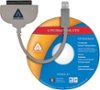
Yes you could put a Samsung EVO ssd or any ssd for that matter in this laptop. The HDD inside the laptop is pretty difficult to access as you need to unscrew 10 ph0 screws on the bottom of the laptop and then need a plastic spudger to ***CAREFULLY*** pop all the tabs in the casing to open the laptop and expose the hdd. once its exposed its held down by 4 screws in a small casing which is then attached to the hdd with another 4 screws. With windows 10 you will need to find a specific software to clone the ssd or you can just do a clean install. I tried with apricorn software and it does not work with windows 10 for some reason. Maybe an update will fix this down the road. The easier bet would be to get an m.2 sata 3 ssd and plug it in the slot. the slot is hidden above where the regular hard drive slot is beneath a wide ribbon cable. AGAIN BE VERY CAREFUL WITH MESSING WITH THIS LAPTOP. I have been fixing electronics for years so I know what to be extra careful with. I would honestly just give the laptop to geek squad and have them swap it, that way if they break anything its on them. Good luck!
I would recommend:
Sorry, there was a problem. Please try again later.I was wondering the same thing before. You can but you are still going to have to clone it over so its not any less work. The speed difference is negligible from sata to m.2. The only reason you would want to do this is to put a bigger ssd. But you dont need more than 250mb ssd. You really only need it for o.s. and other things you want to to boot faster. You dont need to store much on it, thats what you want the actual hard drive still in the laptop for. And the biggest problem with removing the HD is that you could void the warranty.
Sorry, there was a problem. Please try again later.@AL99 - No you cannot have both HDD & SSD occupying the the drive area (not enough room). However, if you are referring to ADDING an M.2 storage card/ssd in the available slot - then, Absolutely. Personally, warranty or not; The first thing I did was ditch the 1TB HDD that came with it and replaced it with an 850 EVO 250GB SSD in addition to cloning the OS to and installing, an 850 EVO 250GB M.2 Sata III. My device is super snappy now.
Sorry, there was a problem. Please try again later.installed m.2 in mine real easy to do hard part was cloning. had best result with easeus software. Left in the hdd and have 512gb ssd and 1tb hdd. you can find videos online for the installation of hdd ssd and memory on youtube.
Sorry, there was a problem. Please try again later.Can i add the SSD without removing the HHD?
Sorry, there was a problem. Please try again later.