A:AnswerTony,
The DU6900 Series does not have PIP (or split-screen). Split-screen capability to view two different content side-by-side is available starting from our DU8000 Series and up using our Multi View feature.
~Samsung Pro
A:AnswerKim,
Please give us the opportunity to better assist with this by reaching Samsung Support at: 1-800-SAMSUNG, 8AM - 12AM EST, 7 days a week, or Chat with us on Samsung.com: https://www.samsung.com/us/support/contact/
~ Samsung Pro
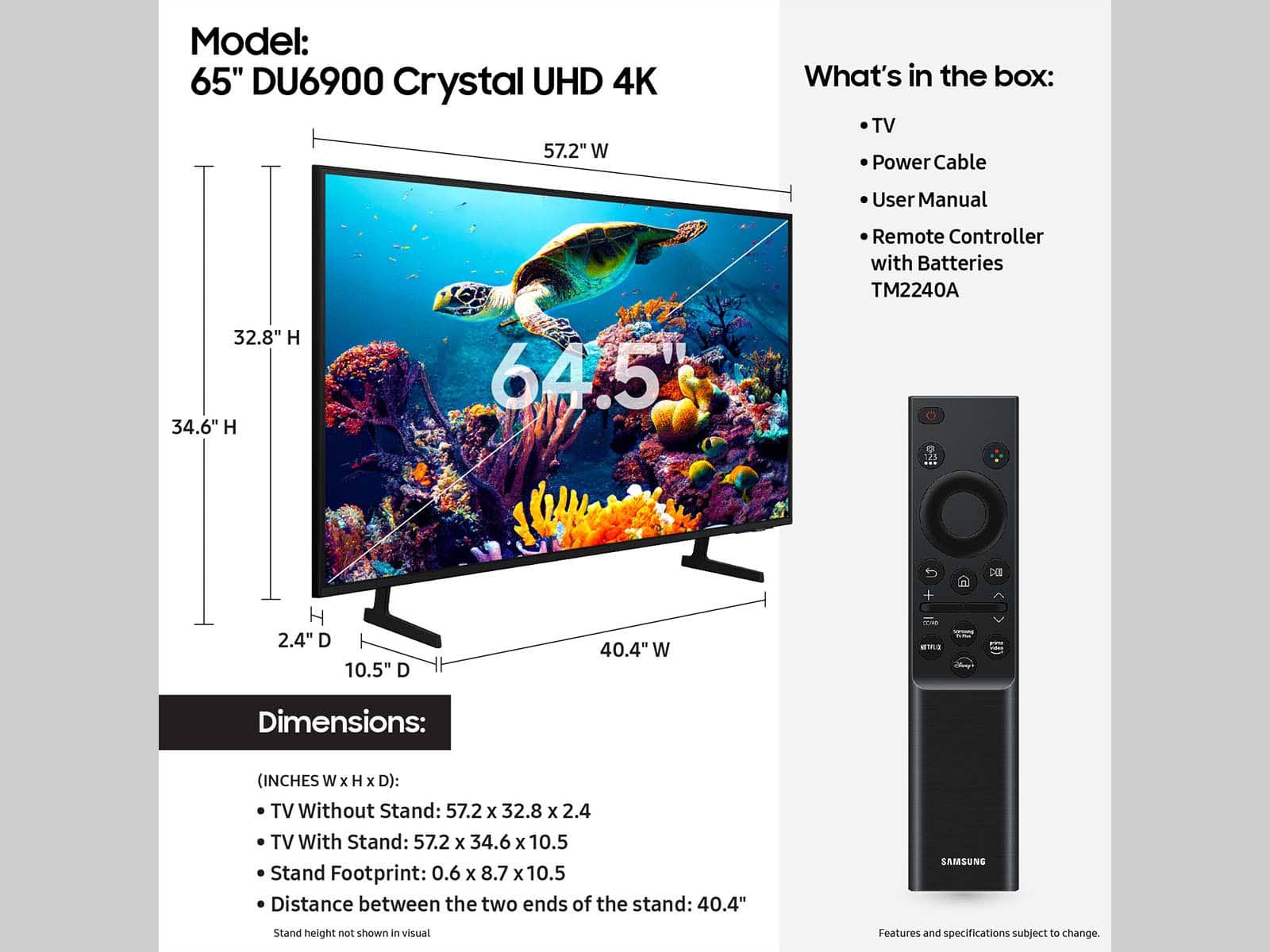
A:Answer57” by 32 1/2 inches
My tv stand cabinet is 50”
So it does hang off inches on both sides.
This tv fit good and the size looks alright on my tv stand.
And size since My livingroom is small.
I had a 50” there before on my tv stand that fit perfect.
Since this 65” tv was on sale decided to buy it and put my Sony in my bedroom.
Pictures might help you decide.
A:AnswerBvity,
The DU6900 does not have voice assistants built in. However, they do work with Alexa and other smart assistants. You can connect them to your existing Alexa devices to ask them to turn on your TV, change channels, control volume, and more. Because of this, the included remote does not feature a microphone.
The DU6900 TV offers 2 HDMI ports and is Bluetooth and Wi-Fi capable, allowing a seamless connection across multiple devices at a time. If your external device requires an Optical port, we recommend utilizing an HDMI to Optical Converter. These can be found at your local electronics store. Please also keep in mind that an Optical port can be found on our DU8000F Series and above.
~Samsung Pro
A:AnswerIt is a lage enough thin box. It would need atleast 2 people to carry if you intend to do that. The packing is very robust but would recommend having one extra person to help you with handling. The box has nice option to hold it.
A:AnswerHi - So that we can best assist you, please reach us on Facebook or Chat with us on the Samsung website. You can also reach us at 1-800-SAMSUNG / Available 8 AM - 12 AM EST, seven days a week.
~ Samsung Pro

A:AnswerJames,
For more information on haul away services, please contact your local Best Buy or visit https://www.bestbuy.com/site/recycling/tv-appliances-haul-away/pcmcat174900050009.c?id=pcmcat174900050009.
~Samsung Pro