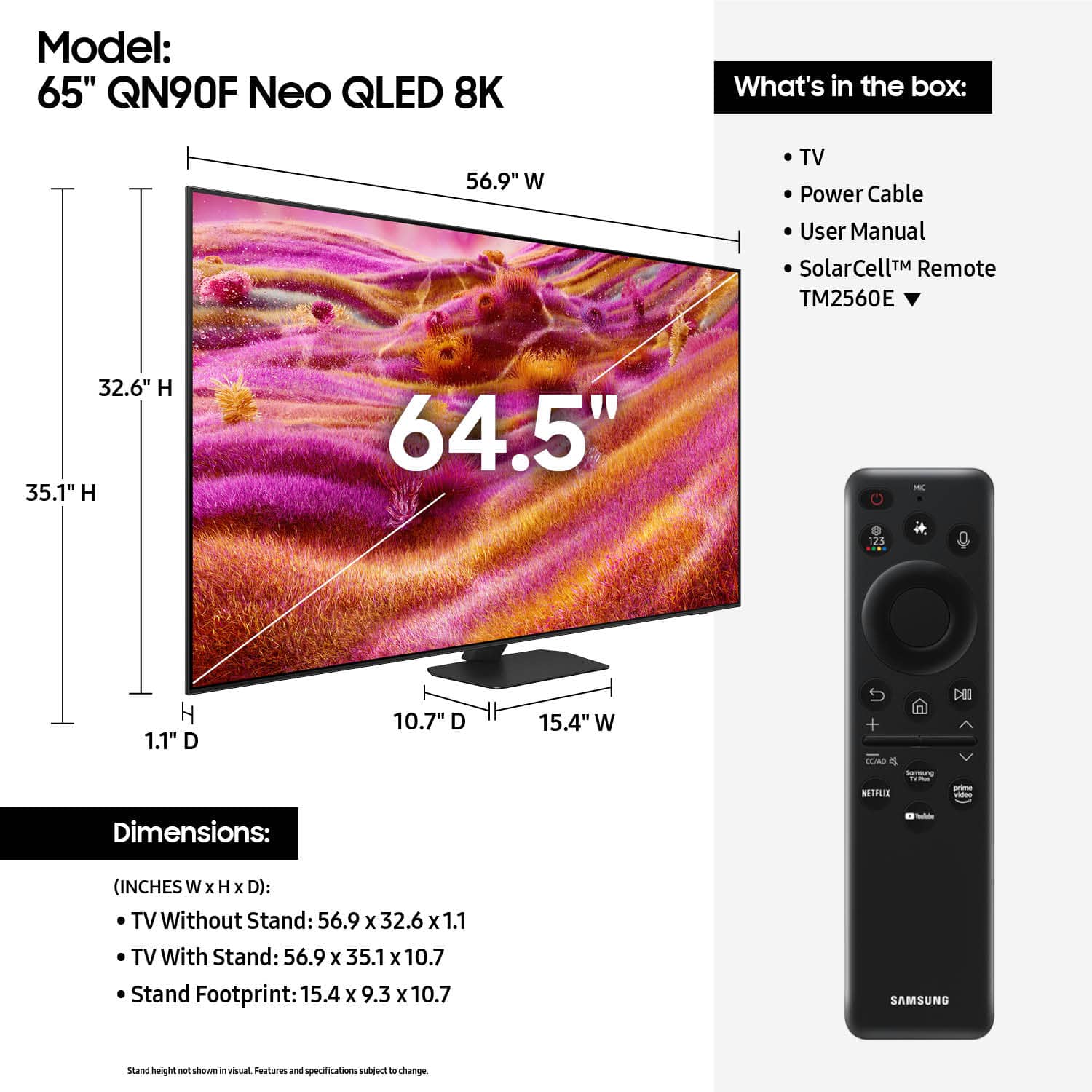
A:AnswerHi johnnyzee - You can find these measurements on this model’s product page – just click Specifications and scroll down to Box Dimension: https://www.bestbuy.com/product/samsung-65-class-qn90f-series-neo-qled-mini-led-4k-uhd-samsungvision-ai-smart-tizen-tv-2025/J3ZYG2FZG8
~ Samsung Specialist
A:Answer2781b - You can find these measurements on this model’s product page – just click Specifications and scroll down to Dimensions: https://www.bestbuy.com/product/samsung-65-class-qn90f-series-neo-qled-mini-led-4k-uhd-samsungvision-ai-smart-tizen-tv-2025/J3ZYG2FZG8
~ Samsung Specialist
A:AnswerWayneInIndy - You can find this information on this model’s product page – just click Specifications and scroll down to Dimensions: https://www.bestbuy.com/product/samsung-65-class-qn90f-series-neo-qled-mini-led-4k-uhd-samsungvision-ai-smart-tizen-tv-2025/J3ZYG2FZG8
~ Samsung Specialist
A:AnswerHi BB - The DirecTV app isn't pre-installed, but it can easily be installed directly on the TV itself. You can use the TV's remote to control external devices that are connected to the TV by an HDMI cable and that support Anynet+ (HDMI-CEC). While only one Solar Cell Remote can be paired with Samsung TVs at one time, you can utilize a secondary standard remote like this option at Best Buy: https://www.bestbuy.com/product/insignia-replacement-remote-for-samsung-tvs-black/J2FPJKYLQG
~ Samsung Specialist
A:AnswerHi Pablo - Art Store (on the QN90F) provides content whereas Art Mode refers to The Frame TV's exclusive motion sensors that automatically turn your TV on/off and optimize your screen for artwork.
~ Samsung Specialist
A:AnswerHi Rob - Please give us the opportunity to better assist with this by reaching Samsung Support at: 1-800-SAMSUNG, 8AM - 12AM EST, 7 days a week, or Chat with us on Samsung.com: https://www.samsung.com/us/support/contact/
~ Samsung Specialist
A:AnswerRichie - Please give us the opportunity to better assist with this by reaching Samsung Support at: 1-800-SAMSUNG, 8AM - 12AM EST, 7 days a week, or Chat with us on Samsung.com: https://www.samsung.com/us/support/contact/
~ Samsung Specialist
A:AnswerNRA - Please give us the opportunity to better assist with this by reaching Samsung Support at: 1-800-SAMSUNG, 8AM - 12AM EST, 7 days a week, or Chat with us on Samsung.com: https://www.samsung.com/us/support/contact/
~ Samsung Specialist
A:AnswerSo that we can better understand and assist with this, please reach out to Samsung Support at: 1-800-SAMSUNG, 8AM - 12AM EST, 7 days a week, or Chat with us on Samsung.com: https://www.samsung.com/us/support/contact/
~ Samsung Specialist
A:AnswerHi JC,
If you’re looking for haul-away services for TVs or appliances, please visit your local Best Buy or see the full service details here:
https://www.bestbuy.com/site/recycling/tv-appliances-haul-away/pcmcat174900050009.c?id=pcmcat174900050009
~Samsung Advisor
~ Samsung