Questions & Answers
- Model:
- UN70TU6985FXZA
- |
- SKU:
- 6476246
Highly rated by customers for: Picture Quality, Price, Ease of use
Page Showing 341-349 of 349 questions
Q: QuestionDo you deliver and set up
Asked by Anonymous.
- A:Answer Hi, for more information on delivery services, please contact your local Best Buy or visit https://www.bestbuy.com/site/help-topics/home-and-business-delivery/pcmcat204400050032.c?id=pcmcat204400050032 ^Tim
Answered by Samsung

Q: QuestionDoes this tv have a hdmi 2.1 input for gaming?
Asked by Brooney.
- A:Answer Hi Brooney! Thank you for considering this TV. Because HDMI 2.1 is a complicated spec, we hope that focusing on TV features will be more helpful to you when deciding on the best model for your usage scenario. The 70” TU6985 Crystal UHD TV has 2 HDMI ports, both of which support Auto Low Latency Mode (ALLM) and Dynamic Metadata (HDR10+). “HDMI In 2” port further supports eARC. If you are looking for a TV capable of 4K@120fps (FRL), please consider the Q70A Series, which supports “FRL on HDMI In 4”. ^Tim
Answered by Samsung

Q: QuestionWhat is the size of the box for pick up or a 70 inch samsung tv
Asked by Portagekid.
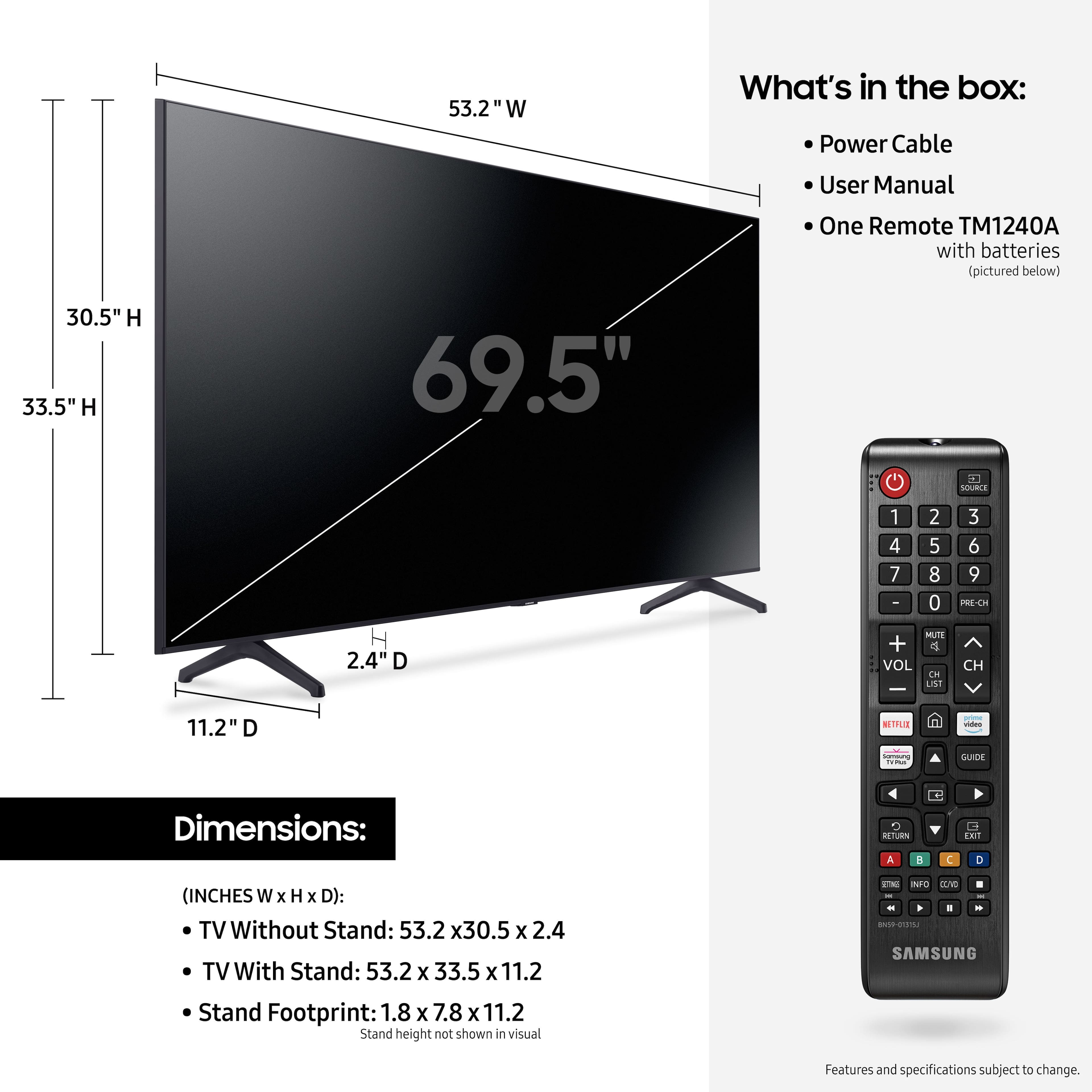
- A:Answer Portagekid - Here are the dimensions of the 70" TU6985 in its shipping box (WxHxD in INCHES): 68.7 x 4.07 x 7.5. ^Gina
Answered by Samsung

Q: Questionwhat is the heigth and length of tv box for the samsung 70 inch tv
Asked by merv.
- A:Answer merv - Here are the shipping box dimensions for this model (WxHxD in INCHES): 68.7 x 4.07 x 7.5. ^Gina
Answered by Samsung

Q: QuestionDoes this TV have a sleep timer? If so, how easy is it to operate? Buying this TV for older parents... if this doesn't have easy sleep timer operation is there a similar model that does? Thanks
Asked by Sleepy.
- A:Answer Hi! You can set the Sleep Timer to turn off after a set period of time. Additionally, you can enable Auto Power Off to have the TV turn itself off if there has been no activity for a set period of time. This is one of your TV’s energy efficiency functions. Using your TV remote, navigate to Settings > General > System Manager > Time > Sleep Timer, and then select the amount of time you would like the TV to stay on before powering itself off. You can set the sleep timer up to 180 minutes, after which the TV will turn off. ^Tim
Answered by Samsung

Q: QuestionHi, which fixed TV wall mount is compatible with the 70” Samsung TU6985? I bought the “Best Buy essentials fixed TV wall mount for most 36” - 90” TV’s” but none of the seven (7) different screws fit in the back of the TV, so I can’t attach the brackets.
Asked by MFalls.
- A:Answer Hi Mfalls! The 70" TU6985 features a VESA mounting pattern of 400 x 300 for compatibility with a wide range of universal mounting solutions. To mount the TV, you will need 4 M8 screws, 20-22 mm length, 1.25mm pitch. ^Tim

Answered by Samsung

Q: QuestionCan you connect your sony surround system to this tv, along with a cable box
Asked by Smitty.
- A:Answer Hi Smitty - The TU6985 TV features 2 HDMI inputs, 1 USB and 1 Optical input, as well as Bluetooth and Wi-Fi connectivity. You can connect a cable box via HDMI; if your current audio system features any of these connection types, you can connect this device as well. ^Gina
Answered by Samsung

Q: QuestionIs the refresh rate fast enough for sports? or does it lag and get pixelated?
Asked by john.
- A:Answer john - The TU6985 TV features Motion Rate 120. ^Gina
Answered by Samsung

Q: Questionwhat is the best settings for picture quality on the samsung tu 6985
Asked by Anonymous.
- A:Answer Hi! Your TV has several Picture Modes to choose from allowing you to enjoy content in optimal conditions. Go to Home > Settings > Picture > Picture Mode 1) Standard: Is the default mode suitable for general viewing environments. 2) Natural: Reduces eye strain for a comfortable viewing experience. 3) Movie: Is suitable for watching TV or movies in a dark room. 4) Dynamic: Makes the picture brighter and clearer in bright viewing environments. ^Tim

Answered by Samsung