“how to you get playbar to work won't work getting a musical tone when trying get volume”
Answer This Question
1-6 of 6 Answers
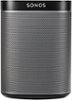
Ideally hook the speaker up using the included digital optical audio cable to your TV (you will need a newer TV). You may need to go into the menu of your TV and make sure output of sound is going to Digital Out. See manual for TV online.
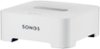
Sorry, there was a problem. Please try again later.It depends on how you set it up. Here are the requirements for having a great experience and easy set up. Set up 1) make sure you have Internet at you location 2) buy the Boost Wireless Bridge 3) download the Sonos application to your smart phone or tablet Install: 1) kick off the application- follow instructions for installing the Boost first! 2) connect boost direct to your router 3)follow instructions to connect playbar to TV ( use optical connection for best results) Play music through the Sonos application. Very intuitive set up. If the playbar doesn't work now than call customer support.
I would recommend:
Sorry, there was a problem. Please try again later.Connect an Ethernet cable to the router and to the playbar. Press the play and volume up button simultaneously and it will be ready to set up on the network. Then install the sonos application on your tablet/phone and select the new setup option. It will then guide you through the rest of the setup. Make sure the optical cable is also plugged in.
Sorry, there was a problem. Please try again later.Follow Instructions on i phone or computer You are not finished installing
Sorry, there was a problem. Please try again later.Wifi,then download the app for sonos,now you have to search for the device,press and hold the button on the side up&down button until it blinks your smartphone will connect to it,if you not getting sound.go into the TV setting an cut off the speakers to the TV it should work Good luck
Sorry, there was a problem. Please try again later.Download the app on a smart phone, and follow the step by step. Unplug and start over if a problem occurs
Sorry, there was a problem. Please try again later.