A:AnswerIt would be required to increase or decrease the minutes by 24 hours in the Sony ICDAX412 Digital Voice Recorder to adjust from AM to PM or vice-versa.
If the Time display is set to 24 hour format, change the time by 12 hours.
A:AnswerThe Sony ICDAX412 Digital Voice Recorder requires 2 AAA Alkaline batteries. The Negative end of the battery has to be placed towards the spring side in the battery compartment. The Positive and Negative symbols would be indicated in the battery compartment.
You can also refer the Page # 11 in the Manual provided below to view the steps on how to install the batteries in to the Sony Digital Voice Recorder.
http://www.docs.sony.com/release/ICDAX412_EN.pdf
A:AnswerThe Voice files recorded in the Sony ICDAX412 Digital Voice Recorder are in the MP3 format and would be saved as MP3 when transferring to the Computer. They can also be uploaded to websites.
A:AnswerI don't think so, as it cannot be recharged on the AX412. ONLY rechargeable batteries can be recharged, not the ones that come with it & one must use an external recharger.
The USB is to utilize the power from the computer instead of using the batteries, since there is NO A/C adapter. I wish that all things could have A/C adapters. I HATE rechargeable & battery powered. The first do NOT last long in my experience & the latter are "BAD" for the environment.
Btw, this was stated in an earlier question... the answer to your question, not my opinion above.
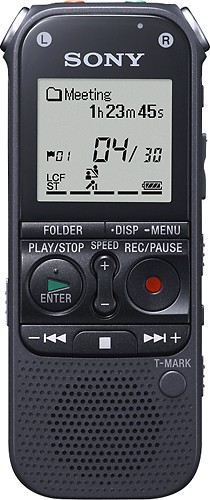
A:AnswerYes, the IC Recorder (ICDAX412B) has the “LCF (Low Cut)” option in the MENU that can be set to OFF. This makes sure that the Noise recording is not reduced. The IC Recorder has the “Noise Cut Level” option that can be set to Maximum or Minimum. This option can be used for cutting the Noise Level when playing the recorded files.
A:AnswerBoth Digital Voice Recorders has very similar features. However, the ICDAX412 has a longer recording time by approx. 10%. For additional information, marketing specifications are available in our eSupport website.
A:AnswerIncluded at purchase are two AAA Non rechargeable Alkaline batteries, however you can purchase as an optional accessory the NH‑AAA‑B2KN Rechargeable battery.
A:AnswerThe battery indicator in the display window shows the battery condition. A “Low Battery Level” appears on the screen then “Low Battery” appears before the display screen goes blank.
A:AnswerYes - the ICD-AX412 has that same dictation correction feature which enables the user to press the record button during playback and overwrite the recording, correcting the original recording.
A:AnswerAs for microSD card availability and price, this question is better answered by the vendor selling our product. There should be a "Contact Us" link on the website to address questions for price and availability.
A:AnswerYes with the "Add/Overwrite" Function. This Allows you to add a recording to a previously recorded fileor an overwrite recording during playback.












